MailsDaddy OST to PST Converter
Try the best-performing OST to PST converter solution that effortlessly recovers data from highly corrupted or inaccessible offline data files and converts OST to PST format. Its easy-to-navigate user interface, fast performance, and innovative file conversion features make this utility stand out. It also offers the option to migrate OST files to Live Exchange Server, PDF, MSG, EML, RTF, HTML, and MBOX formats.
- Quickly scan & repair damaged as well as orphaned OST files.
- Best OST to PST tool for Exchange Server migration.
- Bulk Migration of emails, contacts, calendars, tasks, etc.
- Preserve Read/Unread status of emails & provide Date Filters.
- Maintains same folder hierarchy with same HTML and text formatting.
- Option to split the large OST data files during OST to PST Conversion.
- Supports Microsoft Outlook 365, 2021, 2019, 2016, 2013, 2010 and 2007 etc.
- OST to PST tool is compatible with Windows 11, 10, 8, 7, & Win XP etc.
Certified & Highly Reviewed By Leading Software Authorities
Award-Winning & Recommended by Independent Editors
Software Informer - MailsDaddy OST to PST Converter
Software Informer – MailsDaddy OST to PST Converter software is awarded by a world-known organization named as Software Information in 2018. They provided us this award after testing the complete software and according to client's review on their website. It is a safe and secure platform.
Capterra Review - Awesome Software to Convert OST to PST format
Capterra is a highly regarded and trustworthy company by users. MailsDaddy OST converter software got multiple good reviews here. We have many clients who converted their OST mailbox to PST file format. As per client's reviews, we can say we provide the best place or platform to convert OST to PST and other file formats flawlessly.
Neat & Clean OST to PST Converter Tool - Soft32 Review
Soft32 is a world-known website for downloading third-party paid and free software and tools for Windows, MAC, and Linux machines. Their editors completely analyze the submitted product's functionalities and accuracy before publishing on the website for users. They gave us an 'Excellent' award for our product OST to PST Converter performance. It is completely safe and secure platform for all user and machines.
Features of the OST to PST Converter
Enterprise-grade recovery and conversion, packed into a simple desktop app — no technical expertise or Exchange server required.
Add, Search & Scan OST Files
The application has an advanced option to search for and detect all .ost file extensions within any selected directory or drive. You can either automatically search or manually browse to locate an OST file and quickly scan all mail folders and subfolders.
Repair Corrupted OST Files
The advanced algorithm of the OST to PST Converter allows you to repair highly corrupted, damaged, or orphaned OST files. As a result, you can fix all OST file errors and make the file readable by converting it to PST format.
Recover Soft Deleted Items
The OST file conversion utility quickly retrieves soft deleted emails, calendars, contacts, tasks, notes and journals from the OST file. This option may be helpful to get back the soft deleted items from Outlook OST file.
Search Emails in OST Mailbox
The Search Mail option has been upgraded. Users can now search OST emails from any folder using various criteria such as To, From, Subject, and more. Additionally, filters like date range, read/unread status, and emails with attachments can be applied to refine the search results.
Batch Migration Module for OST to PST
This tool supports selecting multiple OST files at once and also enables users to convert offline OST file data into PST, MBOX, EML, MSG, PDF, and HTML formats quickly and efficiently in just a few simple clicks.
Export Contacts & Calendars Individually
By using this OST Converter tool, users can transfer all contacts in vCard (.vcf) format and calendars in .ics format separately, ensuring a smooth and successful conversion process without any issues.
Convert OST File in Live Exchange
This option is available exclusively for Business and Enterprise license users and enables them to convert OST files to Live Exchange Server. With this advanced feature, users can perform seamless migration to Exchange Server in just a few clicks.
Convert Email Attachments
The OST Converter software allows users to convert OST to PST along with all associated emails and attachments. That means your offline OST folders can be easily migrated to .pst format, including all related data and content.
Split PST File into Required Size
The OST to PST Exporter tool includes an option to split the resulting PST file into a desired size while transferring data from an OST file to PST format. This optional feature is useful for creating multiple smaller PST files from a single large Microsoft OST file.
Quickly Convert OST to PST File
This is one of the most preferred options, allowing you to easily copy an offline OST folder to PST and import the data into Outlook 2021, 2019, 2016, 2013, 2010, 2007, and other versions. With this feature, you can open and access OST files without requiring an Exchange Server.
Multiple Export Options
The application offers multiple options to extract emails from an OST file and save them in EML, MSG, and MBOX formats. This allows you to migrate and access OST file messages in other email clients that support EML, MSG, or MBOX formats.
Multiple Naming Conventions
Use multiple naming convention options while saving OST files to MSG, EML, and MHTML formats. The software supports various naming patterns such as Subject, Date, Subject + Date, From + Subject + Date, and Auto Increment.
Preserve Folder Hierarchy
The OST to PST Converter preserves the original folder structure, maintaining all folders and subfolders in their proper hierarchy. You can simply click the plus (+) icon to expand and view all folders within a selected directory.
Maintain Mail Properties
The OST to PST conversion program effectively preserves all essential email properties such as To, Cc, Bcc, From, Subject, and Date, etc. It also retains the read/unread status of emails while generating a complete preview.
Generate Conversion Logs
The software automatically generates a detailed conversion log report after the migration completes. Users can view essential details including total items converted, folder paths, destination locations, timestamps, and process status for complete auditing and verification.
Eye-Catching Features of MailsDaddy OST to PST Converter software
Batch OST Files Conversion
In an age of speed and innovation, no one has time to waste—we all strive to accomplish more in less time. Keeping this in mind, we have introduced a highly useful feature: Bulk Conversion. This OST to PST Extractor software provides an option to convert OST to PST in bulk mode. You can add multiple OST mailboxes at the time for performing multiple OST file to Outlook PST Conversion without altering the original folder structure.
- Select and convert multiple offline OST files simultaneously
- Retains exact folder structure across all mailboxes
- Mass migration to PST, MBOX, EML, MSG, PDF, or HTML
Import OST to Live Exchange Server
The tool allows users to directly import OST data into a Live Exchange Server mailbox with ease. It securely transfers emails, contacts, calendars, and other mailbox items while preserving the original folder structure and metadata. This feature helps organizations quickly restore or migrate OST data to Exchange Server without data loss or complex manual procedures.
- Direct server mailbox injection without PowerShell scripting
- Preserves Exchange security descriptors and folder mappings
- Available with Business & Enterprise licenses
Convert OST Emails to Single Mail Format
MailsDaddy OST converter software provides the most useful feature to convert OST emails to multiple file formats apart from PST. It provides a 'Naming Convention' option to save emails in your required file name, always maintaining folder structure and saving OST emails in the original folder hierarchy.
- Convert OST to EML, MSG, HTML & MHTML, and RTF
- Naming patterns: Subject, Date, Subject + Date, From + Subject + Date, Auto Increment
- Compatible with Thunderbird, Apple Mail, Windows Mail, and browsers
Export Selected Folders or Items
This is another helpful option provided by the OST Converter which can be used to export only selected folders or messages to the desired file format. So you can select the needed folder and convert OST to PST file format with precision.
- Find emails by using To, From, and Subject properties
- Search emails by using specific Date ranges
- Right-click quick export for individual mail items
We Convert All Data from OST to PST Format!
Every folder hierarchy, email header, embedded attachment, contact attribute, calendar recurrence, task, and note is processed with 100% bit-exact fidelity.
Email Messages & Metadata
Complete email fidelity with zero loss
MailsDaddy OST Converter for Outlook offers an ideal solution to convert OST emails while preserving all email properties. The software always maintains the original folder structure and keeps the original formatting of the email body.
Supported Elements & Formats:
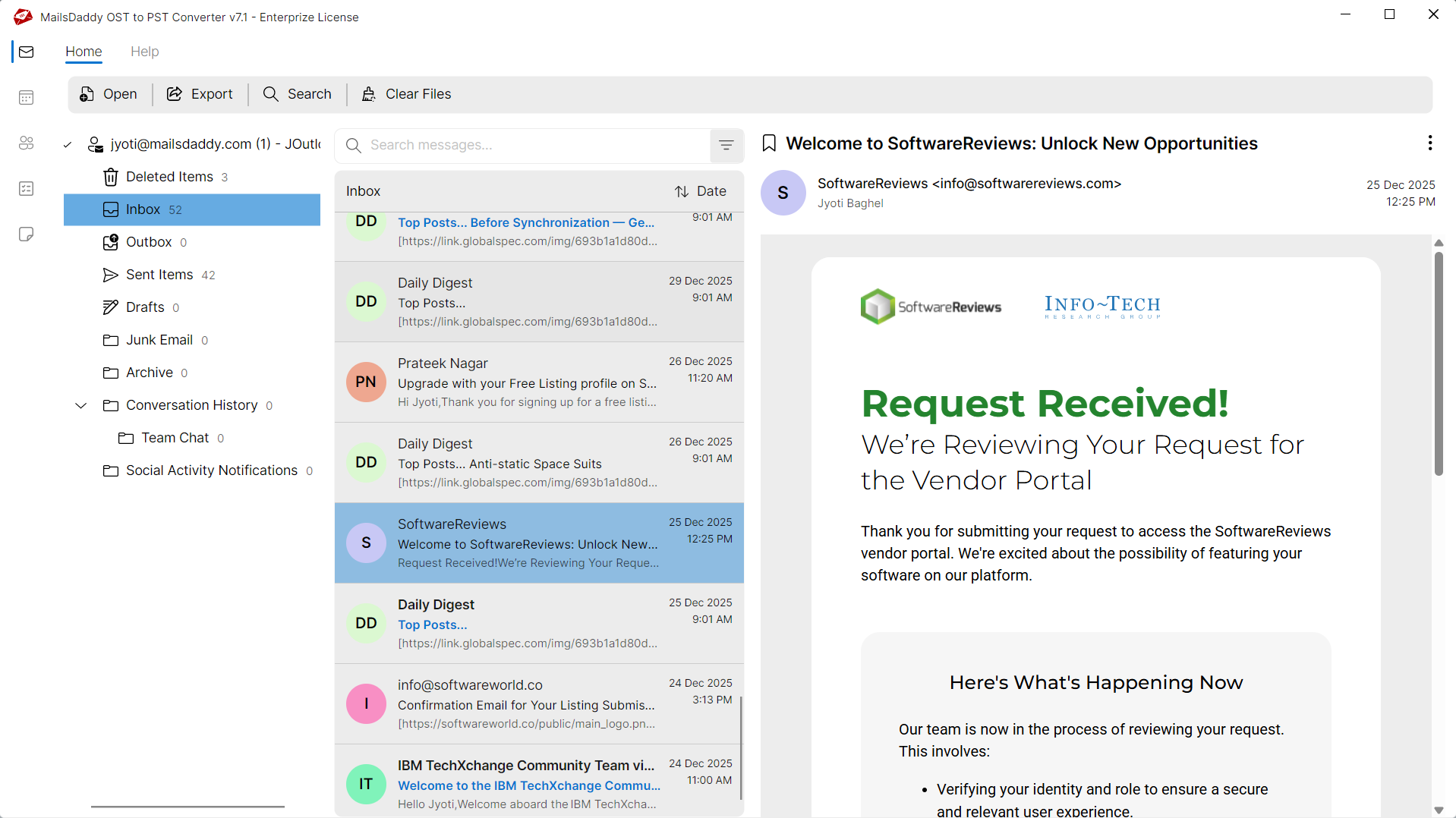
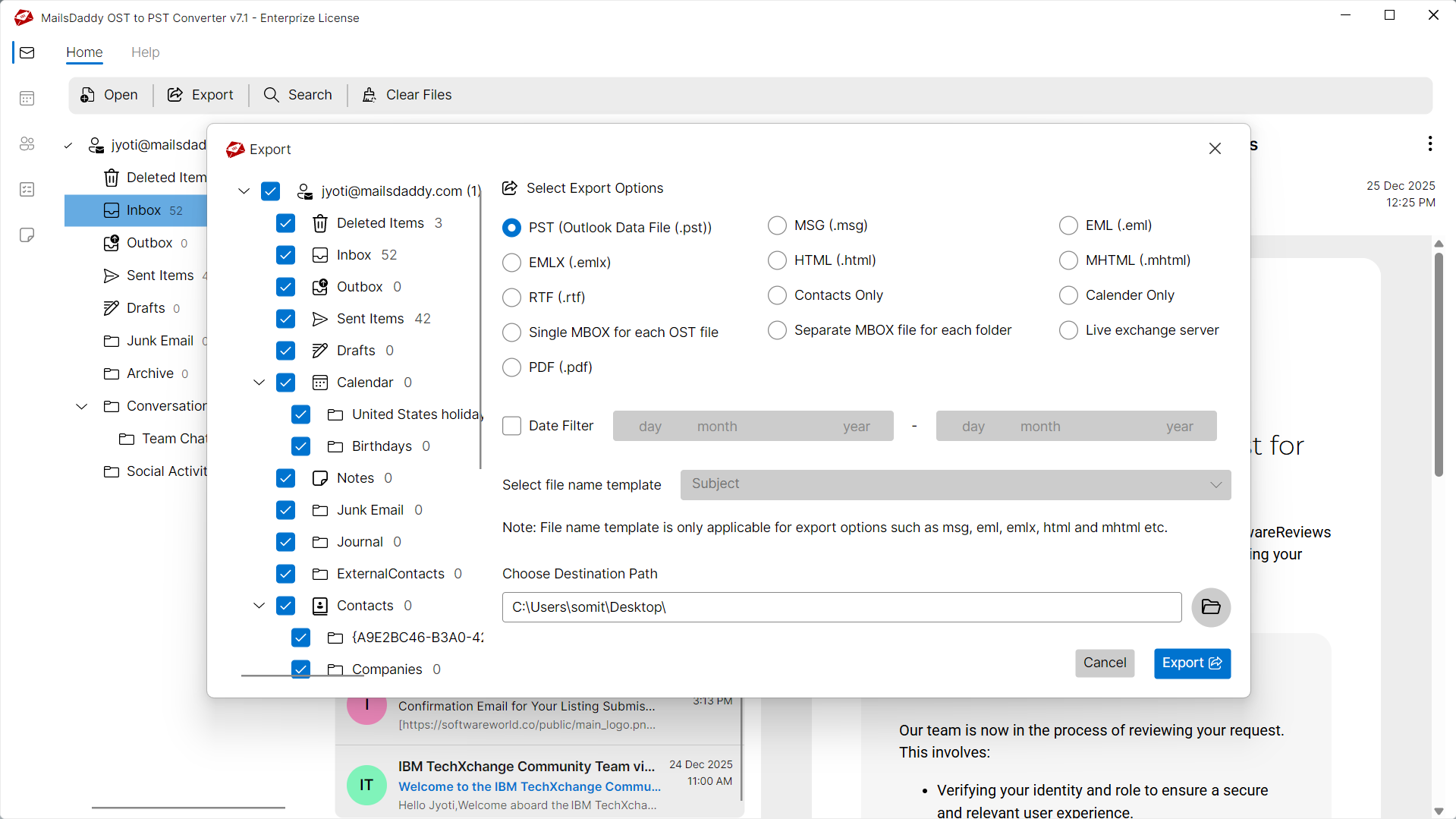
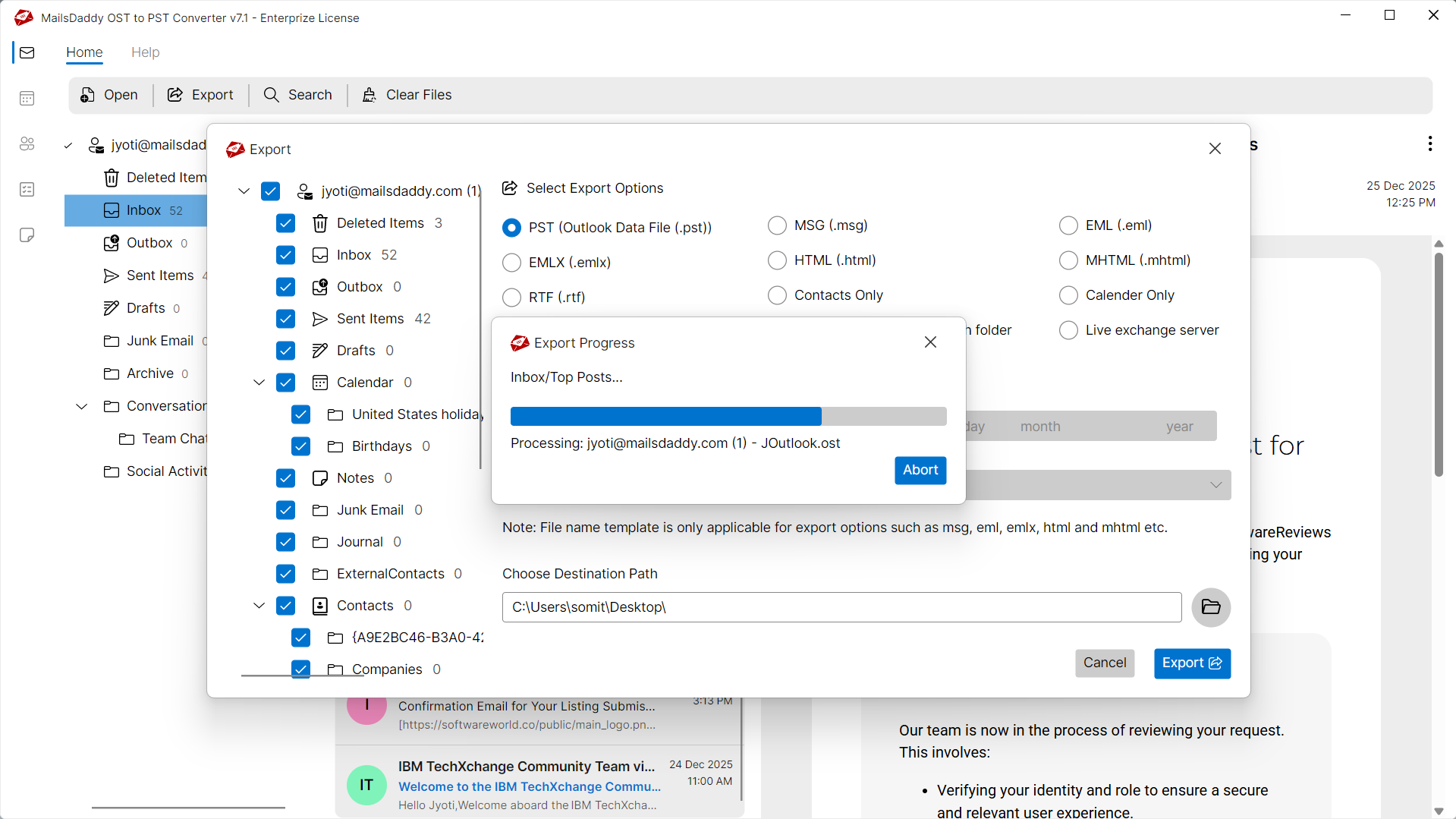
Convert OST to PST in 4 Simple Steps
No technical skills needed. Watch each step in the live software interface or click any step below.
Looking for the complete user manual and working guide?
Explore comprehensive guides for standard PST conversion, search & filter migration, and Live Exchange Server export.
Understanding OST Files & Why Need Safe Migration
Understanding Cached Exchange Mode, reasons for offline file inaccessibility, and how conversion resolves corruption.
Learn what is an OST file & Why Need to Convert OST to PST Format?
Configuration of Exchange Server account with Microsoft Outlook using "Cached Exchange Mode" enables users to save a copy of Exchange mailbox in .ost file extension. It is also known as offline storage table file which stores entire mail components such as Emails, Contacts, Tasks and Calendars, etc. By using an OST file, the user can access data offline even during Exchange server downtime.
In which situations OST files get Inaccessible and You need to Convert OST To PST?
OST Files are Outlook data files which can be only accessed when you are connected to Microsoft Exchange Server and able to sync data from the server. But sometimes you may face issues while accessing OST file due to:
Orphaned OST Files
Disconnecting from Exchange server, modifying profile, changing MAPI details or updating default OST file location may be reasons why the OST file gets orphaned. And you cannot access this OST file without converting to Outlook PST or any other file formats.
OST File Corruption
OST files may get corrupted due to network/server failure, hardware/software issues, virus attack, MS Outlook forced shutdown or any other technical issue. In this situation, you may not be able to open or read OST file data.
What Kinds Of OST File Errors You May Notice?
If you encounter any errors while accessing your mailboxes, converting with MailsDaddy OST to PST Converter resolves them immediately:
Simply Convert OST File to PST Format to Fix These Errors
PST is the most reliable file format which can be opened with any earlier or later editions of Microsoft Outlook. So it is highly recommended to export OST file to PST format by using this simple to use MailsDaddy OST to PST Converter.
Technical Specifications
Engineered for lightweight footprint, standalone execution, and broad enterprise compatibility for MailsDaddy OST to PST Converter.
System Requirements
Full support for Windows Server 2022, 2019, 2016, 2012, 2008 & 2003 (32/64-bit)
Platform Support
Supported Formats
OST (Corrupted, Orphaned, Encrypted, Password-Protected, IMAP)
Direct export to Live Exchange Server
Retains all inline, embedded & external attachments
100% Offline & Private
Zero cloud uploads or telemetry. Processing happens strictly within your local machine.
No Outlook Required
Completely standalone engine. Processes OST files without requiring host email clients.
No File Size Limits
Tested on massive 50GB, 100GB, and 500GB+ enterprise mailboxes with zero crash.
Full Windows Support
Native execution across Windows 11 down to Windows XP & all Windows Server editions.
Trusted by IT teams and professionals worldwide
Explore our client testimonials to see why users trust and recommend our solutions.
“Thanks for providing such a reliable and effective OST to PST conversion solution. It successfully recovered my corrupted and orphaned OST files without any hassle. The advanced search option and flexible naming conventions are standout features that made the process smooth and efficient.”
Michael Angelo
“I was encountering an error while trying to open my OST file with Microsoft Outlook. I'm thankful to MailsDaddy OST to PST Converter, which helped me resolve the issue quickly and access my mailbox data without any trouble.”
Jessica Schofield
“This OST recovery solution truly impressed me when I needed to access an offline, orphaned OST file. The software provided a complete preview of all mail items and allowed me to export the required data to Outlook PST format with ease.”
Alexander Smith
Always Here to Help You...
Facing any trouble while using our OST to PST Converter software? Don’t worry—MailsDaddy's expert technical support team is always here to help. Feel free to reach out with any questions about our product. We’re committed to assisting you with a quick and seamless OST to PST conversion process.
The DEMO version is available free of cost with limited functionalities. After generating a full and clear preview of the OST file, it allows you to export the first 20 items from each folder of the OST mailbox.
Frequently Asked Questions
Find clear answers regarding the OST to PST Converter conversion process, file compatibility, and recovery features.
It is quite simple to export OST to PST using MailsDaddy OST to PST Converter. Follow these steps to perform the migration:
Wait till conversion ends and then you can use the converted PST in any edition of MS Outlook (including Outlook 2024, 2021, 2019, 2016, 2013, 2010, and 2007).
Stop fighting with a broken OST file.
Download the free trial and see your mailbox recovered in minutes — no credit card, no commitment.