MailsDaddy Zimbra Converter
MailsDaddy Zimbra converter aka Zimbra Tgz Converter helps users to convert single or multiple Tgz mail to Outlook, EML, and various other file formats. It maintains the entire folder hierarchy in a new PST file from Zimbra mail.
- Streamlined Converter tool for Zimbra to Outlook Conversion
- Export Zimbra mail to PST, Office 365, EML, MSG, HTML, and various other file formats.
- Preserve mail formatting, inline images, hyperlinks, attachments, and various other properties.
Certified & Highly Reviewed By Leading Software Authorities
Award-Winning & Recommended by Independent Editors
Software Informer - MailsDaddy tgz to PST Converter
Software Informer – MailsDaddy tgz to PST Converter software is awarded by a world-known organization named as Software Information in 2018. They provided us this award after testing the complete software and according to client's review on their website. You may get the complete information of this award from given above link. It is a safe and secure platform.
Capterra Review - Awesome Software to Convert tgz to PST format
Capterra is a highly regarded and trustworthy company by users. MailsDaddy tgz converter software got multiple good reviews here. We have many clients who converted their tgz mailbox to PST file format. As per client's reviews, we can say we provide the best place or platform to convert tgz to PST and other file formats flawlessly. After using this software, our clients shared their experience on this platform, you can check out the product's review from the above link.
Neat & Clean tgz to PST Converter Tool - Soft32 Review
Soft32 is a world-known website for downloading third-party paid and free software and tools for Windows, MAC, and Linux machines. Their editors completely analyze the submitted product's functionalities and accuracy before publishing on the website for users. They gave us an "Excellent" award for our product tgz to PST Converter performance. It is completely safe and secure platform for all user and machines. No need to panic about its reliability.
Features of the Zimbra Converter
Enterprise-grade recovery and conversion, packed into a simple desktop app — no technical expertise or Exchange server required.
GUI Application Wizard
With lots of advanced options, the application interface is very friendly and useful for navigating and exporting Zimbra Tgz mailbox to PST in the local drive.
Add multiple TGZ files
Users can add single or multiple Zimbra / .tgz mailboxes into the application wizard and migrate data as per requirement without any modification.
No Size Burden
It is designed to efficiently convert Zimbra mail to Outlook & others without any file size limitation. You can load large or multiple .tgz mailboxes at once.
Display Zimbra Mail Items
It easily shows the email, contact, calendar, attachments, and other items on the right side of the window. You can also scan and open unextracted tgz mail in the preview pane.
Open Zimbra mail in Outlook
The application wizard allows users to convert Zimbra mail to PST file format for Outlook 2021, 2019, 2016, 2013, 2010 & earlier versions. It keeps mail items safe and secure in a new PST.
Load Extracted & Un-Extracted TGZ mailbox
Zimbra mail converter loads extracted and un-extracted TGZ mailbox into the application and keep in the initial folder hierarchy.
Peaceful Conversion
Experience seamless migration with the advanced TGZ converter tool of MailsDaddy software. It makes your conversion safe, reliable, and accurate.
Multiple Export Option
Zimbra Export tool supports a wide range of email formats, making it highly versatile. So you don’t need to waste time searching for different file conversions.
Migrate Zimbra to Office 365
Easily consolidate your Zimbra mail to Office 365 environment and open email, contacts, calendars, and more in your Exchange online account.
Convert Email Attachments
The main benefit of using this application is that you can easily convert Microsoft office outlook offline folders to .pst along with email attachments. All respective email attachments will be exported into their original format.
Convert Zimbra to Thunderbird MBOX
Import Zimbra mail to Thunderbird, Gmail, Apple Mail, Entourage, etc. once you export MBOX file from the Zimbra mailbox. It saves only emails and attachments in mbox file format.
Save Zimbra mail in PDF
You can also save portable documents from your Zimbra mailbox. Just load and export Zimbra email in PDF file format with attachments.
Zimbra Converter Free Demo
You can check out the above features and functionality in the free Zimbra Converter demo version and even export some items from each folder.
Export Zimbra mail to EML
Import Zimbra mailbox into Windows Live Mail, Outlook Express, and Thunderbird after Zimbra to EML conversion. This is a reliable source to maintain integrity during the migration.
Maintain Mail Properties
The tgz to PST conversion program capably preserves and maintain entire mail properties such as: To, Cc, Bcc, From, Subject and Date etc. The tool also keeps read and unread email status while generating the complete preview.
Eye-Catching Features of MailsDaddy Zimbra Converter software
Easily extract the TGZ file for Migration
Our Zimbra mail converter software effortlessly opens unextracted .tgz files, enabling users to navigate through mail folders and preview emails in a convenient window. With its user-friendly interface, transferring your mailbox becomes a breeze.
- Our Zimbra mail converter software effortlessly opens unextracted .tgz files, enabling users to navigate through mail folders and preview emails in a convenient window.
- With its user-friendly interface, transferring your mailbox becomes a breeze.
- Engineered specifically for optimal easily extract the tgz file for migration workflows.
Versatile Migration Tool for Email Clients
The software simplifies the conversion task, allowing easy importing of Zimbra data to popular email clients like Thunderbird, Outlook, Office 365, Windows Live Mail, Apple Mail, and more. It ensures that each email, contact, task, and other data is preserved in a compatible file format during the migration process.
- The software simplifies the conversion task, allowing easy importing of Zimbra data to popular email clients like Thunderbird, Outlook, Office 365, Windows Live Mail, Apple Mail, and more.
- It ensures that each email, contact, task, and other data is preserved in a compatible file format during the migration process.
- Engineered specifically for optimal versatile migration tool for email clients workflows.
Compatible with All Windows OS
Our Zimbra migration tool is fully compatible with all versions of Windows Operating systems. This means you can effortlessly install the application on any Windows operating system with just a few clicks and begin exporting your Zimbra mailbox into the desired file format.
- Compatible with Windows 11, 10, 8.1, 8, 7, and Windows Server (32/64-bit).
- Supports all Microsoft Outlook editions without requiring Outlook pre-installed.
- Independent standalone utility engineered for high enterprise stability.
Convert every single piece of information from Zimbra Mail
Every folder hierarchy, email header, embedded attachment, contact attribute, and calendar recurrence is processed with 100% bit-exact fidelity.
Email: Zimbra Mail Converter preserves your mailbox properties ti...
Email: Zimbra Mail Converter preserves your mailbox properties till the end of migration and efficiently provides you with desired mail formats for Outlook, Thunderbird, Office 365, Entourage, Apple Mail, etc.
Supported Elements & Formats:
Convert Source to Destination in 4 Simple Steps
No technical skills needed. Watch each step in the live software interface or click any step below.
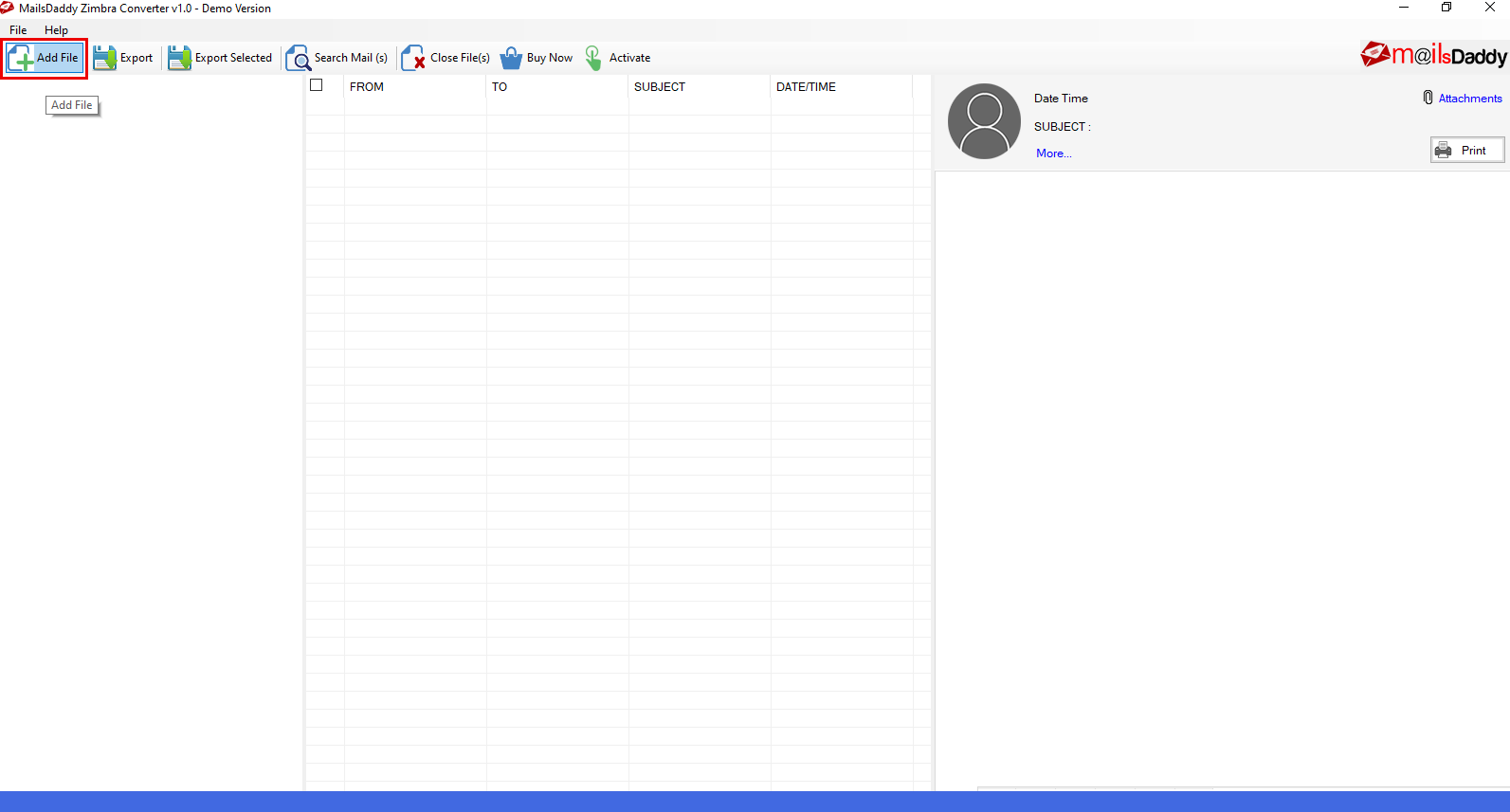
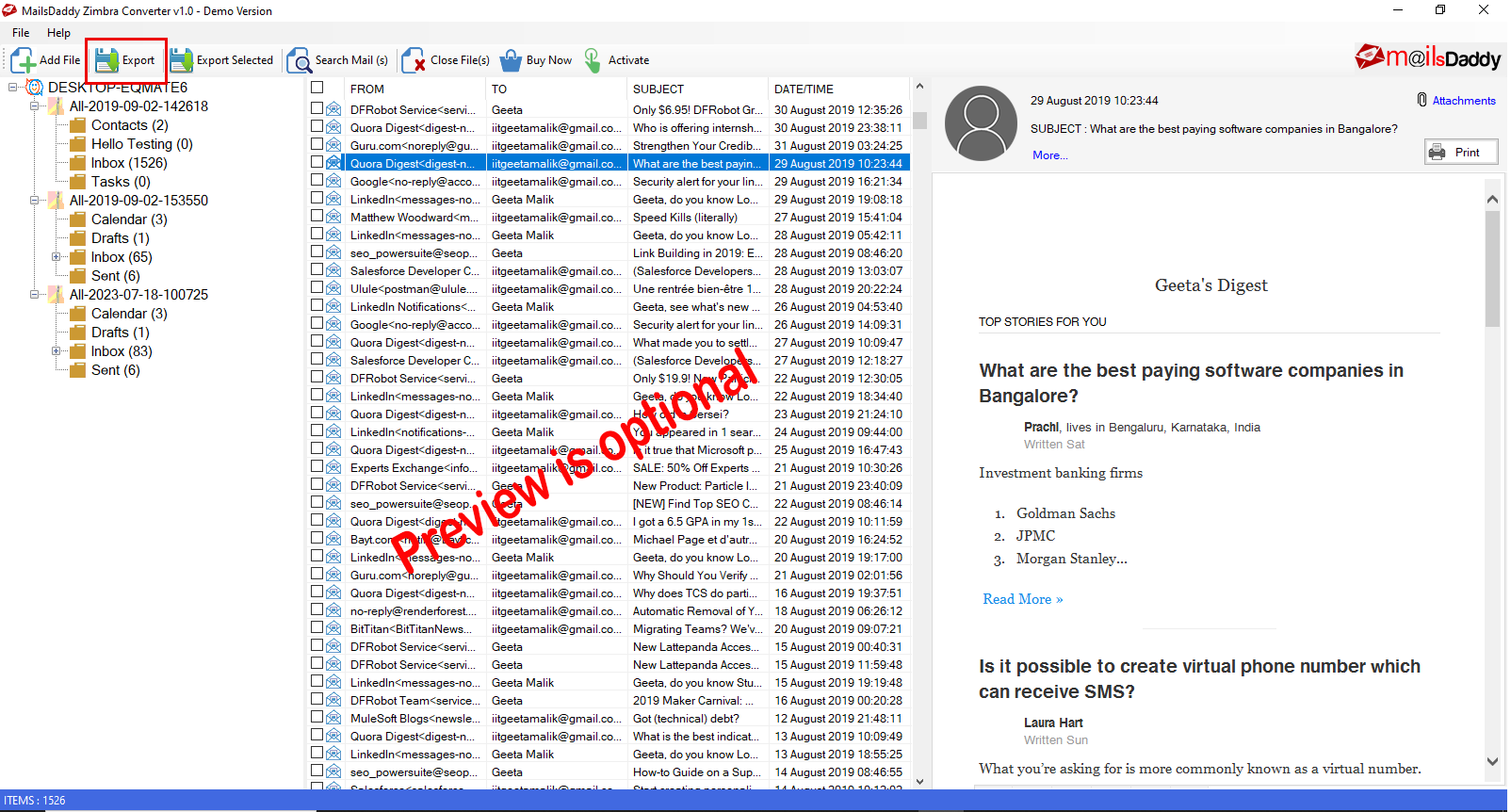
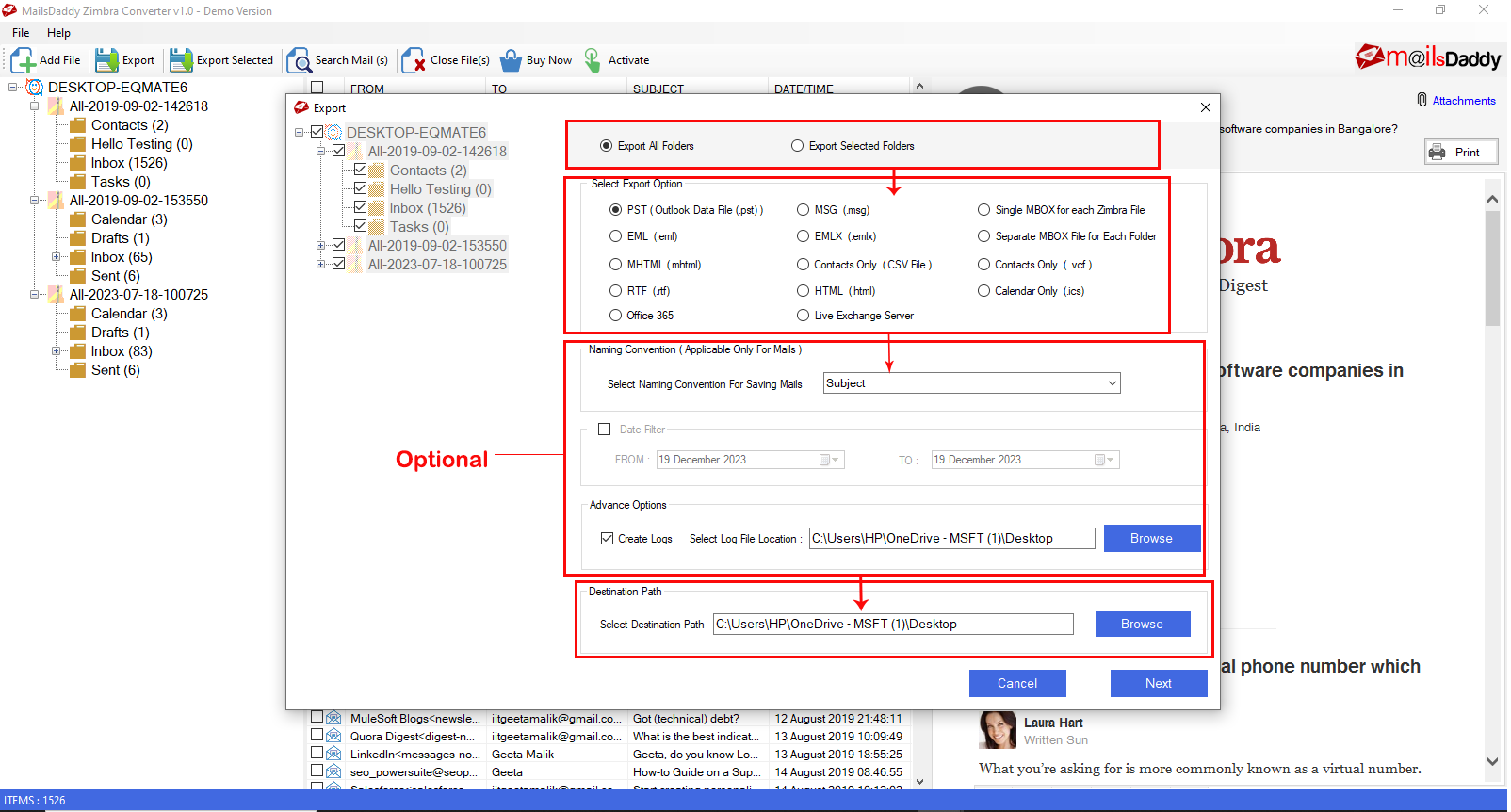
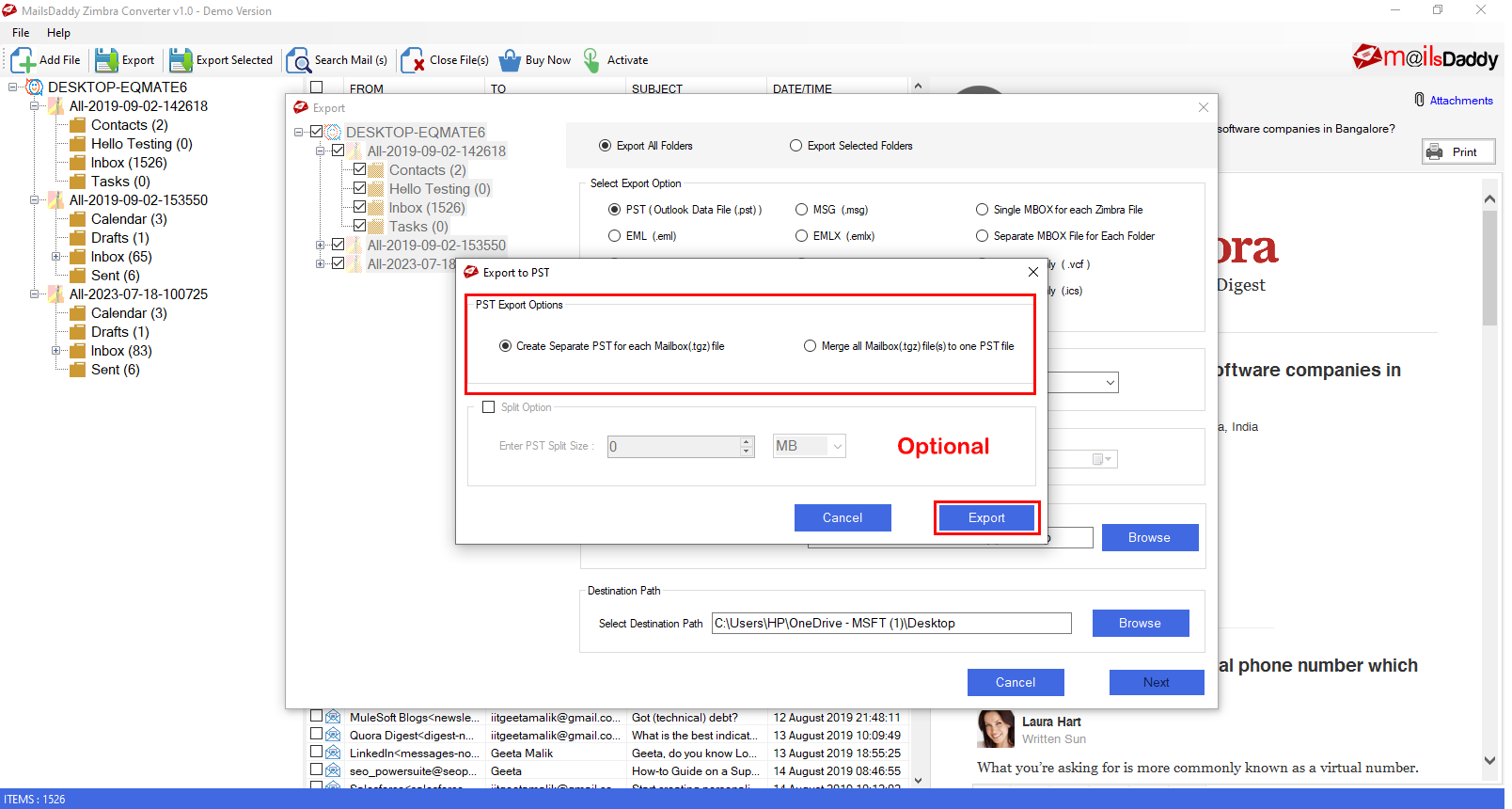
Looking for the complete user manual and working guide?
Explore comprehensive guides for standard PST conversion, search & filter migration, and Live Exchange Server export.
Technical Specifications
Engineered for lightweight footprint, standalone execution, and broad enterprise compatibility for MailsDaddy Zimbra Converter.
System Requirements
Full support for Windows Server 2022, 2019, 2016, 2012, 2008 & 2003 (32/64-bit)
Platform Support
Destination, Microsoft Outlook, Webmail & Desktop Clients
Supported Formats
Source (Healthy, Corrupted, Orphaned, Large Archives)
Retains 100% attachments, inline images, headers, and metadata
Preserves complete folder hierarchy, read/unread flags, and timestamps
100% Offline & Private
Zero cloud uploads or telemetry. Processing happens strictly within your local machine.
No Outlook Required
Completely standalone engine. Processes Source files without requiring host email clients.
No File Size Limits
Tested on massive 50GB, 100GB, and 500GB+ enterprise mailboxes with zero crash.
Full Windows Support
Native execution across Windows 11 down to Windows XP & all Windows Server editions.
Trusted by IT teams and professionals worldwide
Explore our client testimonials to see why users trust and recommend our solutions.
“I want to thank you and your team from the bottom of my heart who helped me so much to keep my mailbox safe. It works great and migrated my Zimbra mailbox to Office 365 very well.”
Lily Voodward
“It is very important to make a good conversion tool accessible to everyone so that everyone can enjoy it like me and convert multiple mailboxes to Outlook and others at once.”
Mickey Huffman
“If you once come across this Zimbra Tgz Converter then you need not think any further. It is a fast and efficient solution to convert single and multiple mailboxes to Outlook PST.”
Edward Paul
Need Help with Zimbra Converter?
Our dedicated 24/7 technical team is available to assist you with any migration or recovery challenge.
The free demo version lets you preview all items and export up to 20 emails per folder.
Frequently Asked Questions
Find clear answers regarding the Zimbra Converter conversion process, file compatibility, and recovery features.
It is quite simple to export TGZ to PST using MailsDaddy TGZ to PST Converter. Follow these steps to perform the migration:
Start migrating with Zimbra Converter today.
Download the free trial and inspect your recovered mailbox in minutes.