MailsDaddy Outlook PST to MBOX Converter
Outlook to MBOX converter is a cross-platform email migration tool that is used to export Outlook PST emails to MBOX, EML, and MSG formats. The software supports converting Outlook 2019, 2016, 2013, 2010, and 2007 data files to MBOX format.
- The PST to MBOX conversion tool easily converts both ANSI and Unicode PST files.
- Previews all emails along with their corresponding attachments and metadata.
- Export password-protected PST files to MBOX without requiring the original password.
- Convert Outlook emails to MBOX, EML, EMLX, and MHTML formats.
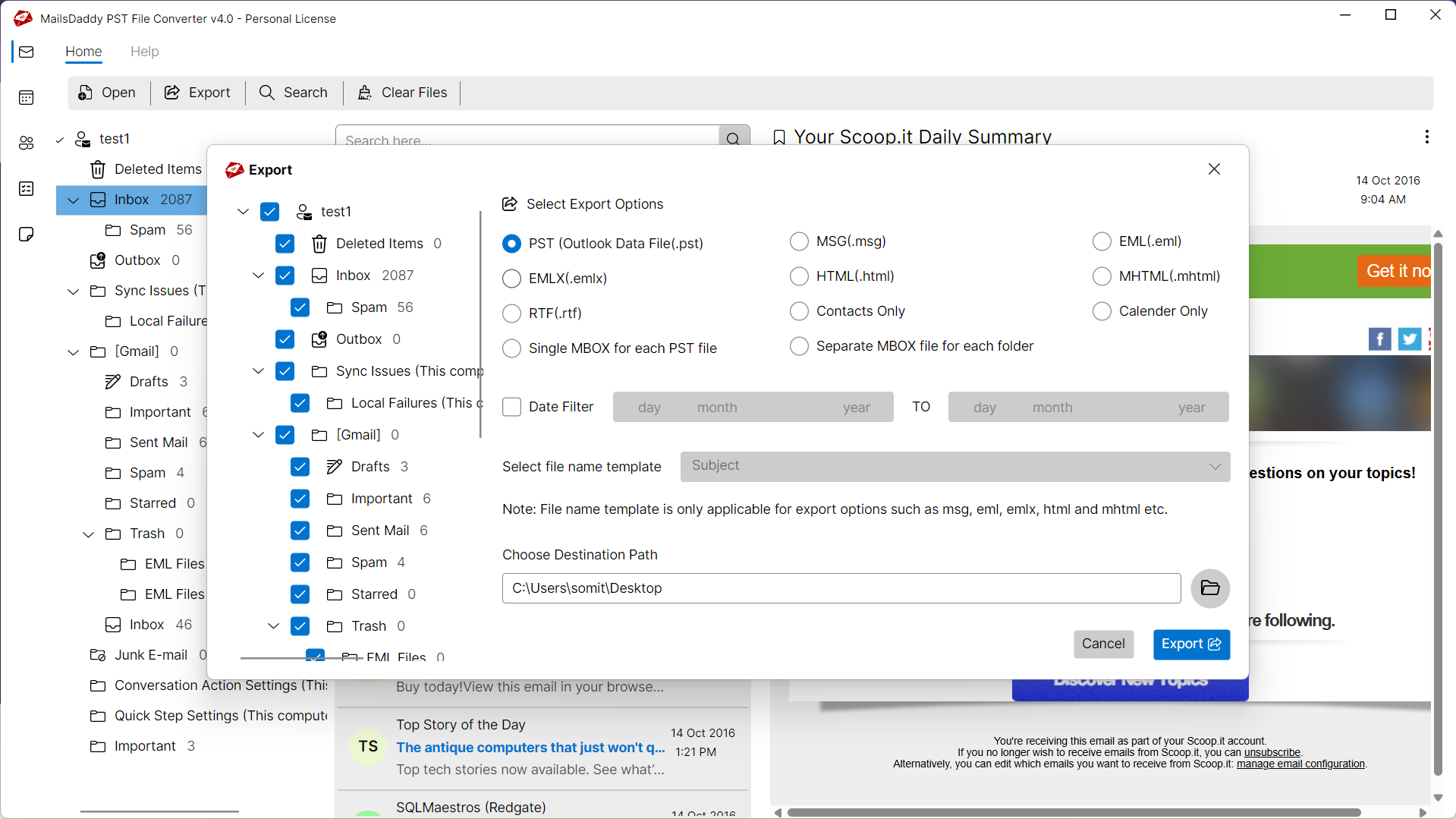
- Export selected folders or individual messages from PST files to MBOX.
- Advanced Search option to preview and export filtered PST emails to MBOX format.
- Supports Microsoft 365, Outlook 2021, 2019, 2016, 2013, 2010, and 2007 data files.
- Compatible with Windows 11, 10, 8, 7, XP, and Vista (32-bit & 64-bit).
Certified & Highly Reviewed By Leading Software Authorities
Award-Winning & Recommended by Independent Editors
CabinetM Review - PST to MBOX
CabinetM recognized MailsDaddy Outlook PST to MBOX Converter as a reliable, outstanding solution for converting Outlook PST files into MBOX format. The software enables users to batch-convert PST files to MBOX format while preserving all emails and attachments.
Trustpilot - Migrate PST to MBOX
According to Trustpilot reviewers, MailsDaddy Outlook PST to MBOX Converter is highly recommended for converting unlimited PST files into MBOX format. Reviewers praise its reliability, ease of use, and verified data accuracy, awarding it top ratings.
Easy to Open PST Files in Thunderbird, Apple Mail, and More
According to Crozdesk reviewers, this is an excellent solution for converting PST files into MBOX format. The editorial team noted that it has all the necessary capabilities to handle large Outlook PST files smoothly.
Features of the Outlook PST to MBOX Converter
Enterprise-grade recovery and conversion, packed into a simple desktop app — no technical expertise or Exchange server required.
Easy to Use
This trusted solution provides an intuitive, user-friendly GUI to complete the migration process. Both technical and non-technical users can quickly convert PST files into MBOX format.
Convert Outlook PST to MBOX
Enables users to convert Microsoft Outlook PST (ANSI & Unicode) files into the standard MBOX format along with all email attachments.
Export PST to EML / EMLX
Includes an additional export option that converts PST messages into EML and EMLX formats supported by multiple email clients.
PST to MHTML Conversion
Export PST emails into MHTML format to view or print messages via standard web browsers including Google Chrome and Mozilla Firefox.
Export Multiple PST Files
Offers bulk processing so users can import and convert multiple Microsoft PST files into MBOX format simultaneously with all emails and attachments.
Search & Export Selected Emails
Includes an Advanced Search feature that lets you find, filter, and export only the required email messages.
Export Large PST Files
Engineered to convert PST files of any size into MBOX format, easily handling oversized mailboxes without crashes or data loss.
Supports Multiple Email Clients
Converted MBOX files can be seamlessly imported into Mozilla Thunderbird, Apple Mail, Entourage, SeaMonkey, Postbox, and more.
Convert Password-Protected PST
Supports converting password-protected and encrypted PST files without requiring the original password.
Preview Mailbox Items & Folders
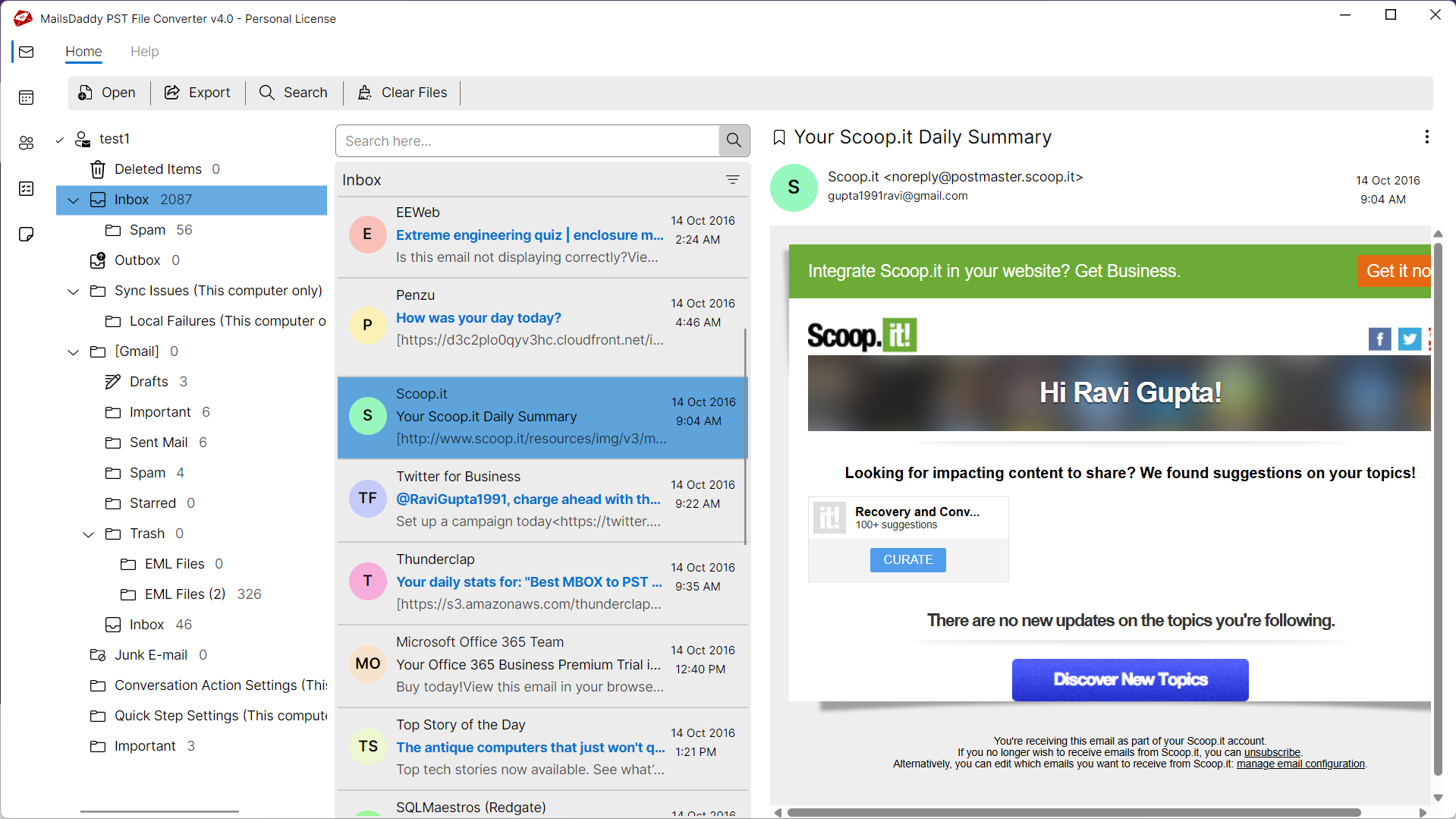
Generates a complete three-pane preview of emails along with metadata, formatting, and corresponding attachments before export.
Maintains 100% Data Integrity
Maintains complete data integrity, preserving sent/received dates, To, CC, BCC, Subject, timestamps, and inline graphics.
PST to Thunderbird Conversion
Easily migrates Outlook PST mailboxes into Mozilla Thunderbird MBOX format along with all nested folders and attachments.
Outlook Emails to Apple Mail
Converts Outlook PST files into Apple Mail-compatible MBOX format while retaining all message properties.
Outlook to Entourage Migration
Helps you migrate Windows Outlook PST data into Mac Mail and Entourage mailbox formats effortlessly.
Comprehensive System Compatibility
Fully compatible with Windows 11, 10, 8, 7, and XP; supports PST files from Microsoft 365, Outlook 2021, 2019, 2016, 2013, 2010, and 2007.
Eye-Catching Features of MailsDaddy Outlook PST to MBOX Converter software
Preserves Original Database
This PST to MBOX migration tool securely converts PST files into MBOX format without making any changes to the original database. Advanced algorithms ensure a 100% accurate conversion.
- Preserves emails, attachments, and embedded images
- Maintains original metadata, timestamps, and styling
- Zero modifications or alterations to source PST files
Maintains Email Status & Flags
Converts Microsoft PST files into MBOX, EML, EMLX, and MHTML formats while preserving the exact read/unread status and priority flags of all messages.
- Preserves Read and Unread flags for every message
- Exports to MBOX, EML, EMLX, and MHTML formats
- Keeps priority levels, importance markers, and tags
Retains Folder Hierarchy
Preserves the complete internal folder hierarchy and directory structure (Inbox, Outbox, Sent Items, Drafts, custom folders) along with email properties.
- Preserves folder hierarchy (Inbox, Sent, Drafts, custom folders)
- Keeps To, CC, From, BCC, Date, Subject, and Time properties
- Retains rich text styling, inline graphics, and HTML formatting
We Convert All Data from PST to MBOX Format!
Every folder hierarchy, email header, embedded attachment, contact attribute, and calendar recurrence is processed with 100% bit-exact fidelity.
Email Messages & Attributes
Complete Message Body & Header Preservation
Exports all email messages from Outlook PST mailboxes to standard MBOX format while retaining full rich text and HTML styling.
Supported Elements & Formats:
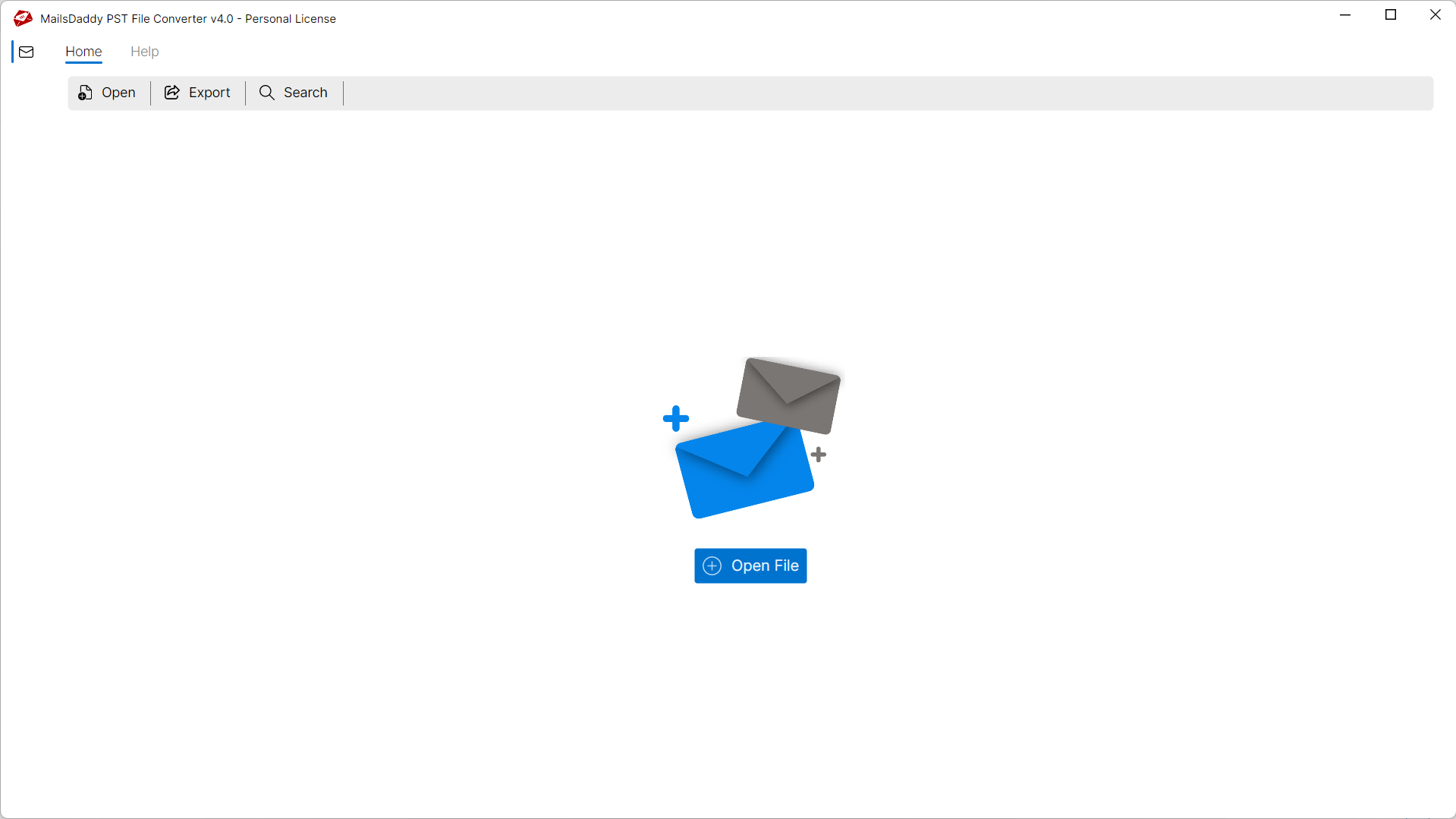
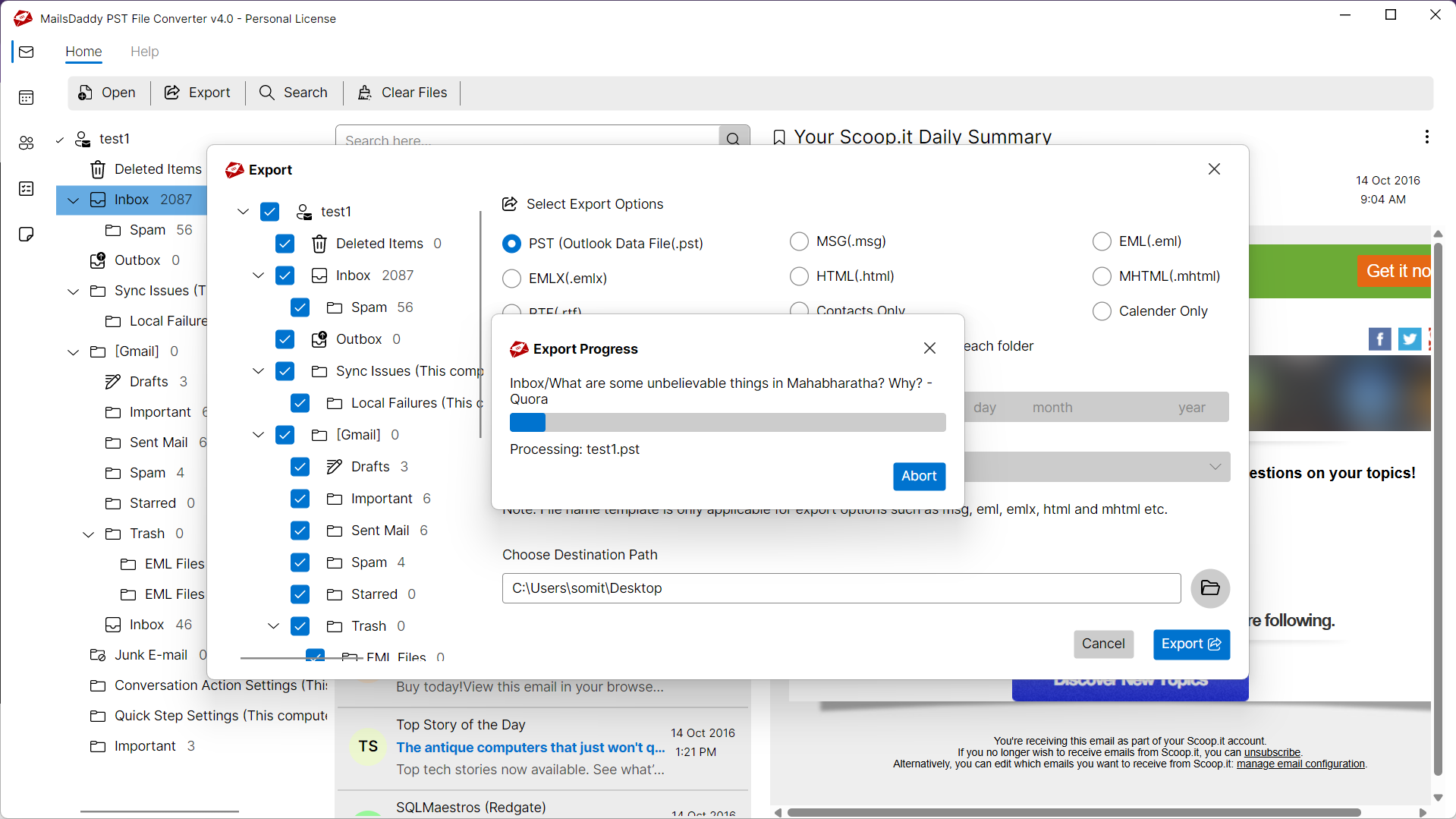
Convert OUTLOOK-PST to MBOX in 4 Simple Steps
No technical skills needed. Watch each step in the live software interface or click any step below.
Looking for the complete user manual and working guide?
Explore comprehensive guides for standard PST conversion, search & filter migration, and Live Exchange Server export.
Understanding OUTLOOK-PST Files & Why Need Safe Migration
Understanding Cached Exchange Mode, reasons for offline file inaccessibility, and how conversion resolves corruption.
Why and How to Convert PST to MBOX Format with Manual Techniques
Microsoft Outlook stores mailbox data in proprietary .pst files, which are not natively supported by other email clients. When users transition to email clients such as Apple Mail, Mozilla Thunderbird, or Entourage, compatibility issues arise because these clients use the universal MBOX format and cannot directly read Outlook PST files.
Why Users Need to Convert Outlook PST to MBOX Format
Key reasons users migrate from Outlook PST to MBOX format include:
Free & Open-Source Email Clients
Outlook requires an active Microsoft 365 or Office license, whereas several prominent email clients that use MBOX (such as Mozilla Thunderbird) are completely free.
Cross-Platform Windows to Mac Migration
PST to MBOX conversion enables users moving from Windows to macOS to transfer their Outlook emails into Apple Mail and Entourage without data loss.
Universal Format Compatibility
While PST is limited to Microsoft Outlook, MBOX is supported by more than 25 email clients, including Thunderbird, Apple Mail, Postbox, SeaMonkey, Eudora, and Opera Mail.
Limitations of Manual IMAP Synchronization
If you encounter any errors while accessing your mailboxes, converting with MailsDaddy Outlook PST to MBOX Converter resolves them immediately:
The Automated Solution: MailsDaddy Outlook PST to MBOX Converter
Manual migration methods are tedious, slow, and prone to data loss. MailsDaddy Outlook PST to MBOX Converter bypasses all these issues, directly converting PST files into standard MBOX format in minutes with 100% folder hierarchy, attachments, and formatting preserved.
Technical Specifications
Engineered for lightweight footprint, standalone execution, and broad enterprise compatibility for MailsDaddy Outlook PST to MBOX Converter.
System Requirements
Full support for Windows Server 2022, 2019, 2016, 2012, 2008 & 2003 (32/64-bit)
Platform Support
Supported Formats
PST (ANSI & Unicode, Password-Protected, Healthy or Corrupted)
Retains 100% attachments, inline images, headers, and metadata
Preserves complete folder hierarchy, read/unread flags, and timestamps
100% Offline & Private
Zero cloud uploads or telemetry. Processing happens strictly within your local machine.
No Outlook Required
Completely standalone engine. Processes OUTLOOK-PST files without requiring host email clients.
No File Size Limits
Tested on massive 50GB, 100GB, and 500GB+ enterprise mailboxes with zero crash.
Full Windows Support
Native execution across Windows 11 down to Windows XP & all Windows Server editions.
Trusted by IT teams and professionals worldwide
Explore our client testimonials to see why users trust and recommend our solutions.
“Thanks for providing such a great application. It helped me convert my Outlook 2013 PST files to MBOX format and migrate all messages to Thunderbird seamlessly.”
Jon Fredric Skogen
“Great experience with this PST to MBOX converter. It saved all my emails in MBOX files cleanly, preserving all attachments and formatting. Thank you, MailsDaddy!”
Danny Veals
“MailsDaddy Outlook PST to MBOX Converter works with 100% efficiency. It exported my PST file to MBOX while perfectly preserving email formatting and attachments just as they were in Outlook.”
Weitao Zhao
Need Help with Outlook PST to MBOX Converter?
Our dedicated 24/7 technical team is available to assist you with any migration or recovery challenge.
The free demo version lets you preview all items and export up to 20 emails per folder.
Frequently Asked Questions
Find clear answers regarding the Outlook PST to MBOX Converter conversion process, file compatibility, and recovery features.
Yes. The software provides checkboxes corresponding to each message, allowing you to select and export only required emails into an MBOX file. You can also right-click any message to export it individually to EML, EMLX, RTF, MSG, or HTML format.
Start migrating with Outlook PST to MBOX Converter today.
Download the free trial and inspect your recovered mailbox in minutes.