MailsDaddy NSF to EML Converter
Convert NSF to EML for accessing the Lotus Notes email data in Apple Mail, Thunderbird, Outlook Express, Windows Mail, eM Client, Windows Live Mail, etc. platform with this handy NSF to EML Converter tool. Get this light-weighted solution to perform bulk, and selected data conversion for Lotus Notes to EML format and get an error-free result.
- Batch NSF to EML migration by converting multiple files to EML format.
- Easily Add and Convert NSF to EML format with maintained hierarchy.
- Preserve all Folder Structure and Text Formatting during conversion.
- Maintains the HTML formatting, attachments & Inline images in EML.
- Previews the Data of the NSF file with proper formatting.
- Search and Export selected emails from NSF to EML format.
- Lotus Notes should be install and configuredto use this utility.
- The tool is compatible with all Windows OS (32-bit & 64-bit).
- Easy to install and DIY solution for a novice user.
- Save Lotus Notes email to EML format without any file size restrictions.
Certified & Highly Reviewed By Leading Software Authorities
Award-Winning & Recommended by Independent Editors
Software Informer Review – NSF to EML Exporter Tool
Fulfil your requirements to export NSF to EML with the versatile solution that enables one to convert single or multiple NSF email data files in EML/EMLX format. The tool provides a virus and error-free result to access the Notes client emails in EML supported platform. As per our software experts, we have done a complete software analysis that bound us to provide 5 star points out of 5 stars as per the superb working efficiency o this Lotus Notes to EML Migration tool.
Software Suggest - Best NSF to EML Migration Tool
Undoubtedly an efficient and effective solution to convert NSF to EML with all email databases of Lotus Notes email client or Domino Server. Performs a versatile process to migrate multiple NSF email data files in EML/EMLX format. After completing the whole software testing, our experts declare it the most systematic and well-coded solution for a novice and professional user and provided five rating stars out of five stars. We awarded it numerous awards as per its working efficiency and features.
Features of the NSF to EML Converter
Enterprise-grade recovery and conversion, packed into a simple desktop app — no technical expertise or Exchange server required.
Bulk Migration of NSF files
One by one email conversion in EML format is a lengthy and cumbersome task. Therefore, the tool avail the user to move multiple NSF email data files in EML/EMLX format in a single click along with their properties.
Selective data conversion
If you want to export only some emails from an NSF file then the tool will help you. It exports all the selective emails from NSF files to EML format, which is accessible in various saving platforms like Outlook Express, Thunderbird, etc.
Allow saving individual email items
After completing the uploading process of the NSF email database it facilitates the user to save the individual email item in EML format with all properties and without losing any integrity and attachment.
Maintains the Mapping structure
The NSF to EML Converter solution maintains the same folder and mapping structure of the Notes email database throughout the conversion process and also keep it in EML/EMLX format and keeps the data migration location unchanged for Domino/Notes client users.
Export all Attachments with email
Lotus Notes to EML Migration tool is fully capable to execute a hassle-free process to convert NSF emails in EML format along with their attachments (doesn’t matter the file is image or doc or anything else.)
Date Filter to fetch emails
In the NSF Exporter software there is an in-built date-filter option by using the user can search and export emails of the specific date range. The user needs to provide “TO” and “From” inputs to find & convert that particular NSF data.
Maintain folder hierarchy
During the IBM Notes to EML conversion, the software ensures that all the folder structure of the EML file should be the same as the NSF file until the migration of NSF to EML is finally completed.
Search Mail Option
If you want to export only some emails of the folder then the software provides an option of search mail to do the process using given various fields like To, CC, From, Subject and dates, etc.
Provide a Naming Convention
It is a unique feature of the converter software that provides a facility to save the Lotus Notes database into EML format, along with the name according to the date format, subject, etc.
Shows the Preview of NSF email
NSF to EML converter is very quick to load the Lotus Notes files and generate a preview of the selected NSF file. Loading and previewing emails are optional so you may skip it and click on the Export button.
Exclude “All” Folder option
The advanced option of this versatile solution to save NSF email in EML format enables the tyro or professional user to reduce the migration process timing and saves the local directory storage by removing the conversion of All folder data of NSF file. By default, it is enabled.
Compatible with Windows OS
The software is compatible with all the Windows (32-bit and 64-bit) OS to save files from Lotus Notes to EML format. You may install and use the software on any earlier or later editions of Windows OS.
Preserves mail formatting
Lotus Notes to EML conversion utility preserves all the mail formatting like hyperlinks, font size, font style, and other HTML structure formats. It also retains the Doc links of the NSF files in EML.
Preserve inline images
The IBM Notes to EML migration software preserves all the inline or attached images of NSF files in EML format as well to see them in another various mail client like Thunderbird or Apple Mail.
Easy to use and understand
The Lotus Notes to Thunderbird EML Converter software has a smart Graphical User interface which makes it easy to use and make it understandable to the professional or novice users to work on it.
Eye-Catching Features of MailsDaddy NSF to EML Converter software
Vast Supportability
MailsDaddy NSF to EML Migration tool is designed in such a manner that makes it supportive with all EML format supported platforms along with Lotus Notes/ Domino Server platform to execute a hassle-free process in a one-go approach.
- Compatible with Windows 11, 10, 8.1, 8, 7, and Windows Server (32/64-bit).
- Supports all Microsoft Outlook editions without requiring Outlook pre-installed.
- Independent standalone utility engineered for high enterprise stability.
Allow searching NSF files from unknown location
The NSF Exporter tool is embedded with three-file searching options Open, Add folder, and Search file/folder to find and add NSF email files for importing in EML format. Each option has a different working style to help the novice to find NSF files to start the process and save NSF email data in EML format.
- Search and filter emails by Date Range, Subject, Sender, or Recipient.
- Quickly isolates critical messages without parsing full mailbox folders.
- Allows exporting only targeted search results directly to output formats.
Requirement of Lotus Notes email client
As the tool is designed, using a highly advanced technical method by our development team, still there is a need for installation of Lotus Notes email client is mandatory for quick and hassle-free NSF to EMLX Migration process.
- As the tool is designed, using a highly advanced technical method by our development team, still there is a need for installation of Lotus Notes email client is mandatory for quick and hassle-free NSF to EMLX Migration process.
- Engineered specifically for optimal requirement of lotus notes email client workflows.
- Maintains complete data integrity, folder hierarchy, and email attributes.
What does NSF to EML Export?
Every folder hierarchy, email header, embedded attachment, contact attribute, and calendar recurrence is processed with 100% bit-exact fidelity.
Emails
The versatile NSF to EML Converter tool easily exports the Notes ...
The versatile NSF to EML Converter tool easily exports the Notes email database in EML format with an error-free process. While processing this email conversion process the tool maintains the email properties intact throughout the process as listed.
Supported Elements & Formats:
Convert NSF to EML in 4 Simple Steps
No technical skills needed. Watch each step in the live software interface or click any step below.
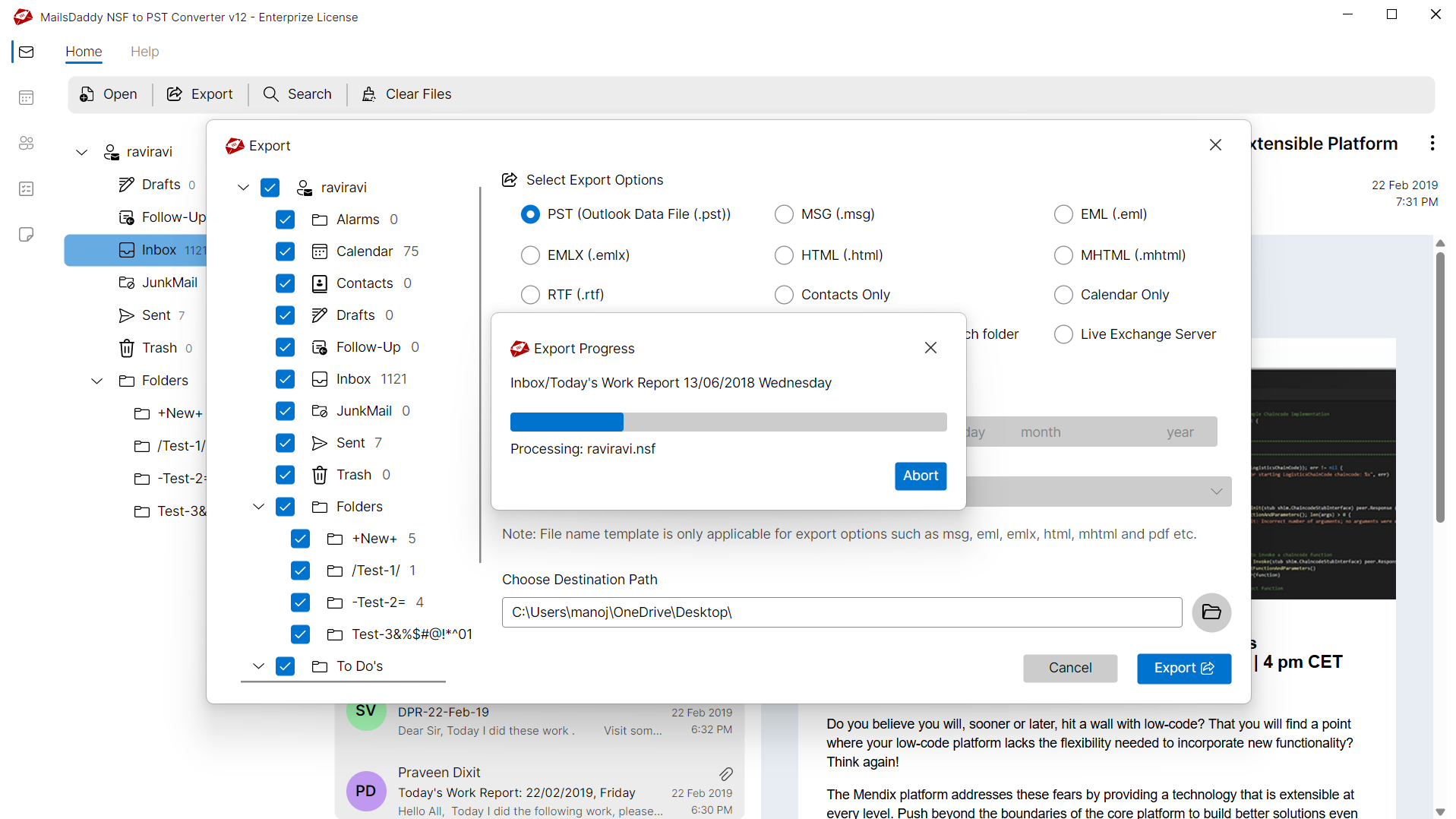
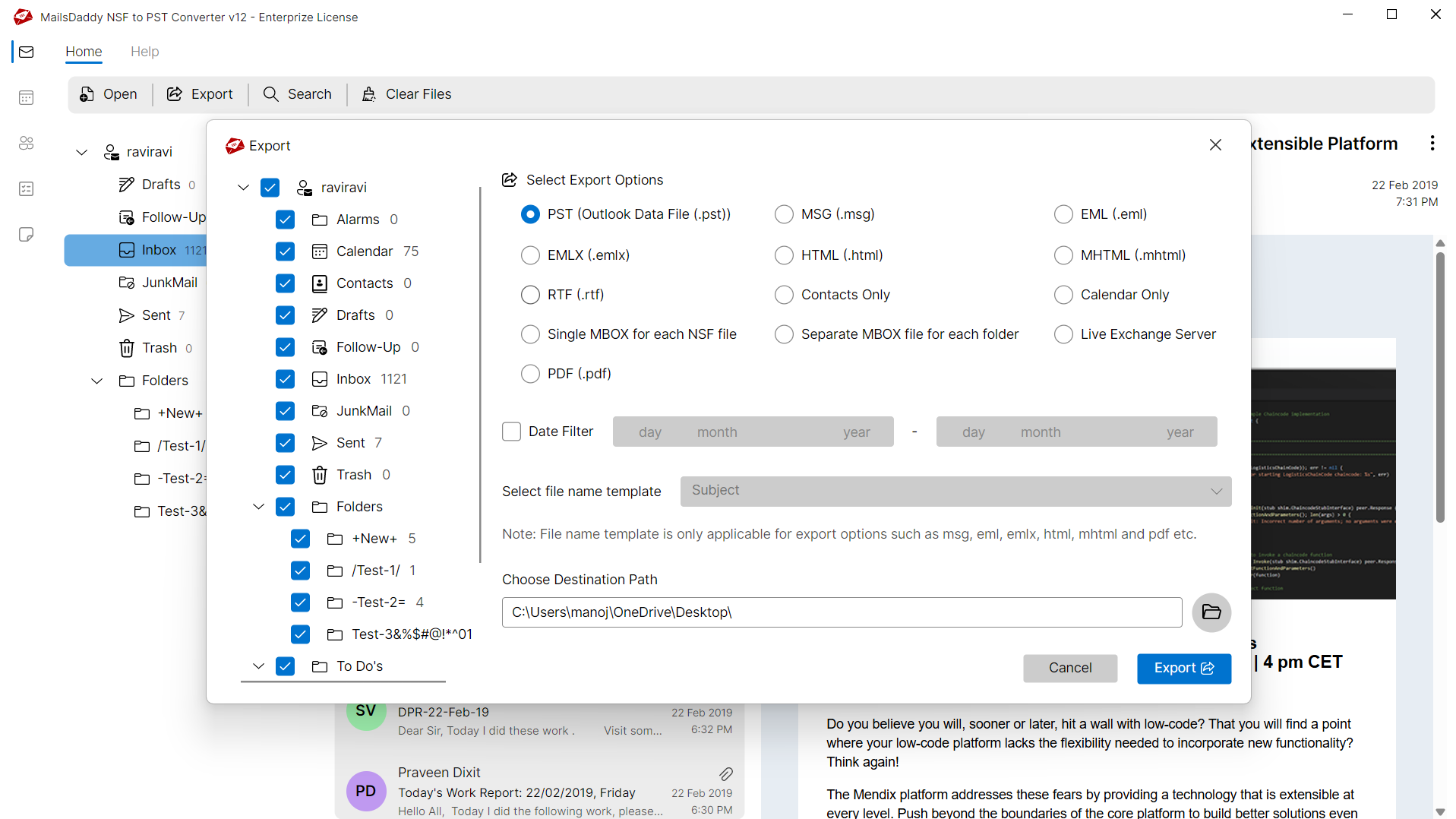
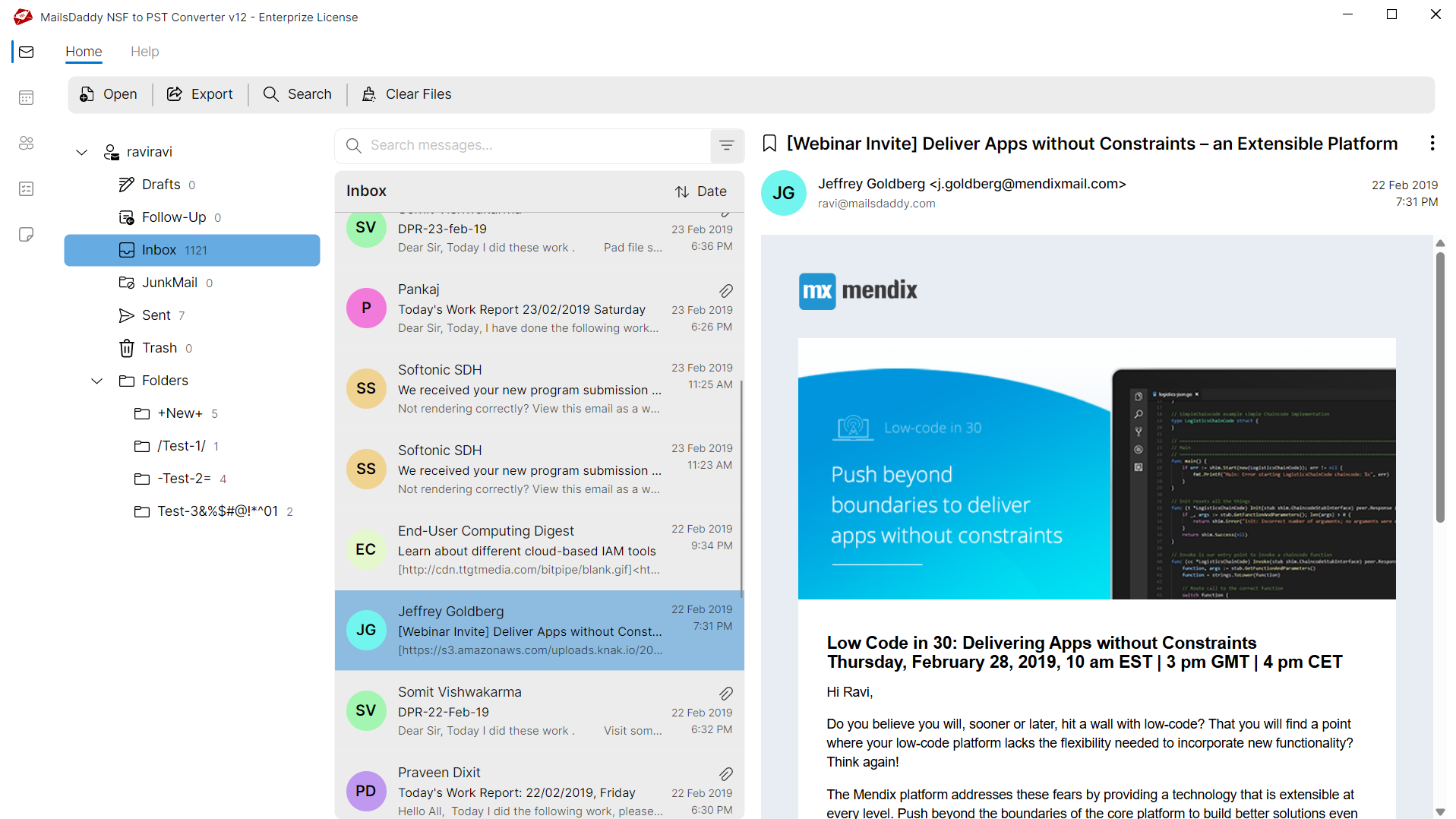
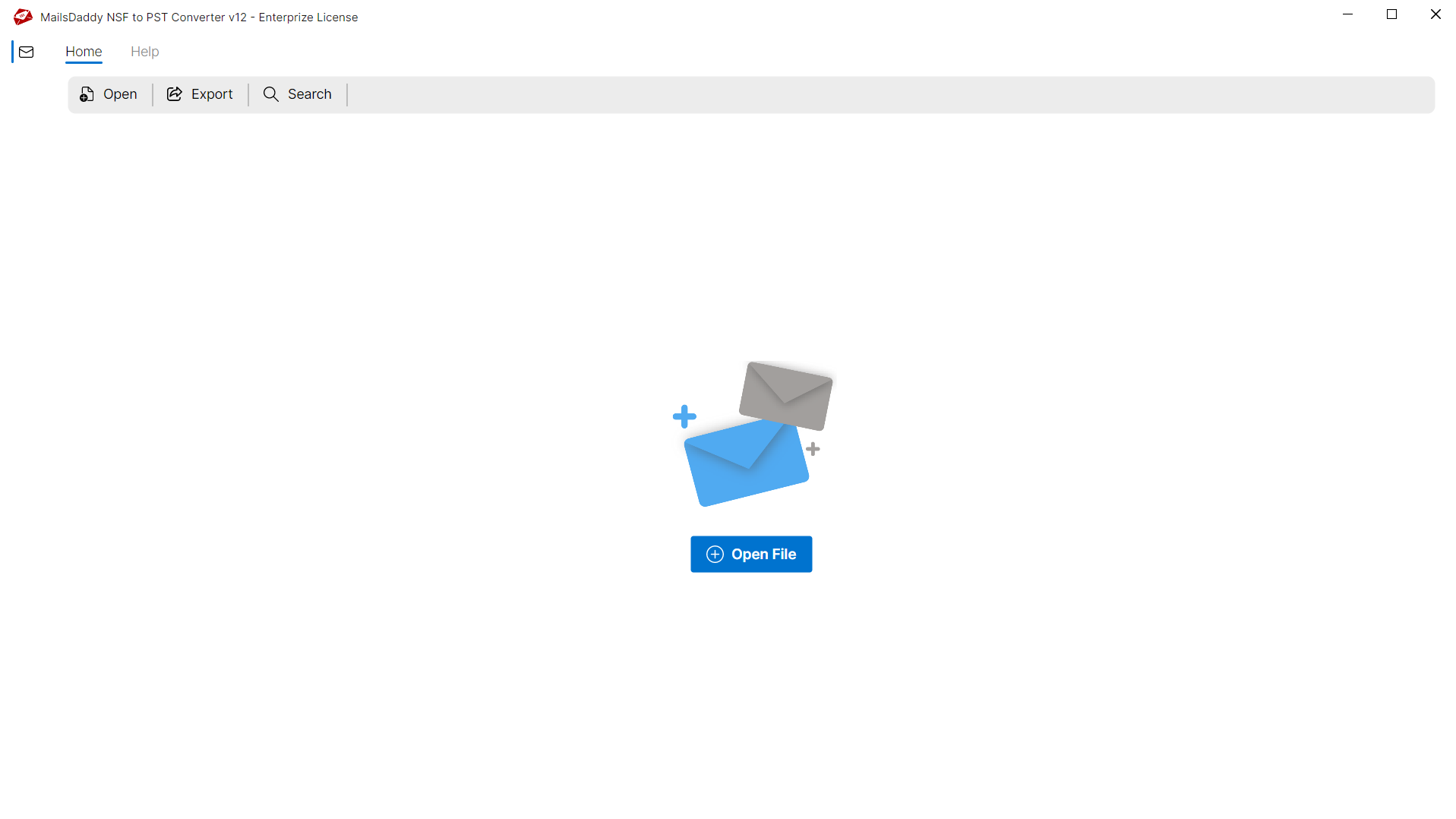
Looking for the complete user manual and working guide?
Explore comprehensive guides for standard PST conversion, search & filter migration, and Live Exchange Server export.
Technical Specifications
Engineered for lightweight footprint, standalone execution, and broad enterprise compatibility for MailsDaddy NSF to EML Converter.
System Requirements
Full support for Windows Server 2022, 2019, 2016, 2012, 2008 & 2003 (32/64-bit)
Platform Support
HCL Notes 12, 11, 10, 9.0, 8.5 & earlier versions without Domino Server
Supported Formats
NSF (Healthy, Corrupted, Orphaned, Large Archives)
Retains 100% attachments, inline images, headers, and metadata
Preserves complete folder hierarchy, read/unread flags, and timestamps
100% Offline & Private
Zero cloud uploads or telemetry. Processing happens strictly within your local machine.
No Outlook Required
Completely standalone engine. Processes NSF files without requiring host email clients.
No File Size Limits
Tested on massive 50GB, 100GB, and 500GB+ enterprise mailboxes with zero crash.
Full Windows Support
Native execution across Windows 11 down to Windows XP & all Windows Server editions.
Trusted by IT teams and professionals worldwide
Explore our client testimonials to see why users trust and recommend our solutions.
“Finally, I found the tool, which I was looking for. I finished all my migration very quickly and it was very easy for me. Thank you MailsDaddy team.”
Shane Taylor
“Working with MailsDaddy NSF to EML migration was amazing because it is easy to understand of GUI & features. Thank you MailsDaddy, You did a good job…Keep it up”
Stefan Schmidt
“MailsDaddy provides an easy process for the migration, which is timesaving, and I am happy because I did it in less time without any trouble with the help of the Support team of MailsDaddy...Thank you”
Oliver Brown
Need Help with NSF to EML Converter?
Our dedicated 24/7 technical team is available to assist you with any migration or recovery challenge.
The free demo version lets you preview all items and export up to 20 emails per folder.
Frequently Asked Questions
Find clear answers regarding the NSF to EML Converter conversion process, file compatibility, and recovery features.
With the free demo version of the tool, one can check its features by processing to export first 20 data items in EML/EMLX format with all properties and see the complete preview of the whole NSF data flle.
Start migrating with NSF to EML Converter today.
Download the free trial and inspect your recovered mailbox in minutes.