MailsDaddy Office 365 Backup Tool
An awesome solution to export and backup Office 365 mailboxes locally to PST, MBOX, MSG, and EML file formats. Easily backup user mailboxes, archive folders, calendars, and contacts to your hard drive.
- Ideal for personal and enterprise-level Office 365 backups.
- Quickly extract PST from Office 365 Exchange Online Mailbox.
- Backup multiple Office 365 accounts with Admin Login Option.
- Download all data of Office 365: emails, tasks, calendars, & contacts.
- Choices to save Office 365 emails to PST, EML, MSG, and MBOX format.
- Date Filter option to backup Office 365 emails of a specific date range.
- The best backup solution for Administrators & Office 365 end users.
- Backup Multiple Office 365 Mailbox to PST file format.
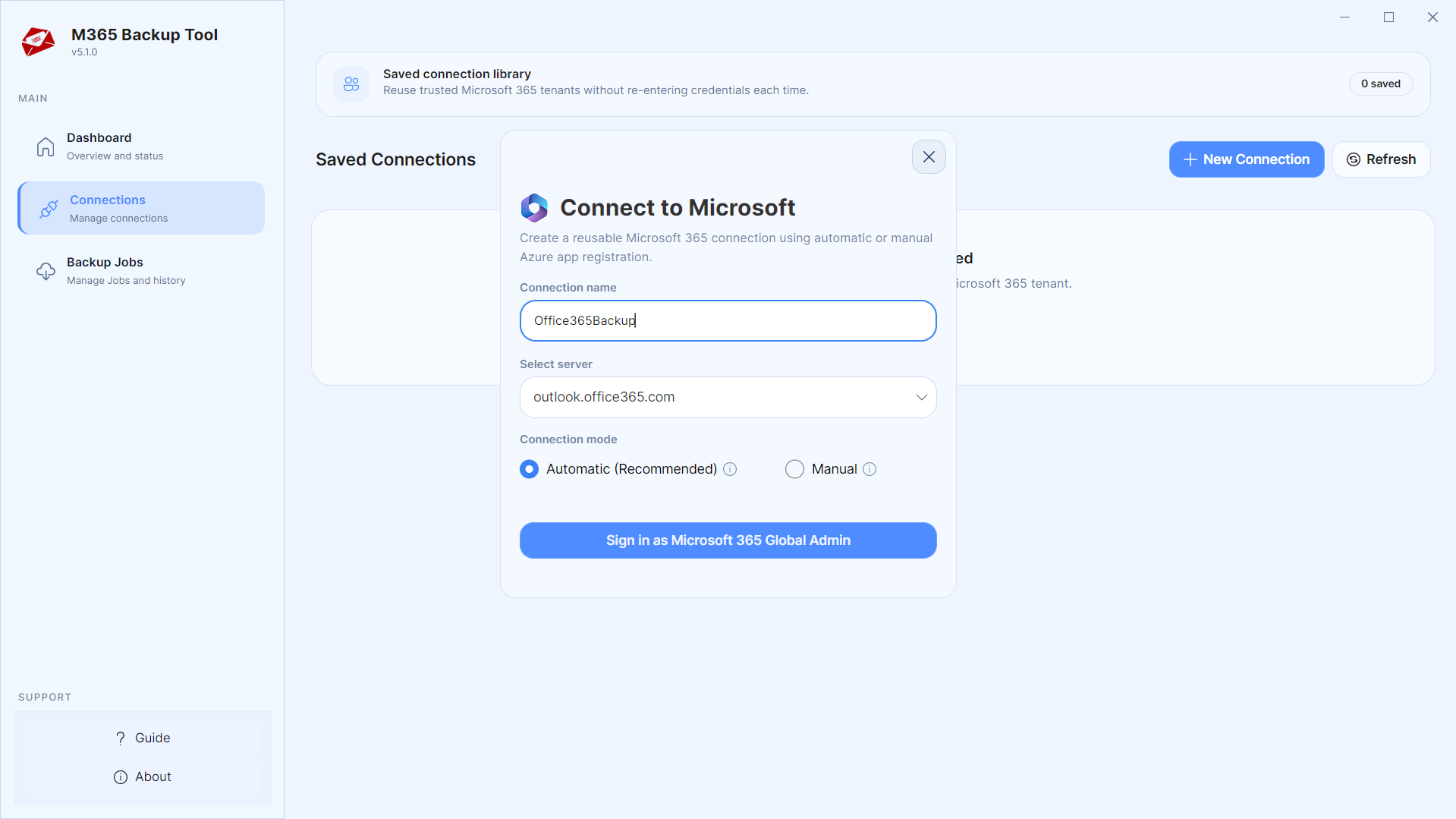
- Offers secure Automate and Manual Login options
- Additional option to Export Contacts Only and Export Calendars Only from O365 mailboxes.
Certified & Highly Reviewed By Leading Software Authorities
Award-Winning & Recommended by Independent Editors
Mouthshut - Office 365 Backup
Our affordable tool has got a good review in one of the renowned review websites named MouthShut. Our product has got good rating in terms of their functionality, service & support, value for money, user-friendly, reliability & satisfaction, etc. Currently, the software has got a total rating of 4.5/5 liked and rated by many people. Our happy customers have also provided many good comments and their experience with MailsDaddy Software products.
Scam Adviser - PST backup Office 365
ScamAdviser Company has shown the Trustscore of 91% with an excellent rating. It means the company has provided a high rating for its security features. The MailsDaddy Software products also got has an outstanding rating according to user reviews. It means the applications are trustworthy towards the users giving the best solution.
Backup Office 365 - Trustmeter
The products of MailsDaddy Software has got good reviews in TrustMeter of 10/10 ratings. In addition, we are looking for more good reviews in the future. Moreover, we are confident our products never disappoint our customers. MailsDaddy developers are highly experienced to provide effective, quality, and best applications for their customers.
Features of the Office 365 Backup Tool
Enterprise-grade recovery and conversion, packed into a simple desktop app — no technical expertise or Exchange server required.
Backup Single or Multiple Mailboxes
The best Office 365 backup software enables users to back up single or multiple Office 365 mailboxes to Outlook PST format. An Administrators can easily export individual mailbox or perform organization-wide mailbox backups with complete data integrity.
Maintain Office 365 Folders Structure
The Office 365 PST Export Tool preserves the original folder hierarchy while backing up Office 365 mailboxes to PST, MSG, MBOX, and EML formats. It also allows administrators to exclude unwanted or empty folders, ensuring a clean and efficient backup process.
Backup Selected Account of O365 Mailbox
The utility allows transferring the selected admins and users of Office 365 Mailboxes to PST or other formats. Just click on the drop-down and choose the desire option (all, admins, users or shared) before downloading backup Microsoft 365 mailboxes.
Export Office 365 to PST
The easiest solution to the backup exchange online mailbox to PST file format. Users can also use the date filter option of the software, which allows downloading emails of the specific date range.
Office 365 to MBOX Migration
The software allows exporting the Office 365 mailboxes to MBOX files that can be used in Apple Mail, Mozilla Thunderbird, Entourage and all MBOX supported email clients.
Transfer O365 Mailbox to MSG
The application also has the option of taking the backup of mailboxes in MSG file format. It maintains the folder hierarchy while performing.
Save Office 365 data to EML
You can easily task backup of data in EML file format which is supported by several email clients like Windows Live Mail, Mozilla Thunderbird, and Apple mail, etc.
Export Office 365 Contacts Only
By using this feature of the software users can easily extract all contacts from the Office 365 user accounts in VCF file format in a few seconds.
Export Office 365 Calendars Only
This feature of the Office 365 Backup tool allows exporting the calendars of Office 365 user accounts in ICS file format.
Office 365 Backup with Incremental Backup
The tool supports incremental backup, allowing it to back up only newly added or modified mailbox data after the initial backup. This saves time, reduces storage usage, and ensures efficient Office 365 mailbox protection.
Compatible with all Outlook Editions
The Extracted PST file is compatible with all versions of Microsoft Outlook including Outlook 2021, 2019, 2016, 2013, 2010 and Outlook 2007, etc.
Compatible with All Windows OS
The Office 365 Email backup solution is compatible with all editions of Windows operating system including Windows 11, 10, 8.1, 8, 7, Vista, XP, etc. for Office 365 Export to PST.
Eye-Catching Features of MailsDaddy Office 365 Backup Tool software
Complete Office 365 PST Export Solution for All
The software provides a comprehensive backup solution for all Microsoft 365 and Exchange Online users. Individual users can easily connect and export their own mailbox data to PST, while IT administrators can securely log in with Admin credentials to back up multiple tenant mailboxes simultaneously.
- Directly export Exchange Online mailboxes into accessible Outlook PST format.
- Supports single mailbox user backup and tenant-wide administrator bulk export.
- Back up primary mailboxes, In-Place Archive mailboxes, and custom folder hierarchies.
- Preserves all email headers, formatting, attachments, and metadata without data loss.
Multiple Choice to download Office 365 Mailbox
The tool offers multiple export options to download Exchange Online mailboxes. It enables you to save Office 365 cloud mailbox data to on-premises formats with ease.
- Export Office 365 mailboxes to PST, MSG, EML, and MBOX formats.
- Save cloud mailbox data to local on-premises storage without data alteration.
- Apply date filters to selectively export emails from a specific time range.
Backup Contacts & Calendars Separately
Through this M365 backup application, organizations or individual person can choose options to move only contacts or calendars of the Office 365 account. This option lets you migrate all the details of the contacts or calendars without harming any information.
- Exports address book contacts to universal .vcf format only.
- Converts calendar appointments, meetings, and schedules to .ics format.
- Preserves contact photos, notes, phone numbers, and recurring events.
We Backup Everything and Export PST from Office 365
Every folder hierarchy, email header, embedded attachment, contact attribute, and calendar recurrence is processed with 100% bit-exact fidelity.
Email: The software download Office 365 email to PST file maintai...
Email: The software download Office 365 email to PST file maintaining the entire properties of the Outlook PST file. It keeps the entire O365 data intact in their same original format. It even preserves the email naming conventions such as To, Bcc, From, Subject, Cc, Date, etc.
Supported Elements & Formats:
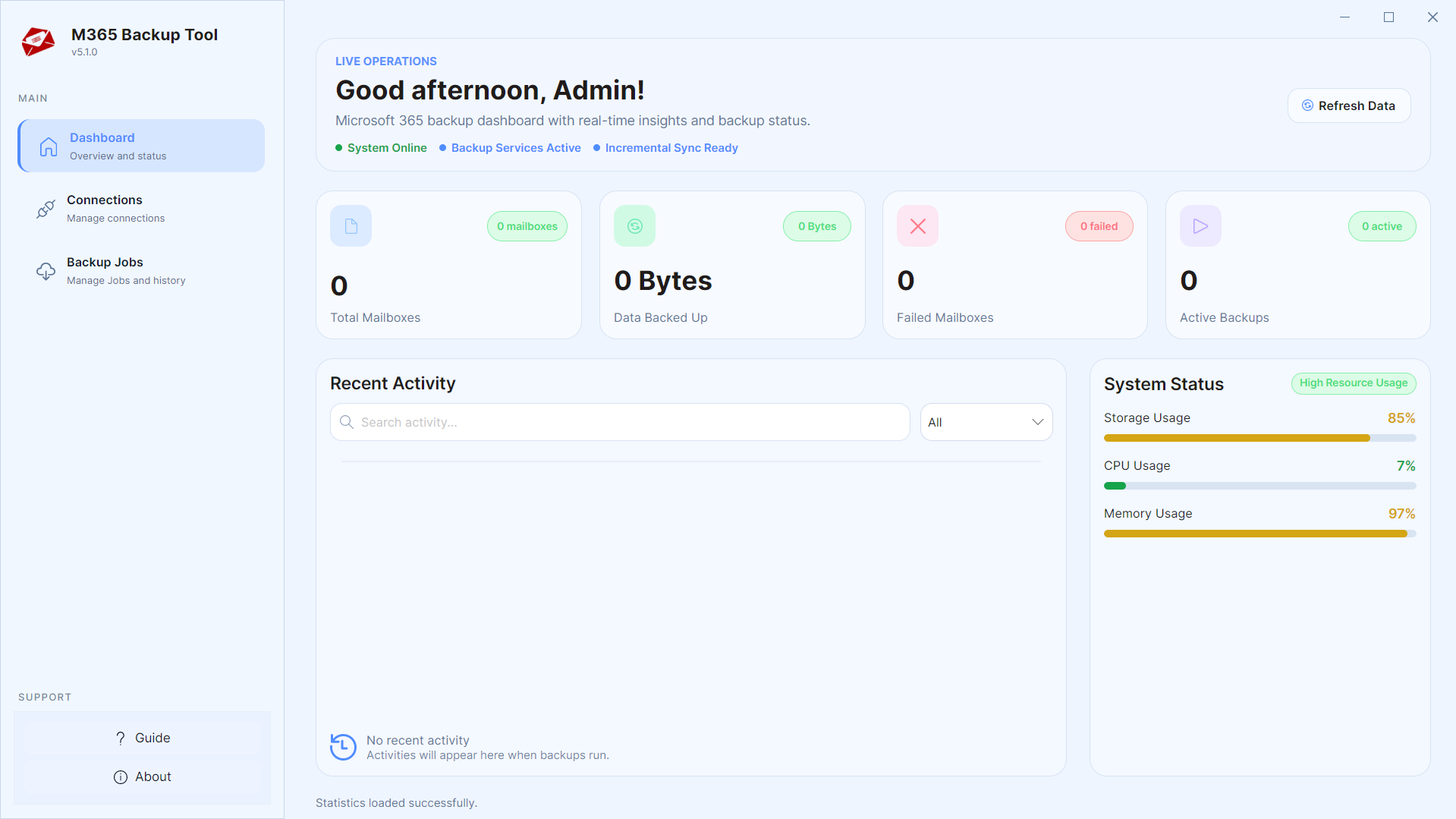
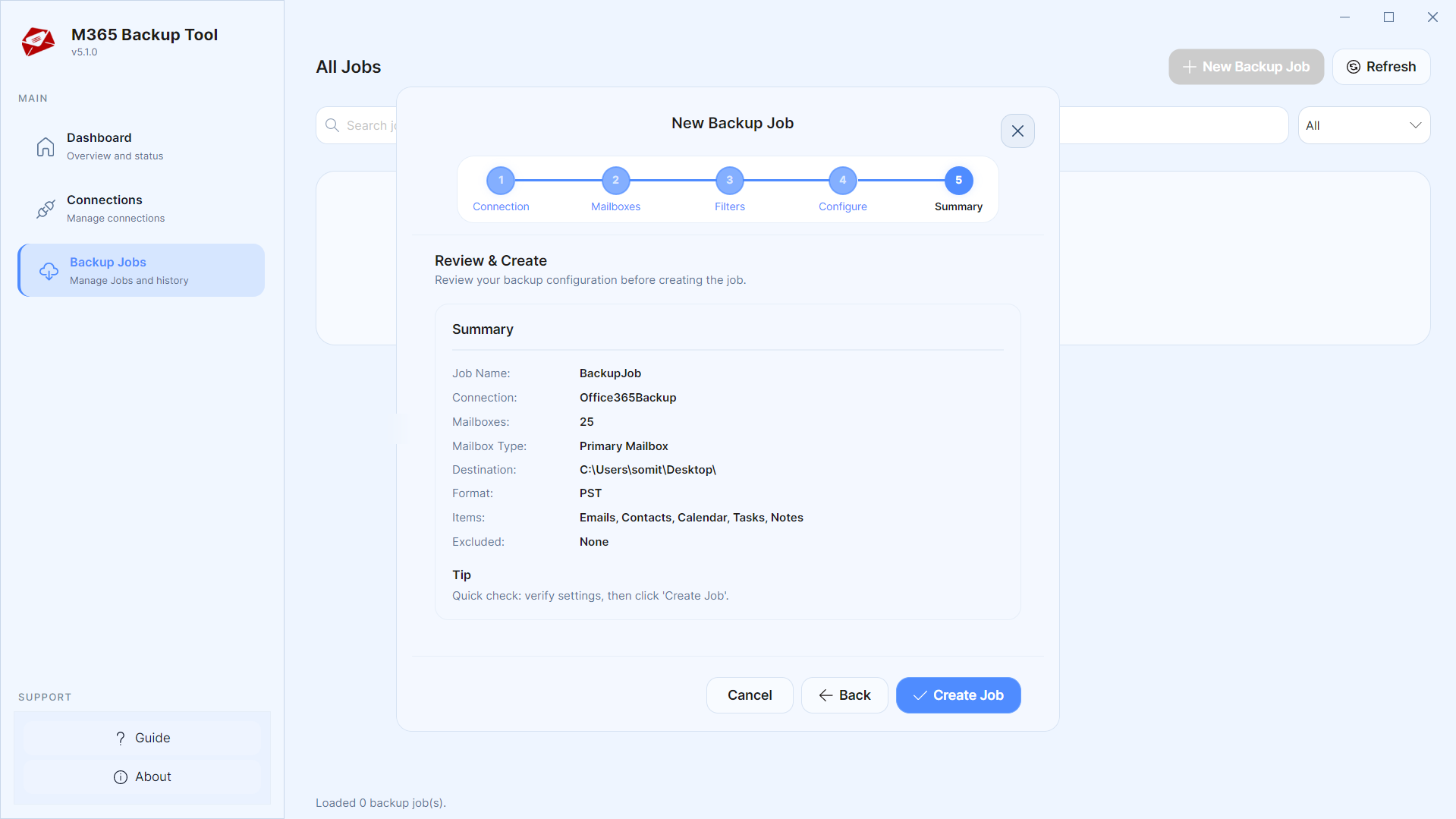
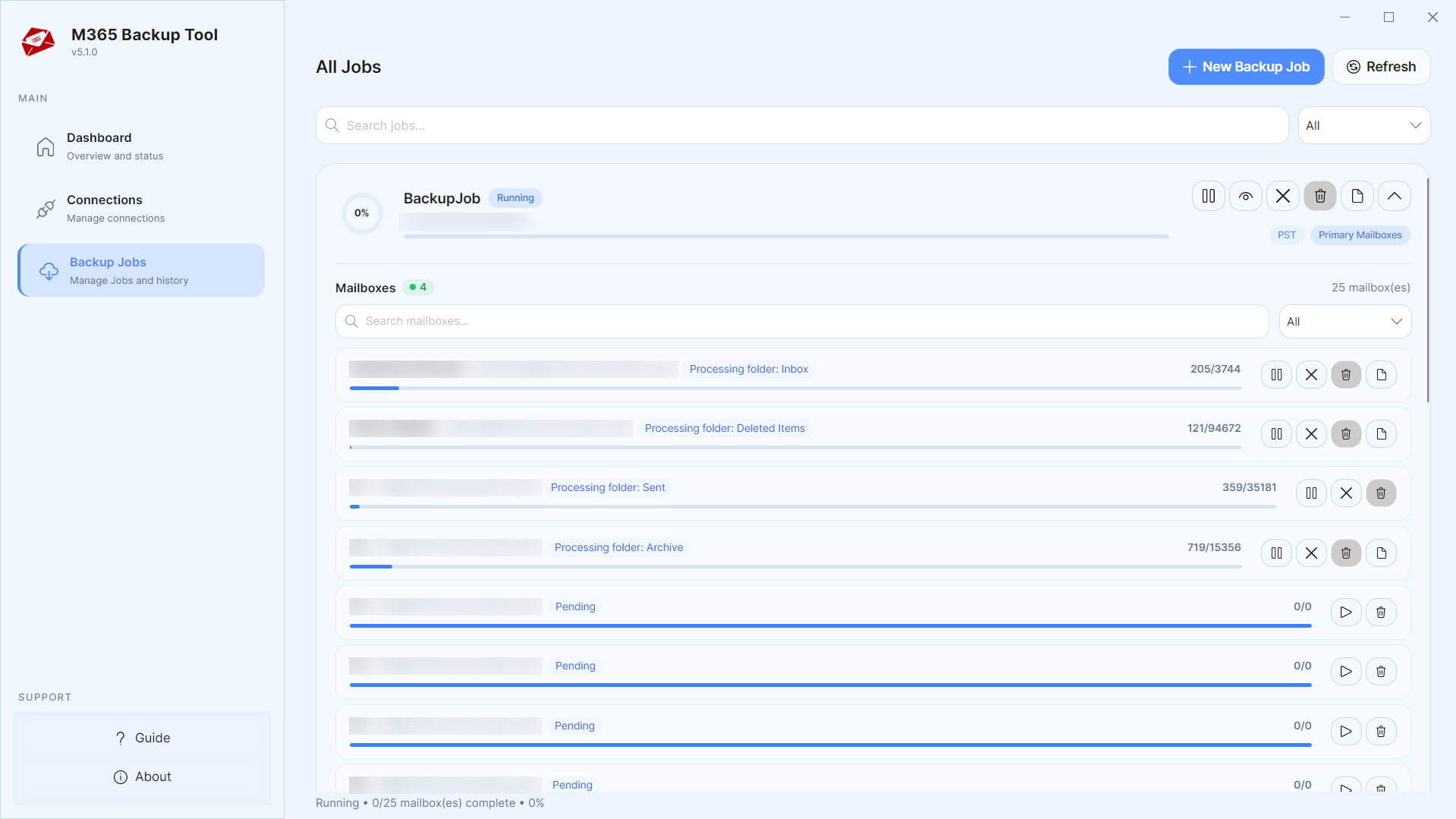
Backup OFFICE-365 Mailboxes in 4 Simple Steps
No technical skills needed. Watch each step in the live software interface or click any step below.
Looking for the complete user manual and working guide?
Explore comprehensive guides for standard PST conversion, search & filter migration, and Live Exchange Server export.
Technical Specifications
Engineered for lightweight footprint, standalone execution, and broad enterprise compatibility for MailsDaddy Office 365 Backup Tool.
System Requirements
Full support for Windows Server 2022, 2019, 2016, 2012, 2008 & 2003 (32/64-bit)
Platform Support
Modern OAuth 2.0, App Password, SSL/TLS encrypted IMAP & POP3 connection
Supported Formats
OFFICE-365 (Healthy, Corrupted, Orphaned, Large Archives)
Retains 100% attachments, inline images, headers, and metadata
Preserves complete folder hierarchy, read/unread flags, and timestamps
100% Offline & Private
Zero cloud uploads or telemetry. Processing happens strictly within your local machine.
No Outlook Required
Completely standalone engine. Processes OFFICE-365 files without requiring host email clients.
No File Size Limits
Tested on massive 50GB, 100GB, and 500GB+ enterprise mailboxes with zero crash.
Full Windows Support
Native execution across Windows 11 down to Windows XP & all Windows Server editions.
Trusted by IT teams and professionals worldwide
Explore our client testimonials to see why users trust and recommend our solutions.
“I was afraid to use the manual technique to backup Office 365 mailbox; I choose this MailsDaddy software to export Office 365 to PST. I liked the application because of its great ease of use and its simple steps. I did not find any issue while handling the software. It is just simply great.”
Jerry Parker
“I found this software very helpful; one can find all possible solutions required to backup Exchange Online mailboxes. In this tool, I also liked the very useful filter options. It helps me extracted my O365 contacts separately.”
Samuel Koloski
“I loved its security features as it always asks for the valid login credential before starting the backup process. I also like its simplicity and smooth operation while performing the Office 365 backup tasks.”
Ron Andov
Need Help with Office 365 Backup Tool?
Our dedicated 24/7 technical team is available to assist you with any migration or recovery challenge.
The free demo version lets you preview all items and export up to 20 emails per folder.
Frequently Asked Questions
Find clear answers regarding the Office 365 Backup Tool conversion process, file compatibility, and recovery features.
Yes, for that we have specially added the Impersonation feature in Business License. Just Login as Admin in our Tool and you will be able to see all your Mailboxes.
Start migrating with Office 365 Backup Tool today.
Download the free trial and inspect your recovered mailbox in minutes.