MailsDaddy Gmail Backup Tool
Backup Gmail emails in a local hard drive using MailsDaddy Gmail Backup Tool without affecting the original content. This tool helps to export Gmail emails into PST, EML, MSG, MBOX, and other formats with high data security. The software is embedded with advanced features that further simplify the backing up Gmail mailbox.
- Backup Gmail emails to PST, MBOX, EML, MSG, and HTML file format.
- Offers a simple GUI interface for quick conversion of emails into PST format.
- Allows backup Gmail emails with corresponding attachments.
- Perfectly save all Gmail email databases on a user-defined storage location.
- Keep safe, complete Gmail backup process & provides accurate result.
- Provides a Date Filter option to find and backup emails between two different dates.
- Preserve the Read and Unread status of all emails after completing emails backup.
Certified & Highly Reviewed By Leading Software Authorities
Award-Winning & Recommended by Independent Editors
Software Informer – Gmail Database Export
MailsDaddy Gmail Backup tool has got good reviews on the Software Informer website. Around 80% of people have given an excellent rating for its best performance. The Gmail Backup software is also submitted here. Users can easily download the free DEMO version from here, check the performance of the utility, and give reviews without facing any type of problem.
How Efficient is this Google Gmail Backup Utility - IverTech Review
IverTech is also one of the best platform to download the software as per your requirement. IverTech provides multiple categories to list the software and tools so that users can easily find the software and complete their tasks. Our services and product have got an overall rating of 4.5/5. Moreover, users can safely download the software from this official site and share feedback with us. Thank you!
Features of the Gmail Backup Tool
Enterprise-grade recovery and conversion, packed into a simple desktop app — no technical expertise or Exchange server required.
Easy To Use for All
The user interface of this tool is much easier for quick Google Emails backup. The best part is that a new user can easily take a backup of their Gmail account.
Download Complete Data
Using this outstanding solution, users can ideally export complete Gmail email data. Here users can backup Emails with complete attachments.
Convert in Multiple Formats
This innovative Gmail email backup tool can move the entire Gmail mailbox into multiple formats. It can export Gmail data into PST, EML, MSG, MBOX, EMLX, and HTML formats.
Date Filter Option Available
It allows users to filter, find speedily, and back up some important dates emails. Here users have to put the date between which the user has to filter the Gmail emails.
Multiple Gmail ID Export
This Professional tool can backup multiple Gmail account(one at a time) with full data security. It also maintains all Gmail emails' status (read and unread).
Maintain Data Integrity
This tool also maintains the data integrity in the overall Gmail data backup process. The utility never changes original content and provides a responsive and complete result.
Keep Meta Properties
This outstanding solution has the ability to download all emails from Gmail without any alteration and maintain all email properties (To, From CC, BCC, Time, Subject, date, etc.).
Create The Logs File
The application allows users to create the log file of the complete Google email backup process. Here users will get to know the file count, conversion start time & end time, etc.
Maintain Folder Hierarchy
This intelligent tool always maintains the original folder structure without extra effort. It never loses a single bit of content and always provides accurate results.
Gmail to Outlook
It is compatible to backup Google Gmail account content into Outlook PST file format. The converted PST file can be imported in Outlook 2019m 2016, 2013, 2010, and other editions.
Gmail to Thunderbird
The application offers users to export all Gmail account email data into EML and MBOX format that can successfully import into the entire Mozilla Thunderbird account with 100% accuracy
Gmail to EML
This outstanding solution is compatible support all EML file-supported email clients. So the converted EML file can be easily imported into all EML file-supported email client platforms.
Eye-Catching Features of MailsDaddy Gmail Backup Tool software
Backup Gmail Emails to Different File Formats
This appreciating solution is designed with a professional algorithm and advanced coding to migrate all Gmail emails into PST, EML, MSG, and other popular formats. It helps to convert all emails with their respective attachments.
- Maintains 100% original directory layout (Inbox, Sent, Drafts, custom folders).
- Preserves rich text formatting, inline graphics, and nested metadata.
- Keeps unread/read message statuses and importance flags intact.
Keep Safe Complete Gmail Account Database
This economical solution is helpful for backup Google Gmail mailbox without any changes in original email items. It enables users to Backup of Gmail emails with maintaining all folders and sub-folders in the hierarchy.
- This economical solution is helpful for backup Google Gmail mailbox without any changes in original email items.
- It enables users to Backup of Gmail emails with maintaining all folders and sub-folders in the hierarchy.
- Engineered specifically for optimal keep safe complete gmail account database workflows.
Export Selected Folders or Items
Gmail backup application offers users to choose some Gmail email items and backup in Microsoft PST and other formats without any type of bugs and errors. Here users can also backup some required dates Google Gmail e-mail without any alteration.
- Checkbox-based selection allows migrating only required mailboxes or folders.
- Prevents migrating unwanted folders, spam, or empty directories.
- Preserves full internal hierarchy for all selected mail folders.
Date Range Filter to Backup Specific Emails
MailsDaddy Gmail Backup Tool provides date range data filter feature to back up selected date emails without any data loss risk. Here, users have to put the start date and end date so that the software can quickly find emails between these dates and provide accurate results.
- Search and filter emails by Date Range, Subject, Sender, or Recipient.
- Quickly isolates critical messages without parsing full mailbox folders.
- Allows exporting only targeted search results directly to output formats.
We Convert All Data From Gmail Account!
Every folder hierarchy, email header, embedded attachment, contact attribute, and calendar recurrence is processed with 100% bit-exact fidelity.
Emails & their Properties
MailsDaddy Gmail Backup Tool provides superb options to convert G...
MailsDaddy Gmail Backup Tool provides superb options to convert Gmail emails with complete email properties. Some of the most popular meta properties are given below-
Supported Elements & Formats:
Backup GMAIL Mailboxes in 4 Simple Steps
No technical skills needed. Watch each step in the live software interface or click any step below.
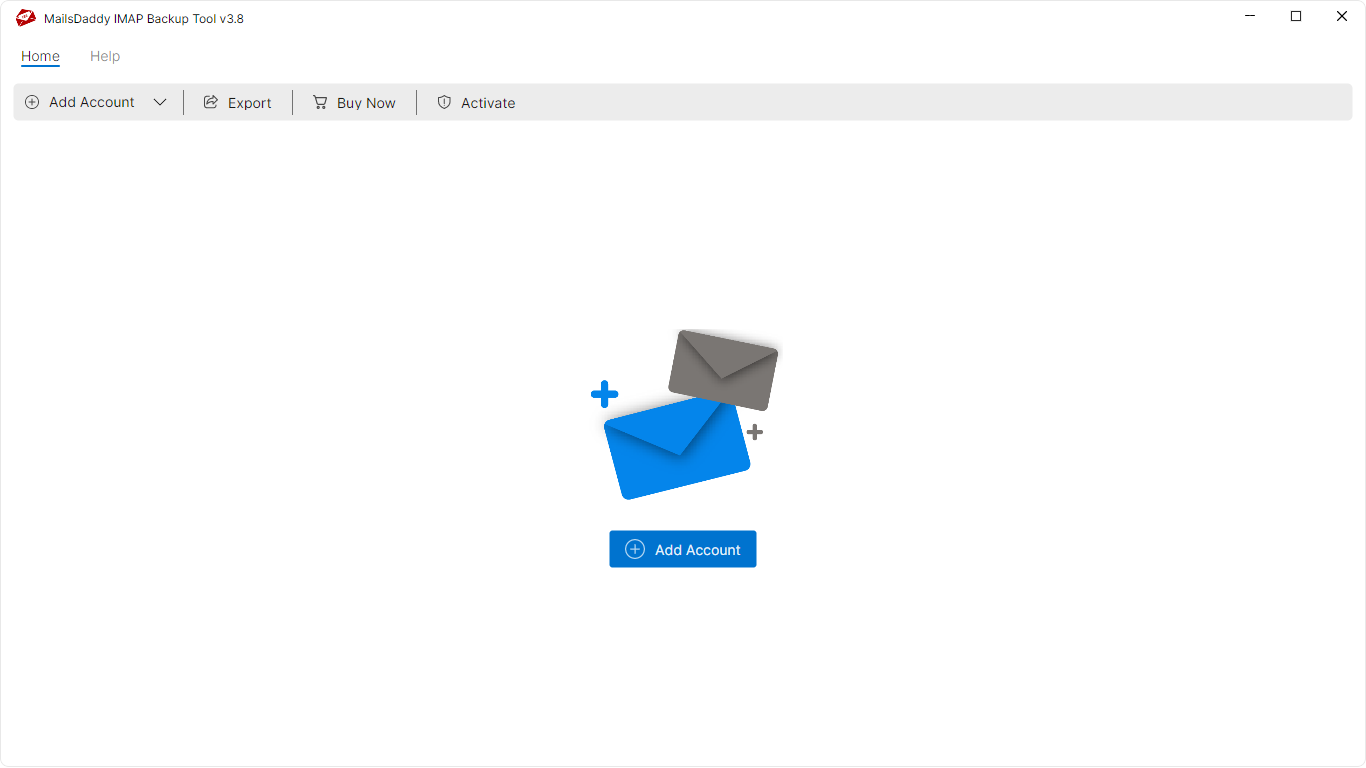
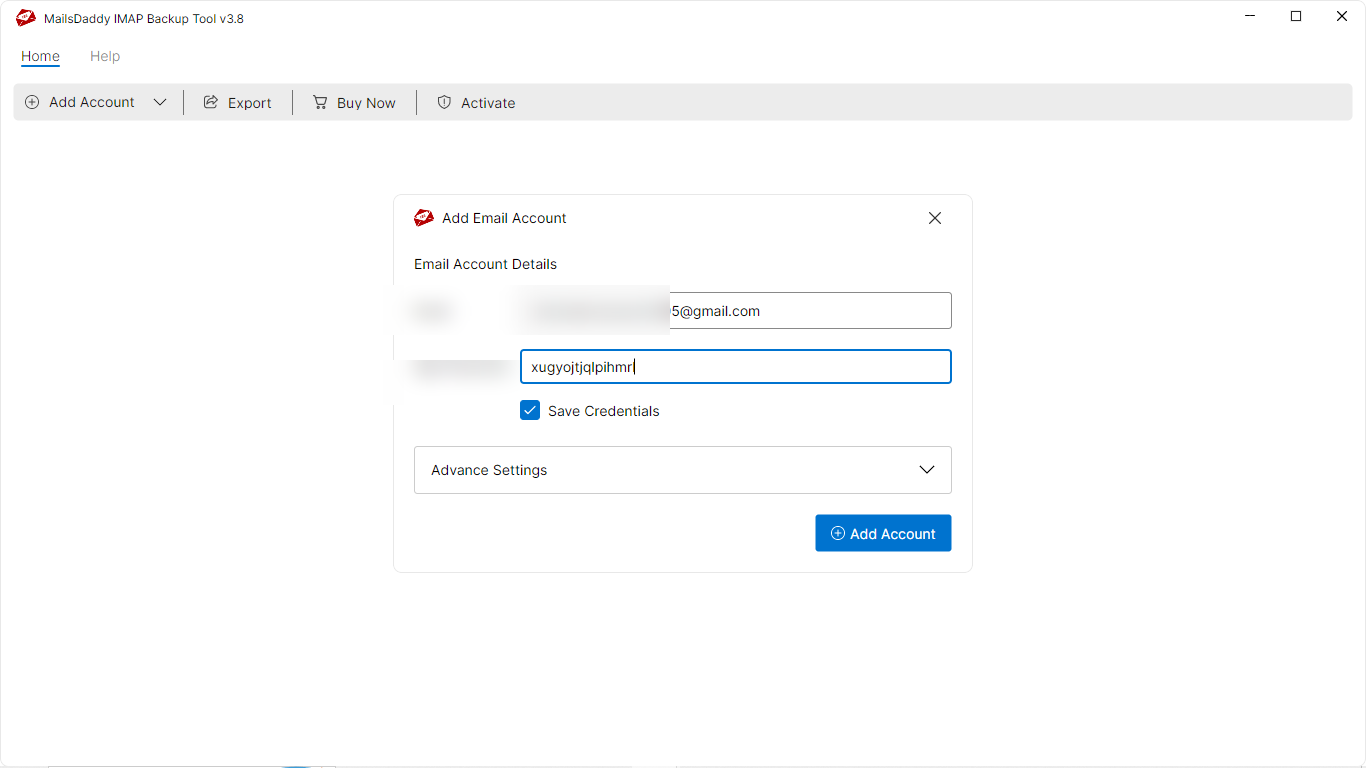
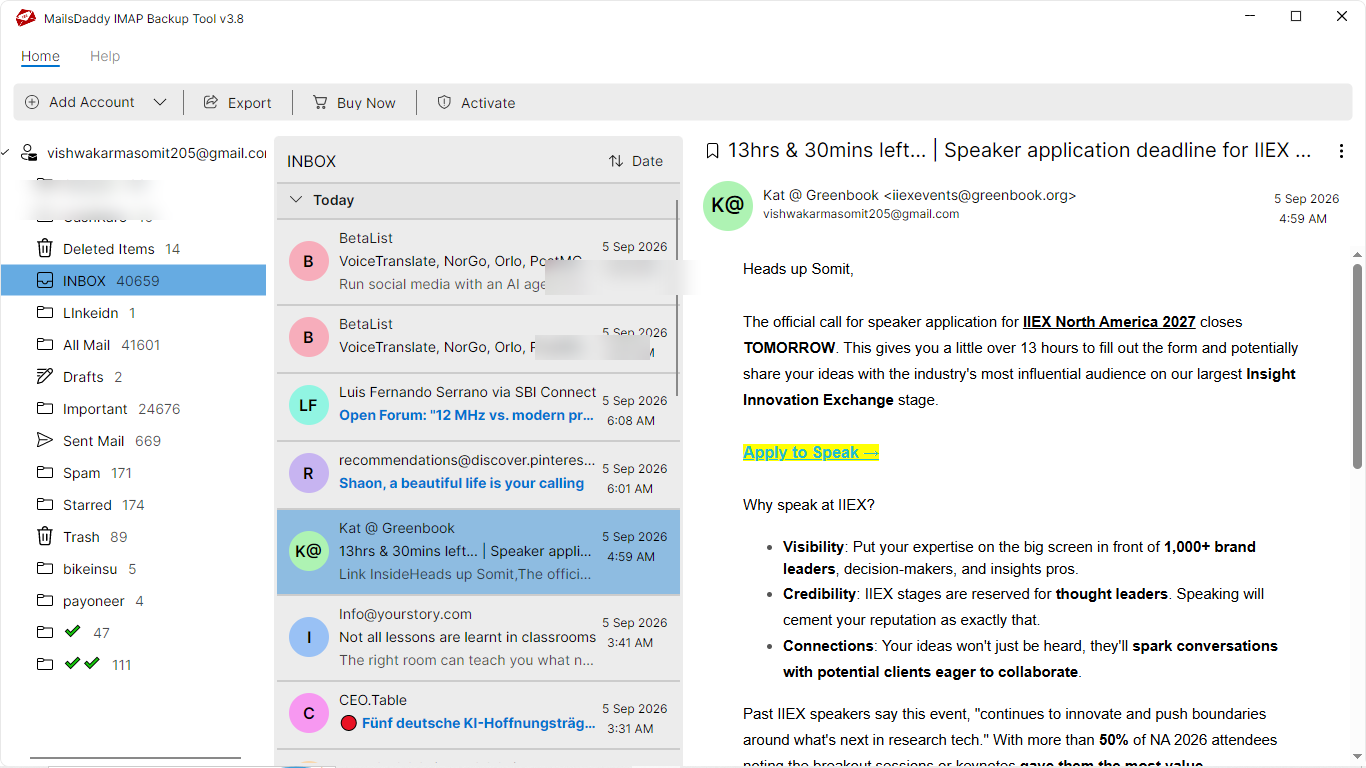
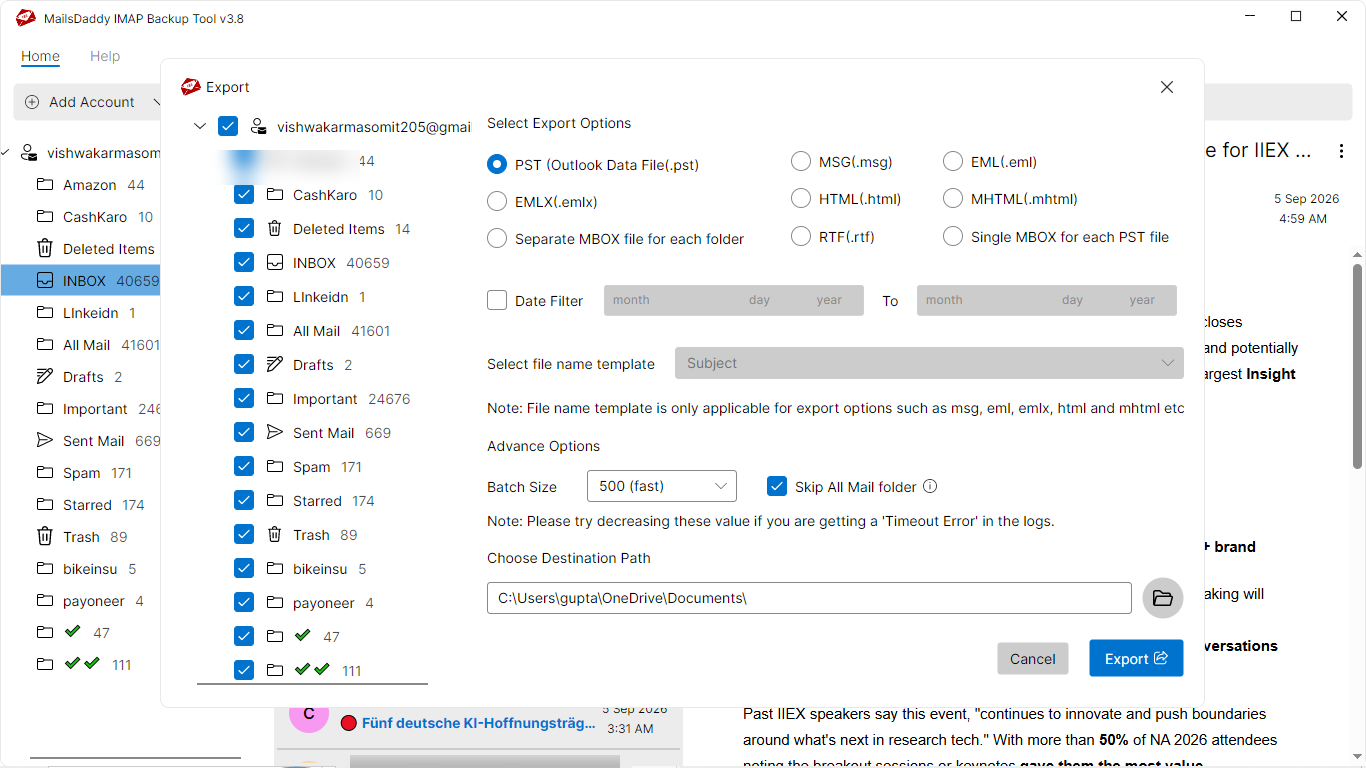
Looking for the complete user manual and working guide?
Explore comprehensive guides for standard PST conversion, search & filter migration, and Live Exchange Server export.
Technical Specifications
Engineered for lightweight footprint, standalone execution, and broad enterprise compatibility for MailsDaddy Gmail Backup Tool.
System Requirements
Full support for Windows Server 2022, 2019, 2016, 2012, 2008 & 2003 (32/64-bit)
Platform Support
Modern OAuth 2.0, App Password, SSL/TLS encrypted IMAP & POP3 connection
Supported Formats
GMAIL (Healthy, Corrupted, Orphaned, Large Archives)
Retains 100% attachments, inline images, headers, and metadata
Preserves complete folder hierarchy, read/unread flags, and timestamps
100% Offline & Private
Zero cloud uploads or telemetry. Processing happens strictly within your local machine.
No Outlook Required
Completely standalone engine. Processes GMAIL files without requiring host email clients.
No File Size Limits
Tested on massive 50GB, 100GB, and 500GB+ enterprise mailboxes with zero crash.
Full Windows Support
Native execution across Windows 11 down to Windows XP & all Windows Server editions.
Trusted by IT teams and professionals worldwide
Explore our client testimonials to see why users trust and recommend our solutions.
“Some time ago, I was looking for a precious application to back up emails from my Gmail account. For this, I tried much different software but did not get any special results. When I got MailsDaddy Google Mail Backup Tool, all my requirements went away and I was able to back up Gmail database easily. I am completely satisfied with the performance of this software.”
Audrey Hope
“I highly recommend all Gmail users to use this Gmail Backup software to export Gmail to Outlook PST format. I like the best performance of this solution. Using this perfect application users can quickly backup Gmail data without any changes in original content, text formatting, meta properties, and Html formatting. Thanks to MailsDaddy support team for quick responses.”
Michael Jourge
“No matter how big your Gmail database is, it can safely backup your Gmail database. Using this solution, I got a 50 GB heavy MBOX file that I easily imported into Thunderbird email client. Thanks for providing such a prominent Gmail Email Backup Software to tack the backup of Google account backup. The advance search option and naming convention are the helpful features of the tool.”
Thomas Paine
Need Help with Gmail Backup Tool?
Our dedicated 24/7 technical team is available to assist you with any migration or recovery challenge.
The free demo version lets you preview all items and export up to 20 emails per folder.
Frequently Asked Questions
Find clear answers regarding the Gmail Backup Tool conversion process, file compatibility, and recovery features.
Follow these steps to backup Gmail email data into PST format:
Start migrating with Gmail Backup Tool today.
Download the free trial and inspect your recovered mailbox in minutes.