MailsDaddy PST to Office 365 Migration
Bulk Import PST files to Office 365 Primary, In-Place Archive, Group and Shared mailboxes effortlessly. Our MailsDaddy PST to Office 365 migration tool will upload all your On-Premise Outlook/Exchange data like emails, attachments, contacts, tasks, notes and calendars to Microsoft 365 cloud environment with same folder structure.
- Automate PST to Office 365 migration with Modern Authentication.
- Import PST files to Office 365 without installing Outlook.
- Import emails, calendars, contacts, attachments & other items.
- Preserve mailbox data integrity and the original folder hierarchy.
- Use date filters to migrate data by year, month, or specific date.
- Transfer large, archived, & orphaned PST without file-size limitations.
- Support PST files created by Outlook 2021, 2019, 2016 & earlier versions.
- Perform incremental migration and skip duplicate items automatically.
- Migrate PST data to Primary, In-Place Archive, Group, or Shared Mailbox.
- Use CSV file to migrate multiple PST files to multiple Office 365 accounts in Organization.
Certified & Highly Reviewed By Leading Software Authorities
Award-Winning & Recommended by Independent Editors
SAASGENIUS Review - Best Rated Software to Import PST to Office 365
MailsDaddy PST to Office 365 migration tool has been reviewed by a popular Software review platform SAASGENIUS. The review editor described that this software has all possible options for importing PST file data into O365 account. They found BULK Export & Impersonate Export options beneficial for large-scale migration. MailsDaddy PST to Office 365 migration tool is the highly suggested software among various for its best performance and got 5-star rating by its users.
Secure & Clean Application to Upload PST to Office 365 - FinancesOnline Review
MailsDaddy PST to Office 365 Migration tool has been awarded by a well-known B2B software review platform FinancesOnline. Their experts described our solution as capable of efficiently importing Outlook PST files to Office 365 portal in a "secure, easy, and fast manner. The software win two awards: Rising Star 2017 Award & Great user experience 2017 award. Apart from that MailsDaddy PST to Office 365 migration tool also get 8.0 score as well as 100% user satisfaction awards by FinancesOnline. You may read the complete review from above link.
Features of the PST to Office 365 Migration
Enterprise-grade recovery and conversion, packed into a simple desktop app — no technical expertise or Exchange server required.
Add & Scan PST File
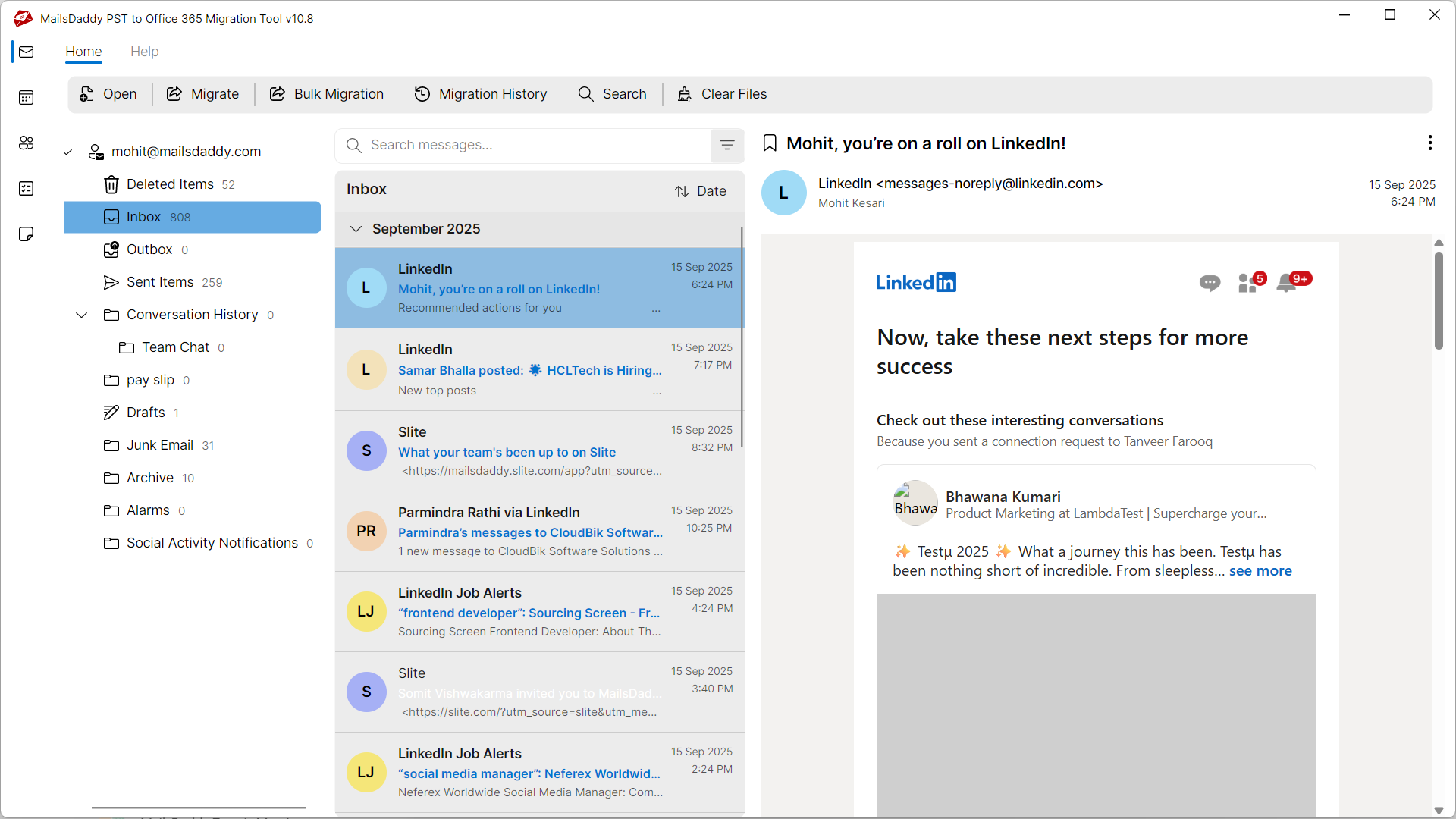
Easily Search, add and Scan the Outlook PST file by clicking on the 'Open' button that you want to move to Office 365 user account. You can also search the Outlook PST file by clicking on search icon.
Preview Outlook PST File
The PST to Office 365 Migration Tool generates complete preview of Outlook PST file including emails, tasks, contacts, calendars and attachments etc. prior to conversion.
Import PST to Office 365
The tool provides a simple and quick solution of moving the data of archived or local Outlook PST file to office 365 environment. Download the Free tool to perform the migration.
No PowerShell Required
The tool is developed with advance algorithm that provides the best way of converting PST to Office 365 environment without dealing with complex Powershell command.
Map PSTs to Multiple Office 365
This is a unique feature which allows users to import multiple PST files into different Office 365 accounts & mailboxes with one go using a CSV file. See how?
Export to Primary Mailbox
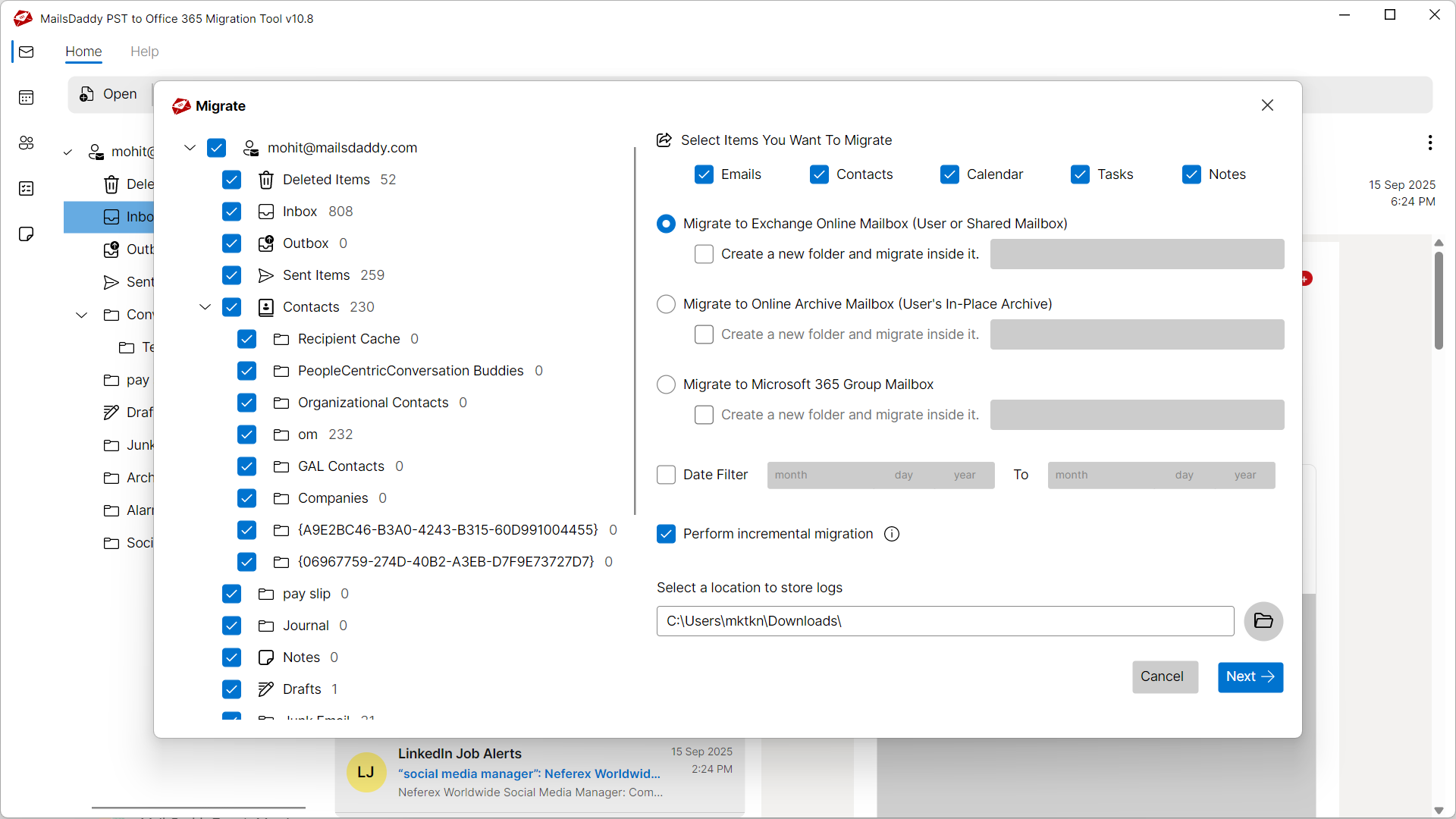
With this powerful feature you can export PST file to Office 365 primary mailbox where Mail folders, contacts and calendars will be exported to related folders. See how?
Migrate PST to Archive Mailbox
You can use this option to import PST to Office 365 archive mailbox instead of primary mailbox. It will create a new folder and import all data inside this folder.
Import PST with Impersonation
Impersonation option can be used by admin to transfer Outlook PST files into multiple user accounts at a time. It's easy for administrators to do the bulk PST migration.
Maintains Folder Hierarchy
The application maintains the actual folder hierarchy while importing PST to office 365 environment. Data of PST will be imported into Office 365 as it is with no alteration.
Export Selected Mails/Folders
The software offers different options with which users can migrate selected emails as well as selected folders of PST file to Office 365 user account.
Maintains Mail Properties
The tool preserves the Meta information like To, CC, Bcc and header part etc. while performing the migration of your PST file to Office 365 environment.
Upload Email with Attachment
The tools imports the emails of PST file with the corresponding attachment. Use the tool now to smoothly perform your PST to Office 365 Migration.
100% Secured Migration
The tool securely transfers the PST data to Office 365 platform with guarantee of no data loss. Download the Free Trial version of the tool to evaluate.
Supports All Outlook Versions
The application is compatible with Outlook 2021, 2019, 2016, 2013, 2010 & 2007 etc. Easily import your ANSI and UNICODE PST File.
Compatible with Windows 10
The software is fully compatible with all major Windows Operating System including Windows 11, 10, 8.1, 8 and Windows Vista.
Eye-Catching Features of MailsDaddy PST to Office 365 Migration software
Import PST to Primary and Archive Mailbox
The Best Feature of this PST to Office 365 Migration Tool is that it can easily import data to Primary as well as Archive Folder. Just choose the option: Export to Primary/ In-place Archive/Shared or Group mailbox of office 365. There is also an option of creating a new folder in Primary mailbox and migrating data in that folder.
- The Best Feature of this PST to Office 365 Migration Tool is that it can easily import data to Primary as well as Archive Folder.
- Just choose the option: Export to Primary/ In-place Archive/Shared or Group mailbox of office 365.
- There is also an option of creating a new folder in Primary mailbox and migrating data in that folder.
Supports Incremental Migration
The PST to Office 365 Import Tool supports incremental migration that skips the data that is already there in office 365. Before migrating the data item to office 365 it checks whether the item already there in office 365 or not. If it is already there then it skips that particular item and hence does not create duplicacy at office 365.
- Compatible with Windows 11, 10, 8.1, 8, 7, and Windows Server (32/64-bit).
- Supports all Microsoft Outlook editions without requiring Outlook pre-installed.
- Independent standalone utility engineered for high enterprise stability.
Migrate Bulk PST to Multiple O365 Accounts
The PST to Office 365 Migration tool is added with a lot of advance features that allows migrating multiple PSTs to Multiple Office 365 accounts. For this purpose we have added two options in this tool. One is Bulk Export and another is Impersonate Export.
- The PST to Office 365 Migration tool is added with a lot of advance features that allows migrating multiple PSTs to Multiple Office 365 accounts.
- For this purpose we have added two options in this tool.
- One is Bulk Export and another is Impersonate Export.
Shared Mailbox Migration
In Office 365 Shared Mailbox is a mailbox which allows multiple users to Send/Receive the emails from that shared mailbox. This type of mailbox is usually used by the companies to divide the overall load of replying to customers. For Example, We can make Support Email ID of a particular company as shared and hence it can be handled by multiple users.
- Direct migration support for Office 365 Shared Mailboxes and Public Folders.
- Retains original read/unread statuses and subfolder structures.
- Ensures uninterrupted user access during cloud tenant migration.
We Migrate Everything from PST to Exchange Online!
Every folder hierarchy, email header, embedded attachment, contact attribute, and calendar recurrence is processed with 100% bit-exact fidelity.
Email: The PST to Office 365 Migration Tool imports the outlook P...
Email: The PST to Office 365 Migration Tool imports the outlook PST emails with all its properties. Some of the properties are mentioned below:
Supported Elements & Formats:
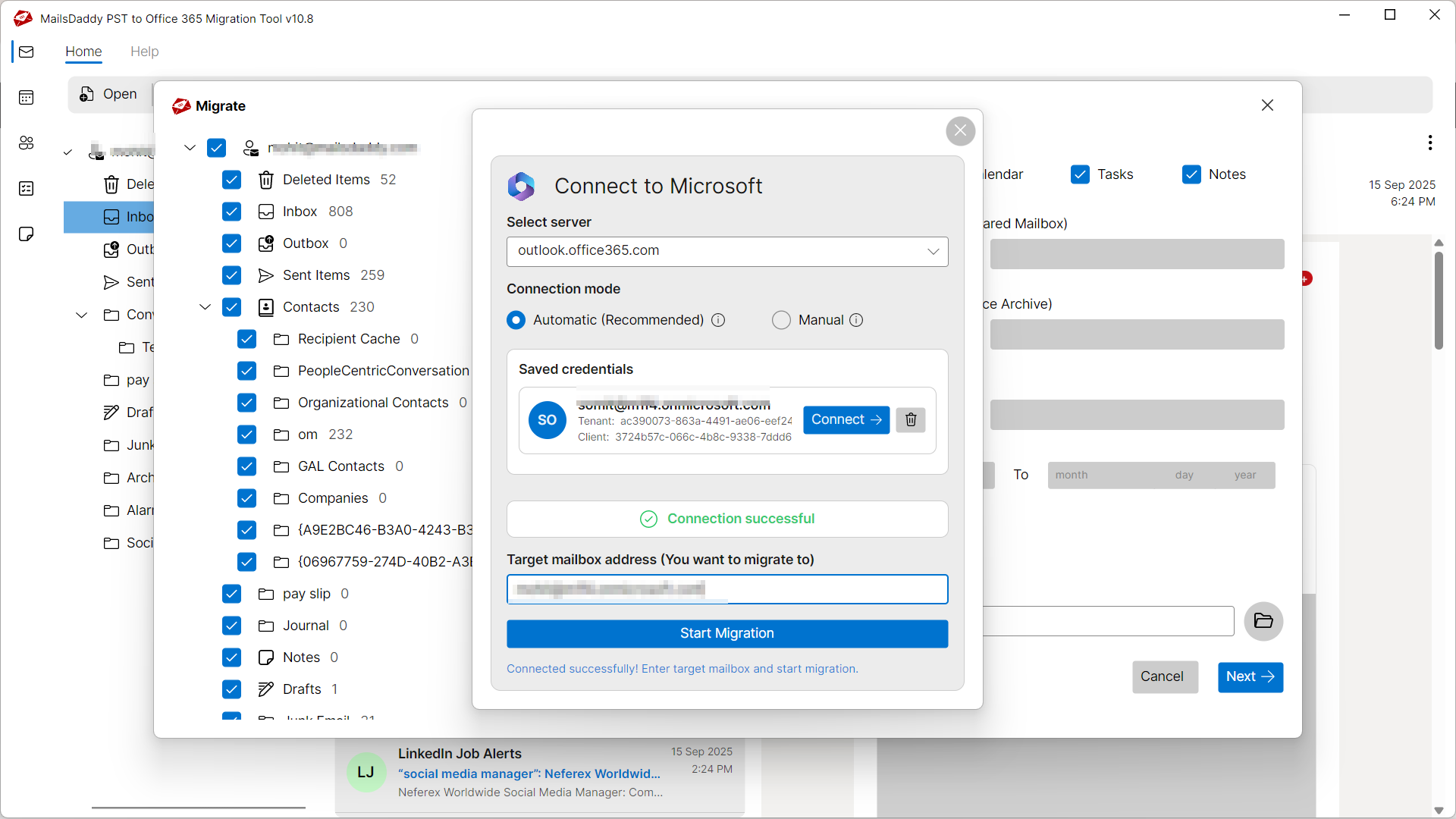
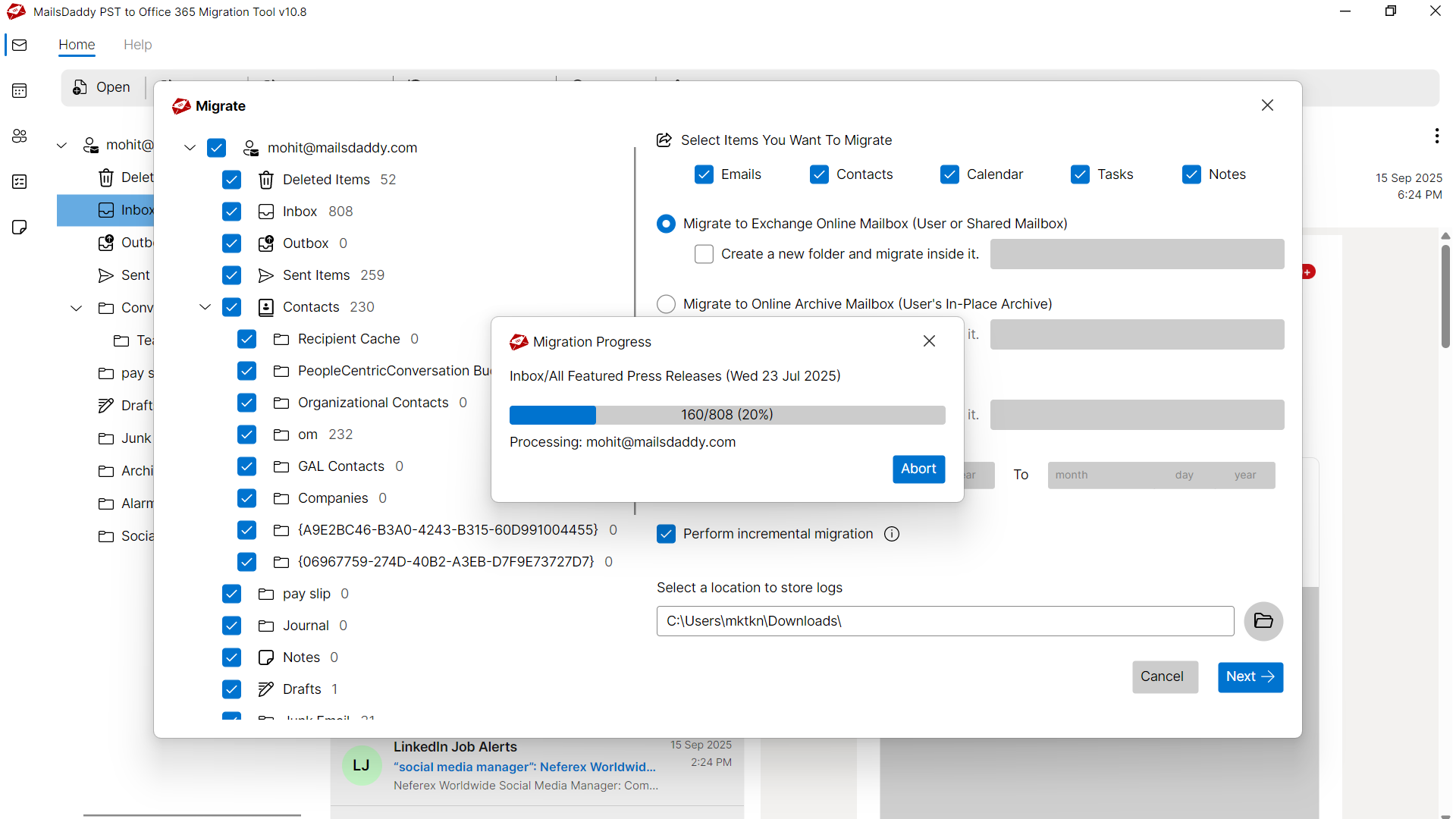
Convert PST to OFFICE-365 in 5 Simple Steps
No technical skills needed. Watch each step in the live software interface or click any step below.

Looking for the complete user manual and working guide?
Explore comprehensive guides for standard PST conversion, search & filter migration, and Live Exchange Server export.
Understanding PST Files & Why Need Safe Migration
Understanding Cached Exchange Mode, reasons for offline file inaccessibility, and how conversion resolves corruption.
Resolving Common PST File Issues
Damaged, orphaned, or inaccessible PST files can prevent users from accessing crucial mailbox messages. MailsDaddy PST to Office 365 Migration repairs and extracts data from problematic files without modifying original contents.
Common Causes of PST Corruption
Mailbox files can become unreadable or unstable due to several unexpected environment factors:
Sudden Application Termination
Abrupt power cuts or crashes while writing to PST files can leave header indexes inconsistent.
Oversized Mailbox Files
Exceeding recommended mailbox capacity can lead to performance degradation and corruption.
Hardware or File System Failure
Bad sectors on the storage drive or network transfer drops can damage database sectors.
Typical PST Error Messages
If you encounter any errors while accessing your mailboxes, converting with MailsDaddy PST to Office 365 Migration resolves them immediately:
How PST to Office 365 Migration Resolves the Problem
By bypassing the native email client's corrupt cache and performing low-level binary reading, PST to Office 365 Migration extracts all healthy and orphaned items directly into clean OFFICE-365 files.
Technical Specifications
Engineered for lightweight footprint, standalone execution, and broad enterprise compatibility for MailsDaddy PST to Office 365 Migration.
System Requirements
Full support for Windows Server 2022, 2019, 2016, 2012, 2008 & 2003 (32/64-bit)
Platform Support
Office 365, Microsoft 365, Exchange Online
Supported Formats
PST (Healthy, Corrupted, Orphaned, Large Archives)
Retains 100% attachments, inline images, headers, and metadata
Preserves complete folder hierarchy, read/unread flags, and timestamps
100% Offline & Private
Zero cloud uploads or telemetry. Processing happens strictly within your local machine.
No Outlook Required
Completely standalone engine. Processes PST files without requiring host email clients.
No File Size Limits
Tested on massive 50GB, 100GB, and 500GB+ enterprise mailboxes with zero crash.
Full Windows Support
Native execution across Windows 11 down to Windows XP & all Windows Server editions.
Trusted by IT teams and professionals worldwide
Explore our client testimonials to see why users trust and recommend our solutions.
“Recently I need to migrate the data of my PST file office 365 mailbox but the problem is that I don't have enough technical skills to perform the migration manually. Then I found this tool and it has converted my PST file very easily.”
Chris Luker
“I have to migrate some folders of my PST file to Office 365 environment and this tool did my task like a champ. Thanks a lot to the developers of this tool to make it so handy to operate.”
Sorin
“MailsDaddy PST to Office 365 Migration Tool helped me in migrating data of my Outlook PST file to Office 365 Cloud. Thanks for such a wonderful support that helped me in doing the compete migration.”
J Driven
Need Help with PST to Office 365 Migration?
Our dedicated 24/7 technical team is available to assist you with any migration or recovery challenge.
The free demo version lets you preview all items and export up to 20 emails per folder.
Frequently Asked Questions
Find clear answers regarding the PST to Office 365 Migration conversion process, file compatibility, and recovery features.
Download and Install the MailsDaddy PST to Office 365 Migration Tool Launch the Application and Select PST file Click on the Export button Select required options from Export Window & finally, Click on the Export Button Wait till the Migration process get completed.
Start migrating with PST to Office 365 Migration today.
Download the free trial and inspect your recovered mailbox in minutes.