MailsDaddy PST to IMAP Migration Tool
MailsDaddy PST to IMAP Migration Tool is an all-in-one desktop utility to migrate Outlook PST email messages, folders, and attachments directly to any IMAP-supported webmail or cloud server. Quickly and securely export PST emails to Gmail, AOL Mail, Zoho Mail, Yahoo Mail, and Yandex Mail without data loss.
- Preview section available to access database before migration.
- Successfully repair the corrupted PST files for accurate data migration.
- Incremental Migration skips the item if already in IMAP email provider.
- Migrate PST file mailboxed to IMAP server without skipping a single mail.
- Data integrity & folder hierarchy remain the same as in Outlook PST file.
- No file size limits – migrate unlimited-sized PST files to IMAP effortlessly.
- Ability to import single or multiple selected PST items to IMAP Server.
- Supports PST files of MS Outlook 365, 2019, 2016, 2013, 2010, 2007, etc.
- The PST to IMAP Converter is compatible with all Windows OS versions.
Certified & Highly Reviewed By Leading Software Authorities
Award-Winning & Recommended by Independent Editors
Comparecamp Review - MailsDaddy PST to IMAP Migration Tool
The MailsDaddy PST to IMAP Migration Tool is a powerful and user-friendly solution designed to help you import Outlook PST files to any IMAP-supported email service with ease. Whether you want to migrate to Gmail, Outlook.com, Yahoo, or Zoho Mail, this tool handles it all efficiently. Most of the customers have given best feedback in the review section of We suggest software. Users can get download demo from We suggest software and share the feedback with others.
Best Rated Software to Import PST file to IMAP server
The MailsDaddy PST to IMAP Migration Tool is a trusted and efficient solution to import PST mailbox data directly to any IMAP server without altering or damaging the original email content. According to Software Informer experts, it stands out as one of the safest and most reliable tools for migrating Outlook PST emails to IMAP servers. Users can easily download the free demo version, test its features before purchase, and share their valuable feedback with us to help improve our services.
Most used application to upload PST file to IMAP accounts - TopSharewar review
The MailsDaddy PST to IMAP Migration Tool delivers excellent results when exporting PST file emails to IMAP servers without any hassle. According to TopShareware experts, this software efficiently performs smooth and quick migration from PST to Gmail or any other IMAP-based email account. It ensures data accuracy and maintains the original folder structure throughout the process. Users can also try the free demo version to evaluate its features and performance before purchasing the full edition. Thank you for choosing MailsDaddy!
Features of the PST to IMAP Migration Tool
Enterprise-grade recovery and conversion, packed into a simple desktop app — no technical expertise or Exchange server required.
Add & Scan PST File
This solution helps to easily search and PST file in the application. After scanning and resolving all bugs of PST file the software all it in the software so that users get the accurate result after the migration.
Preview Outlook PST File
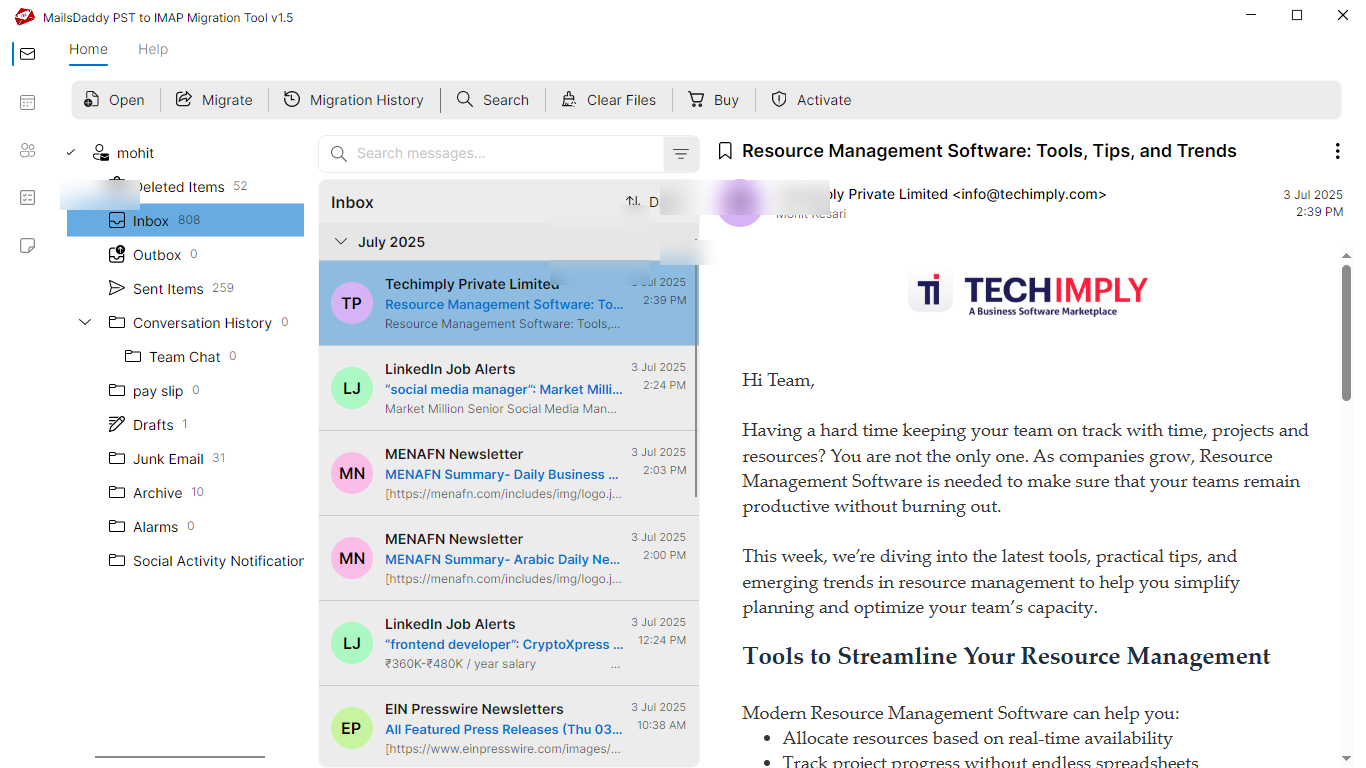
Using this advanced PST to IMAP migration tool, users can open and view Outlook PST mailbox folders, email messages, and attachments before migrating to IMAP servers.
Batch Migration Available
The software uses advanced algorithms to ensure all emails are migrated exactly as they appear in the PST file. It preserves email formatting and metadata properties throughout the migration process.
Maintains Folder Hierarchy
This PST file converter tool accurately keeps the original folder structure. It uploads PST emails to the IMAP server while maintaining the same clear folder and subfolder layout during conversion.
Export Selected Folders
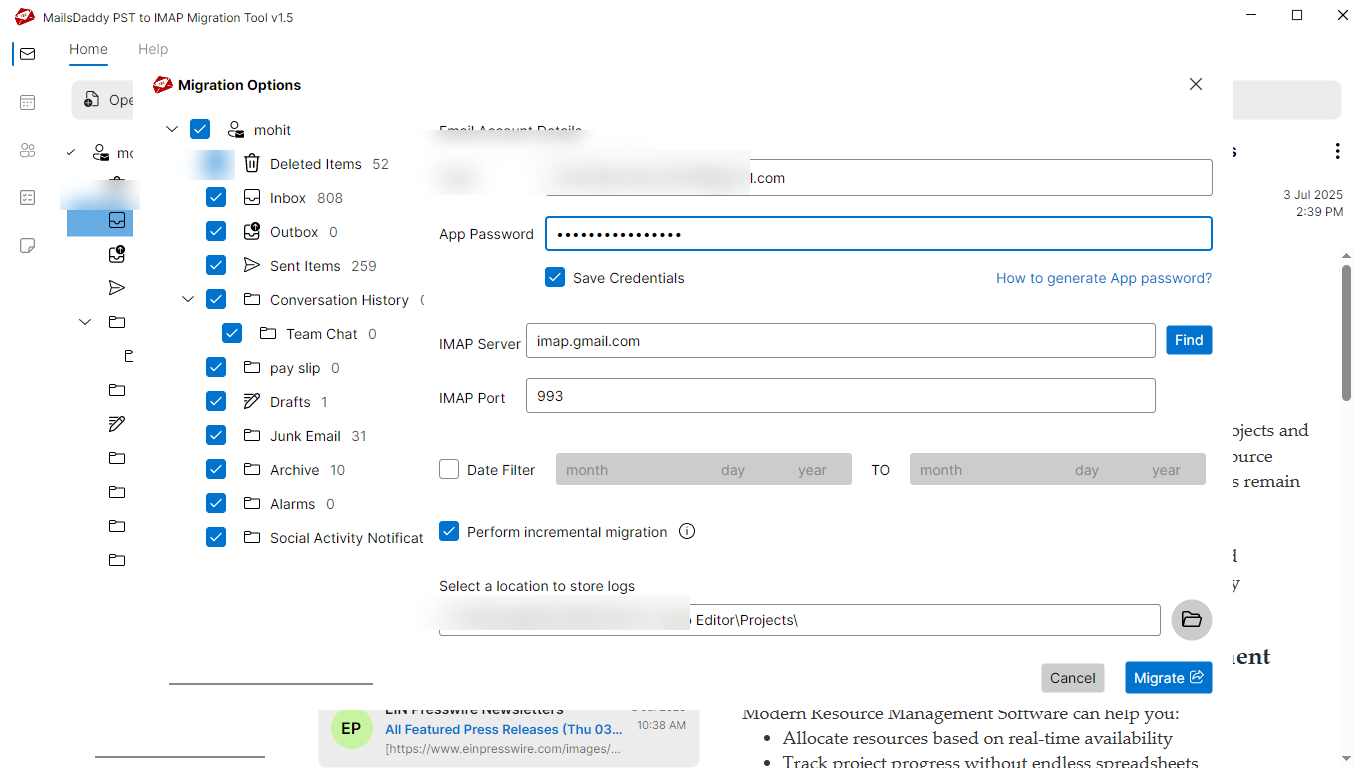
If you want to exclude specific items from your PST file and export only selected folders, this tool makes it easy. Users can choose particular emails, folders, or subfolders to migrate to their IMAP account.
Maintains Mail Properties
This software uses advanced algorithms to ensure all emails are migrated exactly as they appear in the original PST file. It preserves email formatting and metadata details throughout the migration process.
Required Email Migration
With the help of this solution users can easily filter, find and upload some important PST file emails to IMAP account. It offers advance meta filter options (To, From, Subject, Date, etc.). Using this, users can find specific emails and migrate them to IMAP server.
Upload Email with Attachment
Do your PST emails contain attachments and you wish to migrate them as well? No need to worry — this PST to IMAP conversion tool automatically detects all attachments and seamlessly uploads them along with your emails to your IMAP account.
Migrate All Type PST File
With this tool, users can migrate IMAP, ANSI, or Unicode Outlook PST files to their IMAP account. Even if the PST file is password-protected, it can be imported securely without sharing the password, ensuring a smooth migration to the IMAP server.
No Capping of File Size
Using this utility users can perfectly convert PST to IMAP server without any file size limitation. Here users can migrate unlimited size of PST info into IMAP server account.
Create a Log File
Using this utility users can perfectly convert PST to IMAP server without any file size limitation. Here users can migrate unlimited size of PST info into IMAP server account.
Compatible with Windows 11
This advance software can easily in all Windows systems. The software works smoothly with all major Windows versions, including Windows 11, 10, 8.1, 8, and Vista.
Eye-Catching Features of MailsDaddy PST to IMAP Migration Tool software
Migrate in Different IMAP Email Provider Accounts
The PST to IMAP Migration Tool allows users to migrate their Outlook PST files into different IMAP email provider accounts with complete accuracy. Whether you want to transfer data to Gmail, Yahoo, Outlook, Zoho, iCloud, or any other IMAP-supported server, the tool ensures a smooth and secure migration.
- The PST to IMAP Migration Tool allows users to migrate their Outlook PST files into different IMAP email provider accounts with complete accuracy.
- Whether you want to transfer data to Gmail, Yahoo, Outlook, Zoho, iCloud, or any other IMAP-supported server, the tool ensures a smooth and secure migration.
- Engineered specifically for optimal migrate in different imap email provider accounts workflows.
Advance Check Migration History Option Available
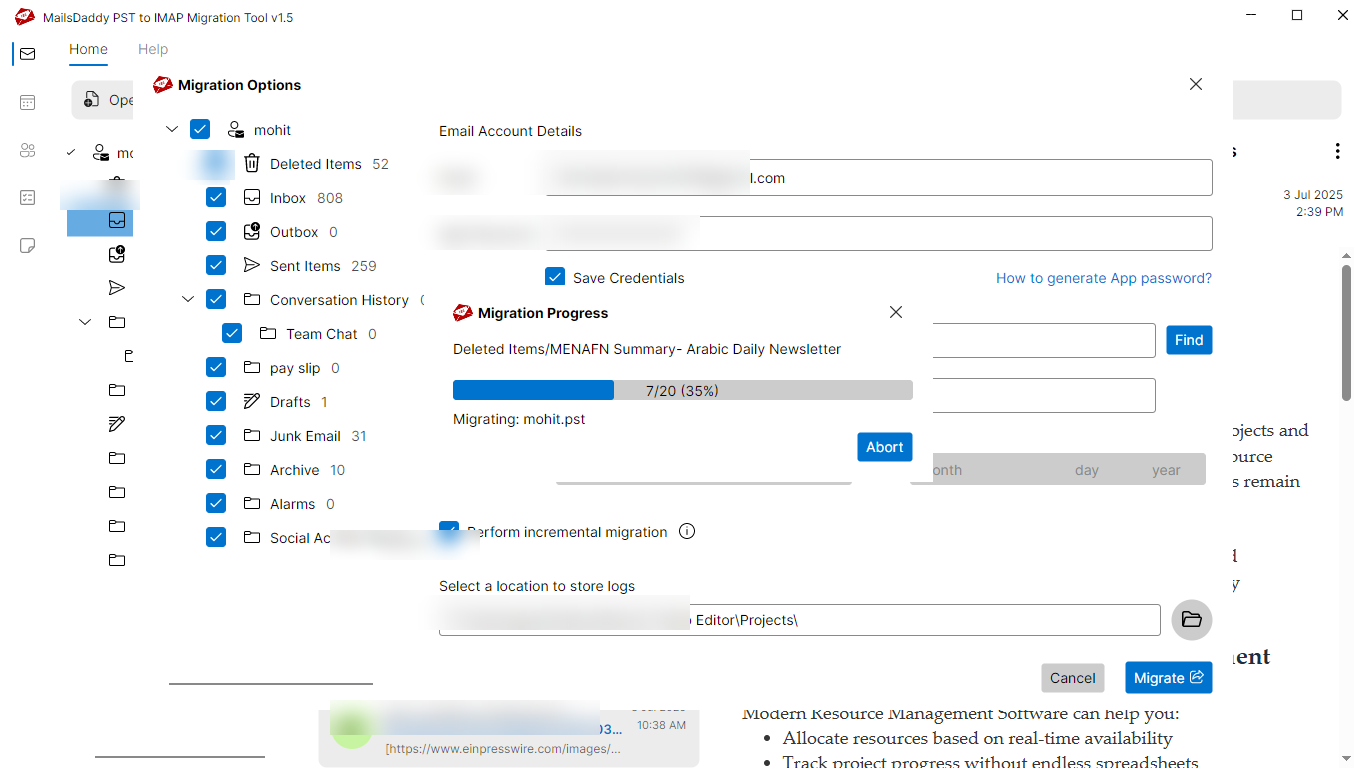
The software provides an advanced Migration History option that allows users to view the total number of migrated, skipped, and pending emails. This feature gives a clear summary of the entire migration process, helping users track progress in real time.
- The software provides an advanced Migration History option that allows users to view the total number of migrated, skipped, and pending emails.
- This feature gives a clear summary of the entire migration process, helping users track progress in real time.
- Engineered specifically for optimal advance check migration history option available workflows.
Generate App Password for Your IMAP Accounts
For enhanced security, most IMAP email providers require users to create an App Password when accessing their accounts through third-party applications. If you’re unsure how to generate it, the software includes a helpful guide. Simply click the provided option to view detailed instructions on creating an app password for your specific IMAP email service, ensuring a safe and smooth login process.
- For enhanced security, most IMAP email providers require users to create an App Password when accessing their accounts through third-party applications.
- If you’re unsure how to generate it, the software includes a helpful guide.
- Simply click the provided option to view detailed instructions on creating an app password for your specific IMAP email service, ensuring a safe and smooth login process.
Why Select Outlook PST to IMAP Account Migration Tool?
Every folder hierarchy, email header, MIME attribute, and embedded attachment is processed with 100% bit-exact fidelity.
Email: With this PST File Migration tool, one can easily perform ...
Email: With this PST File Migration tool, one can easily perform the conversion process without getting any error. The software allows users to securely import PST file email messages in IMAP server. and retains the metadata properties.
Supported Elements & Formats:
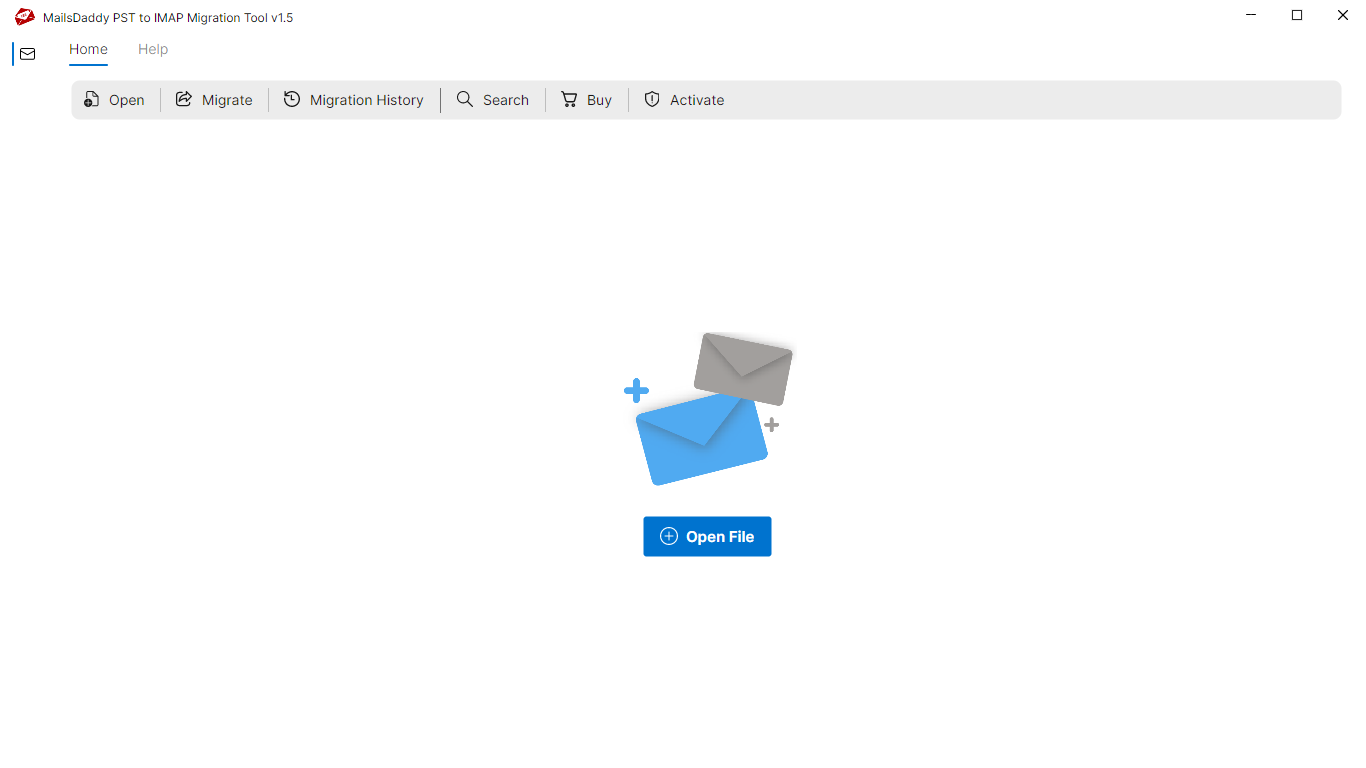
Convert PST to IMAP Server in 4 Simple Steps
No technical skills needed. Watch each step in the live software interface or click any step below.
Looking for the complete user manual and working guide?
Explore comprehensive guides for standard PST conversion, search & filter migration, and Live Exchange Server export.
Technical Specifications
Engineered for lightweight footprint, standalone execution, and broad enterprise compatibility for MailsDaddy PST to IMAP Migration Tool.
System Requirements
Full support for Windows Server 2022, 2019, 2016, 2012, 2008 & 2003 (32/64-bit)
Platform Support
Gmail, Google Workspace, Yahoo Mail, AOL, Zoho Mail, iCloud, and all standard IMAP servers
IMAP4 with SSL/TLS encryption, Port 993/143, App Passwords & 2FA support
Supported Formats
Outlook PST (ANSI & Unicode)
Preserves all attachments, embedded graphics & headers
100% bit-exact folder hierarchy preservation
100% Offline & Private
Zero cloud uploads or telemetry. Processing happens strictly within your local machine.
No Outlook Required
Completely standalone engine. Processes PST files without requiring host email clients.
No File Size Limits
Tested on massive 50GB, 100GB, and 500GB+ enterprise mailboxes with zero crash.
Full Windows Support
Native execution across Windows 11 down to Windows XP & all Windows Server editions.
Trusted by IT teams and professionals worldwide
Explore our client testimonials to see why users trust and recommend our solutions.
“The MailsDaddy PST to IMAP Migration Tool worked flawlessly for me. It quickly uploaded my PST files to my IMAP account without missing any emails or attachments. The tool’s user-friendly interface and detailed migration report made the process simple and transparent. I was impressed with how well it preserved the folder hierarchy. Definitely a dependable and efficient solution for anyone looking to migrate Outlook PST data safely to an IMAP server.”
Andy Howson
“I had a great experience using the PST to IMAP Migration Tool by MailsDaddy. It helped me move all my Outlook data, including emails and attachments, to my IMAP account effortlessly. The batch migration feature saved me a lot of time. I really appreciate how smoothly it handled large PST files without any technical issues. Highly recommended for users who want an easy and accurate PST to IMAP migration solution.”
Jonny Davies
“The MailsDaddy PST to IMAP Tool is an excellent product for anyone needing quick and safe migration. I used it to transfer multiple PST files, and everything migrated perfectly. The software is straightforward and doesn’t require any technical skills. I also liked the feature that shows detailed migration status. Overall, this tool offers great value for money and ensures a smooth PST to IMAP migration experience.”
A Smith
Need Help with PST to IMAP Migration Tool?
Our dedicated 24/7 technical team is available to assist you with any migration or recovery challenge.
The free demo version lets you preview all items and export up to 20 emails per folder.
Frequently Asked Questions
Find clear answers regarding the PST to IMAP Migration Tool conversion process, file compatibility, and recovery features.
The MailsDaddy PST to IMAP Converter is a professional utility that helps users upload or import Outlook PST files directly to any IMAP-based email server without data loss or technical hassle.
Start migrating with PST to IMAP Migration Tool today.
Download the free trial and inspect your recovered mailbox in minutes.