MailsDaddy PST Merge and Join Tool
Merge or Join multiple PST files with an easy and hassle-free solution. Our MailsDaddy PST merger tool will help you to combine two or more PST files into Outlook compatible PST format. The software merges Outlook data files (.pst) in a few minutes without any size, data loss, and security issues.
- Quickly merge multiple PST files in a new Outlook compatible PST file.
- Keeps Rich text format, Attachments, inline images & folder structure.
- Merges/joins all data like emails, attachments, contacts & calendars
- Supports ANSI as well as Unicode both PST formats.
- Allows skipping duplicate items while merging multiple PST files.
- Simple & easy-to-use interface for combining two or more Outlook archives.
- The software is compatible with Window 10, 8, 7 & all earlier versions.
- Supports All MS Outlook versions 2019, 2016, 2013, 2012, and 2010 etc.
- The software supports password-protected Outlook PST files
Certified & Highly Reviewed By Leading Software Authorities
Award-Winning & Recommended by Independent Editors
CabinetM Review – Combine PST file
– CabinetM serves the best software on their platform so that users can easily & confidently purchase any tools. Mailsdaddy PST Merger tool gets an excellent mark in a trusted platform CabinetM. It's a highly suggested software by CabinetM when users searching utility for combining PST files. As per the CabinetM team, the PST Merger tool is a powerful solution to combine unlimited PST files into a PST file. It attaches the user's overall PST files into a PST file without getting any trouble. It is a 100 % safe & secure solution so it can be installed in all Windows systems.
Software Suggest - Add PST file
To get instant & unique solution while merging PST files a new PST file MailsDaddy PST Merge & Join tool become the best choice for all clients. It’s a deeply analyzed software by the most populated & great users experienced platform; Software Suggest. It gives 5 stars rating to this PST Merger tool. Software Suggest is a reputed company and their experts described this software that anyone can use this software to perform the merging process of different types of PST files (ANSI/Unicode/Archive) in a PST file.
Best PST Merger Software
This is possible to combine two are more Microsoft PST file into a PST file by taking the help of a smart solution Mailsdaddy PST Merge & Join Toll. Anyone can use the free trial version of this application to examine it before purchase. TrustRadius is a leading software providing company that helps to add all top-level applications on its platform. Recently I requested to TrustRadius publish PST Merge & Join Tool & sent all details to his experts. After analyzed complete software they give a 5-star rating & add it on their platform. Also says that this is an outstanding tool to Combine PST Files.
Features of the PST Merge and Join Tool
Enterprise-grade recovery and conversion, packed into a simple desktop app — no technical expertise or Exchange server required.
Easy-to-use Interface
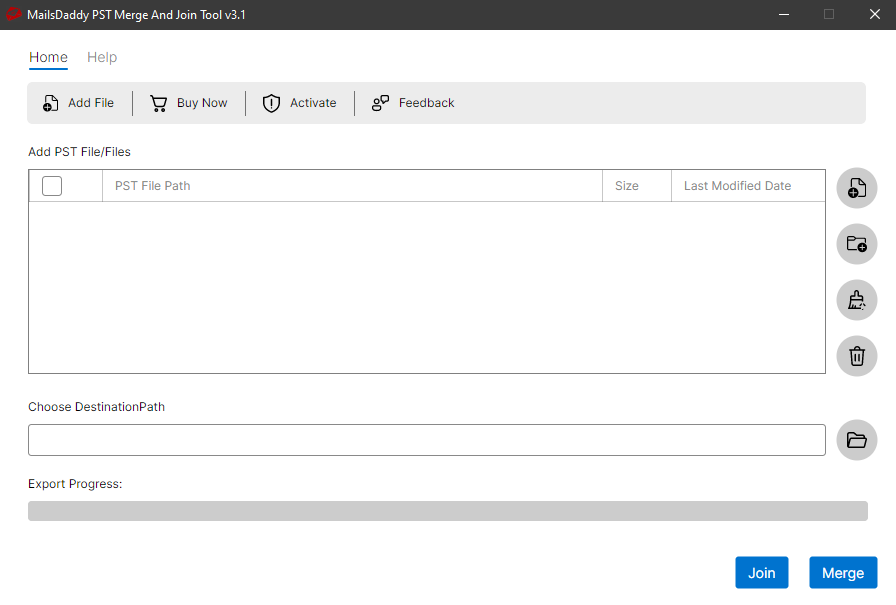
The PST merger tool gives you two add mediums. With the help of this option, you can load or add multiple Outlook data files or PST files in the software.
Merge PST Files
By using this option, you can merge data of 2 or more similar folders like Inbox, Draft, Sent, Outbox, Deleted, etc. to a single folder. The tool keeps the original folder structure
Join Outlook PSTs
Join option can be used to add all PST files inside a new PST file. The software will create a new fresh PST file and add all PST files as folders which can be accessed separately.
Search PST Files
This feature allows you to search PST or Outlook data files from a particular location by accessing the system's drive and folder
Load Multiple PST Files
The PST merger tool gives you two add mediums. With the help of this option, you can load or add multiple Outlook data files or PST files in the software.
Maintain Folder Infrastructure
The software preserves the original folder structure even after combining multiple PST files into a single PST. Easily Merge PSTs in the same folder sequence.
No PST Size Limit
The PST file combiner tool has already been tested with 50 GB PST file size. So you do not have to worry about the size of Outlook data files while merging or joining.
Support Unicode/ANSI Type
The tool has been well programmed to perform with ANSI and Unicode both types of PST files. Just run the tool and combine multiple outlook archive PST files in one.
Supports all Window Versions
Best PST merge tool which is compatible with all window versions, whether old or new. Its demo version will help you to get familiar with the PST joiner tool features and working process.
No Outlook Installation Required
With this tool, you don’t need to install any add-on, application, and MS Outlook. It has been expertly designed to work standalone to gives you proper combining PST files.
Merge All Outlook Data
Our PST merge and Join tool combines all PST data including emails, contacts, tasks, calendars, notes, and tasks without skipping or altering a single record.
Add/Remove PST Anytime
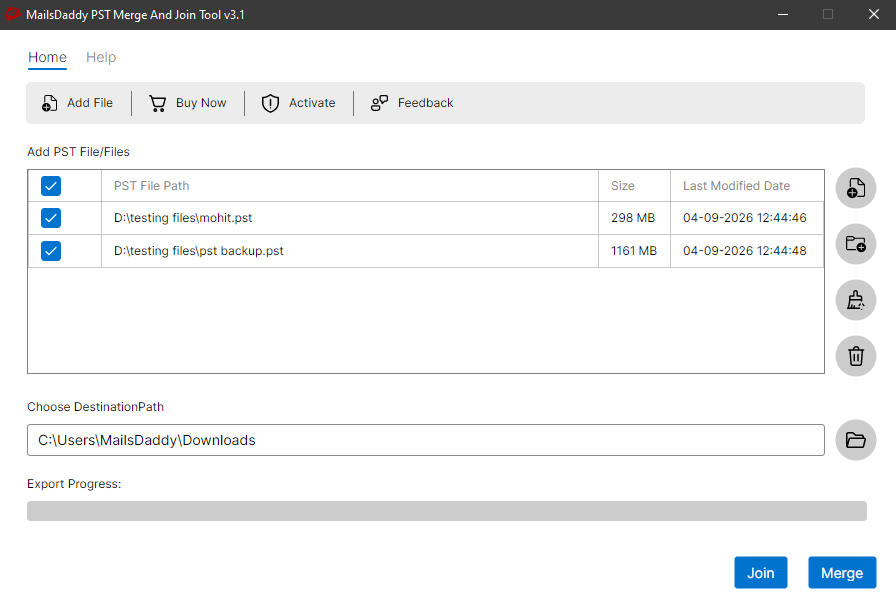
The tool also has the option to add or remove the PST file before clicking the Join or Merge button, which means if you want to remove some PST file from the list just hit the delete button.
Eye-Catching Features of MailsDaddy PST Merge and Join Tool software
Multiple Options to Browse PST file
The utility provides two different options for importing multiple PST files in the application. Using both option users can easily search & import the file which you want to combine.
- The utility provides two different options for importing multiple PST files in the application.
- Using both option users can easily search & import the file which you want to combine.
- Engineered specifically for optimal multiple options to browse pst file workflows.
Skip Duplicate data Items
The professional software provides the latest feature that enables users to skip the duplicate database while merging. Mean, if any data items are matched in any other PST file then it automatically skips that item.
- The professional software provides the latest feature that enables users to skip the duplicate database while merging.
- Mean, if any data items are matched in any other PST file then it automatically skips that item.
- Engineered specifically for optimal skip duplicate data items workflows.
Compatibility with Password-protected file
For some security purposes, sometimes we lock our PST file and accidentally forget its password. Now you want to combine that password-protected file with other PST files but you do not know the password of that file. This PST merger tool can easily solve this problem as users are not required to give passwords of locked PST files here. Using this solution, users can add password-protected PST files directly without knowing the protected code.
- Compatible with Windows 11, 10, 8.1, 8, 7, and Windows Server (32/64-bit).
- Supports all Microsoft Outlook editions without requiring Outlook pre-installed.
- Independent standalone utility engineered for high enterprise stability.
Merge or Join Every Single Element of Mailbox
Every folder hierarchy, email header, embedded attachment, contact attribute, and calendar recurrence is processed with 100% bit-exact fidelity.
The MailsDaddy PST Merge and Join tool enables users to add more ...
The MailsDaddy PST Merge and Join tool enables users to add more than two PST files to a single Microsoft PST without any alteration You do not have to worry about the folder structure as it ensures during the Mailbox Combine that all folders are in the hierarchy and other data is in the right place. like:
Supported Elements & Formats:
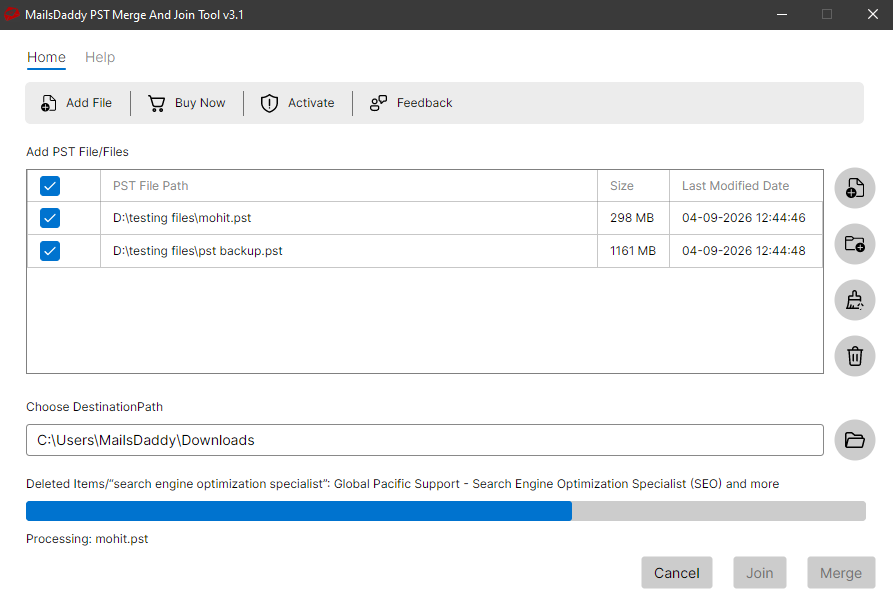
Merge and Join PST Files in 3 Simple Steps
No technical skills needed. Watch each step in the live software interface or click any step below.
Looking for the complete user manual and working guide?
Explore comprehensive guides for standard PST conversion, search & filter migration, and Live Exchange Server export.
Technical Specifications
Engineered for lightweight footprint, standalone execution, and broad enterprise compatibility for MailsDaddy PST Merge and Join Tool.
System Requirements
Full support for Windows Server 2022, 2019, 2016, 2012, 2008 & 2003 (32/64-bit)
Platform Support
PST, Microsoft Outlook, Webmail & Desktop Clients
Supported Formats
PST (Healthy, Corrupted, Orphaned, Large Archives)
Retains 100% attachments, inline images, headers, and metadata
Preserves complete folder hierarchy, read/unread flags, and timestamps
100% Offline & Private
Zero cloud uploads or telemetry. Processing happens strictly within your local machine.
No Outlook Required
Completely standalone engine. Processes PST files without requiring host email clients.
No File Size Limits
Tested on massive 50GB, 100GB, and 500GB+ enterprise mailboxes with zero crash.
Full Windows Support
Native execution across Windows 11 down to Windows XP & all Windows Server editions.
Trusted by IT teams and professionals worldwide
Explore our client testimonials to see why users trust and recommend our solutions.
“Handling multiple PST files was a difficult task for me, so we took this tool. And I am amazed that it added two 6GB Outlook data into a single PST in a moment easily. Thank you very much Mailsdaddy's team to create such a great product.”
Clisty Smith
“I wanted to buy a tool to merge more than one PST file quickly. That's why I chose the Mailsdaddy product because I have already used some of the tools of this company, which do great work. After using the PST merge, I appreciate that I chose the best company tool.”
Denny
“I am working in a reputable company and manages outlook data. So every day, I check many PST data files. A few days ago my business partner suggested merging Outlook data. So I bought this tool and I am happy that it made my process easier.”
Zoe
Need Help with PST Merge and Join Tool?
Our dedicated 24/7 technical team is available to assist you with any migration or recovery challenge.
The free demo version lets you preview all items and export up to 20 emails per folder.
Frequently Asked Questions
Find clear answers regarding the PST Merge and Join Tool conversion process, file compatibility, and recovery features.
Merging your Outlook PST files is totally safe. The MailsDaddy PST Merge and Join Tool will create a new PST file with all merged folders and data.
Start migrating with PST Merge and Join Tool today.
Download the free trial and inspect your recovered mailbox in minutes.