Migrate Apple Mail to Outlook
Convert Apple Mail To Outlook PST Format from MAC OS using Apple Mail to PST Converter. This smart utility program exports single or multiple Mac Mail data to Outlook with maximum accuracy. Transfer your Personal or Business Emails from MAC OS to Windows with ease.
- Simple, Secure and Cost-effective MBOX Converter software
- Converts single as well as multiple MBOX files to PST, EML, PDF, MSG, HTML, and RTF etc.
- Preserves folder structure, inline images, HTML formatting, and attachments, etc.
- Convert MBOX to PST for Office 365 or Outlook 2021, 2019, and earlier versions.
Certified & Highly Reviewed By Leading Software Authorities
Features of the Migrate Apple Mail to Outlook
Enterprise-grade recovery and conversion, packed into a simple desktop app — no technical expertise or Exchange server required.
Save individual Email & Attachment
You can save individual emails directly from MAC mail to MSG, EML, RTF, MHTML or HTML format with a right-click option. Also, MAC Mail to PST Converter is helpful to save attachment in relevant format.
Selected Conversions
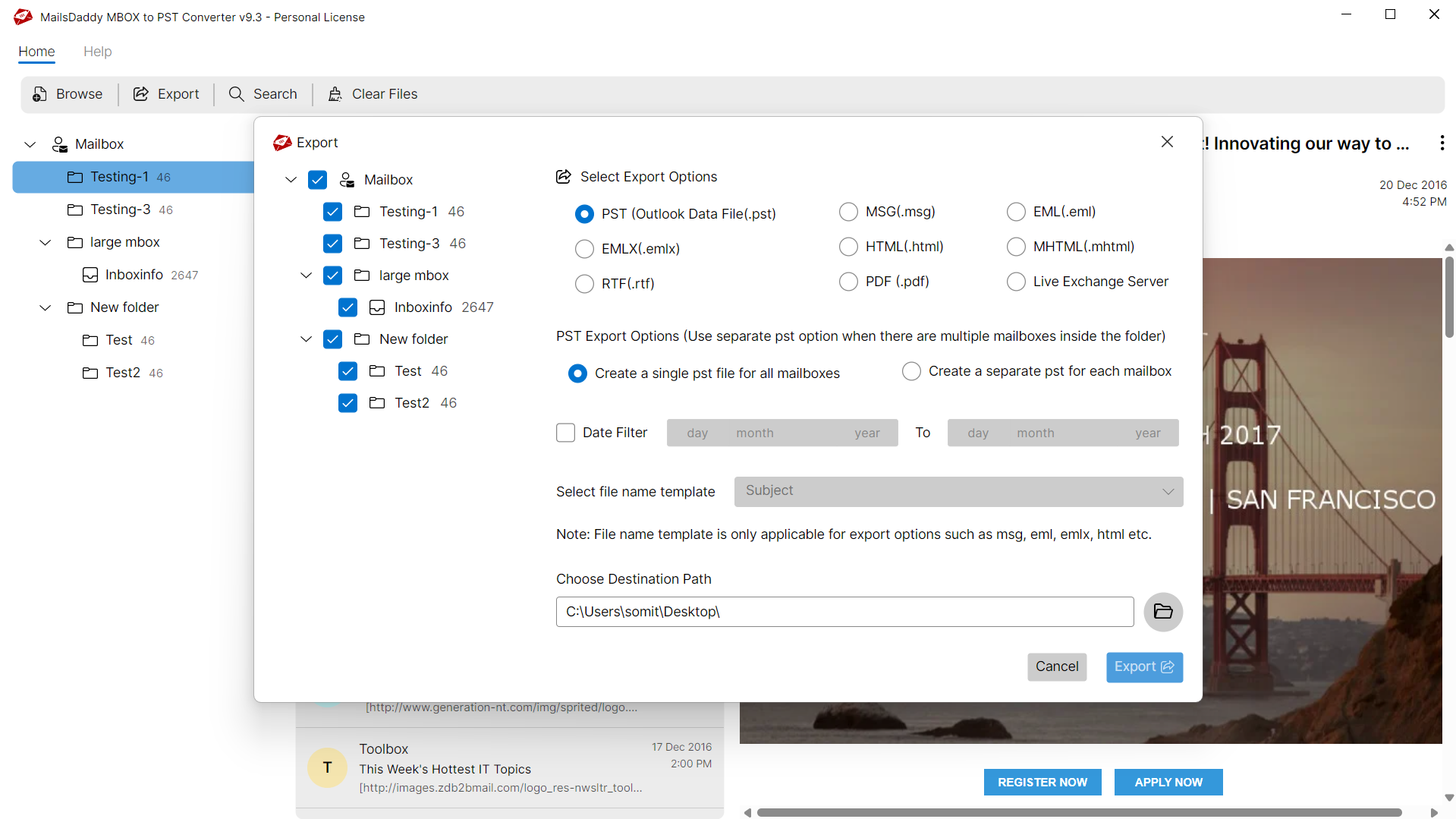
MAC mail converter allows exporting selected emails into given formats such as PST, EML, MSG, HTML etc. With this feature, user can also migrate selected folder/subfolders from MAC mail to Outlook.
Export Filter Email
The user can use “Search Mails” option in order to filter & export required emails from MAC OS to Windows Outlook. The search window has different parameters such as To, From, Subject, Has, Received On etc.
Individual/Separate PST
MAC Mail to Outlook Converter has another feature to create all Mac Mail data in one or different PST files for Outlook. Both methods allow the user to create a new PST file for Outlook 2021/2019/2016/2013/2010/2007.
Display Window
Once the software loads the mailbox, MAC mail Converter is able to show the preview of selected email along with the attachments. You may save the individual attachment from the preview pane as well.
Intact all emails & properties
Mail is made up of many properties and attachments that the software maintains, so users do not have to worry about mail formatting and metadata during Apple Mail to PST conversion.
Multiple Export Format
With this independent tool, User can export Apple Mail to Outlook and other mail formats such as EML, Live Exchange, HTML, MSG etc.
Batch Migration
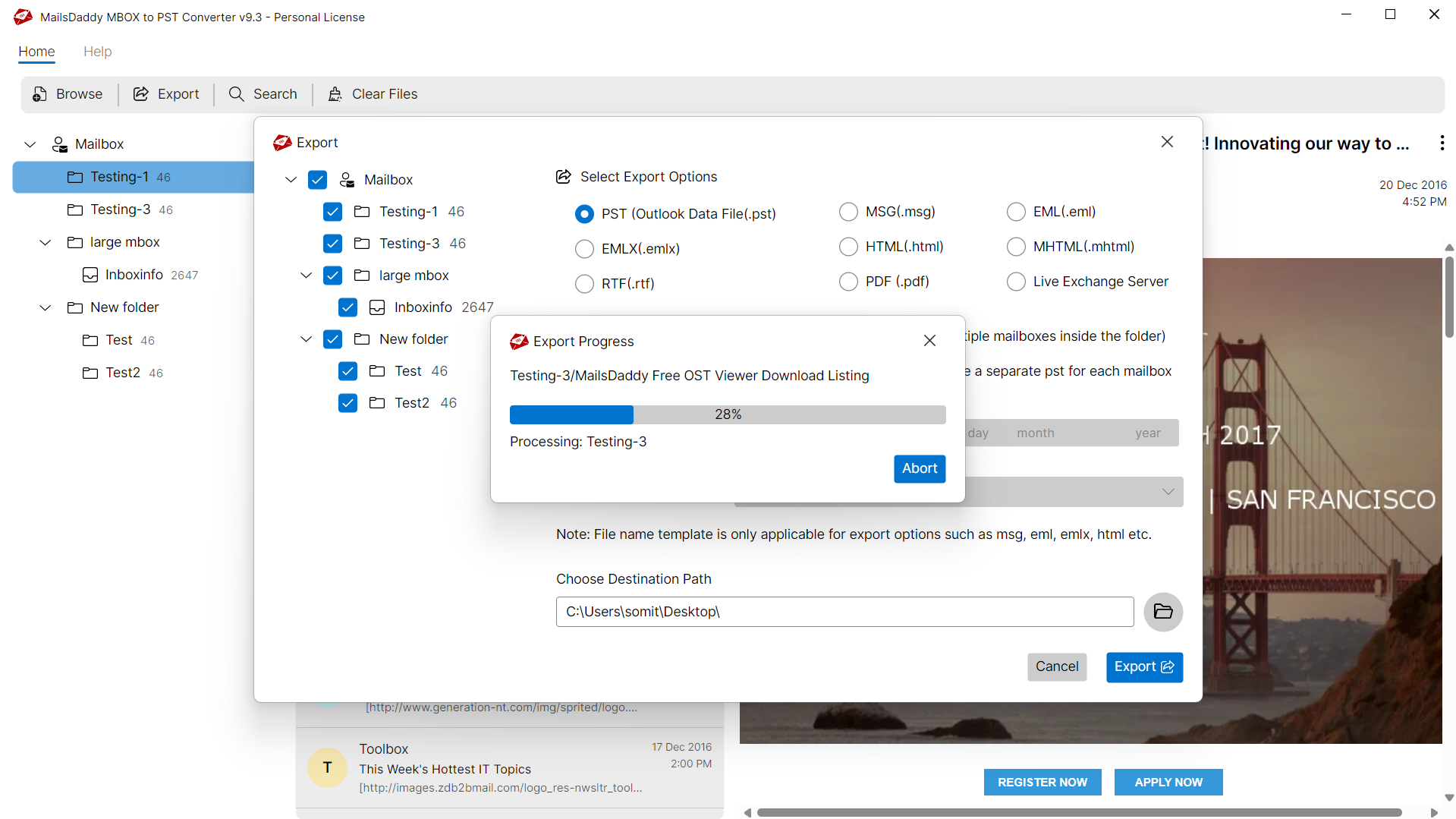
The software supports batch migration so user can export single or multiple Apple Mail mailbox to Outlook PST format at once and open all email from MAC mail to Windows PST without any hard efforts.
Windows & Outlook Support
For exporting MAC mail to Windows Outlook, users can install the software in any Windows OS such as Win 11, 10, 8, 7, XP, Vista etc. Also, allows migrating Apple Mail to Outlook 2021, 2019, 2016, 2013, 2010 & 2007 etc.
We Convert All Data from Apple Mail to Outlook PST!
Every folder hierarchy, email header, and embedded attachment is processed with 100% bit-exact fidelity into Outlook PST format.
Emails & Its Properties
MBOX Converter is a not only quick & reliable tool but it also pr...
MBOX Converter is a not only quick & reliable tool but it also preserves email properties you want. Plus it never mismatches the relevant information of the mailbox.
Supported Elements & Formats:
Convert Apple Mail to Outlook PST in 4 Simple Steps
No technical skills needed. Watch each step in the live software interface or click any step below.


Looking for the complete user manual and working guide?
Explore comprehensive guides for standard PST conversion, search & filter migration, and Live Exchange Server export.
Technical Specifications
Engineered for lightweight footprint, standalone execution, and broad enterprise compatibility for Migrate Apple Mail to Outlook.
System Requirements
Full support for Windows Server 2022, 2019, 2016, 2012, 2008 & 2003 (32/64-bit)
Platform Support
Supported Formats
MBOX
Retains 100% attachments, inline images, headers, and metadata
Preserves complete folder hierarchy, read/unread flags, and timestamps
100% Offline & Private
Zero cloud uploads or telemetry. Processing happens strictly within your local machine.
No Outlook Required
Completely standalone engine. Processes Apple Mail files without requiring host email clients.
No File Size Limits
Tested on massive 50GB, 100GB, and 500GB+ enterprise mailboxes with zero crash.
Full Windows Support
Native execution across Windows 11 down to Windows XP & all Windows Server editions.
Trusted by IT teams and professionals worldwide
Explore our client testimonials to see why users trust and recommend our solutions.
“Unbelievable utility! It made MBOX conversion so much easier and faster. It wouldn't have been possible without this MBOX Converter for Outlook. I give it five stars for its excellent performance. Thank you to the technical team for guiding me on how to export MBOX files to PST format using this app.”
Alex Murray
“I really appreciate the support teamwork, who make MBOX to Outlook conversion so faster and cheaper. Mainly the option to merge all mbox files in a single PST file is the best feature ..i can't explain this in word …impossible work , great job, thank you.”
James Smith
“Ik zou graag dank aan Mailsdaddy team voor het aanbieden van deze MBOX naar Outlook converter die mijn kostbare mails bespaart en laat me in staat om mijn werk in Microsoft Outlook te hervatten. Zoeken en exporteren geselecteerde mails is de beste eigenschap die ik heb gezien in dit MBOX aan PST conversie-tool.”
Jayden Finn
Frequently Asked Questions
Find clear answers regarding the Migrate Apple Mail to Outlook conversion process, file compatibility, and recovery features.
No , you cannot migrate Apple Mail to Outlook for MAC because it is a Windows-compatible to migrate Apple mail to Outlook.
Start migrating with MBOX to PST Converter today.
Download the free trial and inspect your recovered mailbox in minutes.