MailsDaddy Free OST Viewer
Use free OST viewer application to open and inspect the content of corrupted, orphaned, or offline OST files without MS Outlook. Upgrade to export to PST, PDF, MSG, EMLX, HTML, MHTML, RTF, and MBOX.
- One click solution to read OST File without Exchange Server connection.
- Facilitates users to View OST File contents without its MAPI Profile.
- OST Reader to read corrupted/orphaned OST file without Outlook.
- View all items such as: emails, contacts, calendars, tasks & notes etc.
- Available 100% Free to download for Windows users.
- Integrated with advance search option to view a required emails only.
- Support OST files created in MS Outlook 2021, 2019, 2016, 2013, & 2010 etc.
Certified & Highly Reviewed By Leading Software Authorities
Award-Winning & Recommended by Independent Editors
G2 - Read OST File Without MS Outlook
G2.com is a supreme platform to provide the thought, opinion, and review about the listed products. They have lots of categories for millions of products. Our Free OST Viewer software is also listed in it. They submitted our product after analyzing the complete features and functionalities. You can also provide the review here.
IVERTECH - Best OST Viewer
IverTech is the platform to download free software as per your requirement. They provide multiple categories to list the software and tools. Our MailsDaddy Free OST File Viewer software is also submitted. You can download the free DEMO version from here and give your review without facing any type of problem.
Software Informer Review - Read OST File
Software Informer is the largest project of Informer Technologies. They have multinational programming team to develop the web project. It is made to inform the user about the latest development and trends. Our Free Free OST Viewer software is available here free of cost. Just click on the DOWNLOAD button and install it. Please provide your thought and review of this software.
Features of the Free OST Viewer
Enterprise-grade recovery and conversion, packed into a simple desktop app — no technical expertise or Exchange server required.
Quick Search to Find OST Files
The OST viewer freeware is embedded with the feature to search all files having .ost extension from the selected drive or directly. You can also browse or add OST file manually.
Preview OST File Mail Properties
Once the OST file is loaded, the OST viewer software previews all items along with all properties such as: To, CC, BCC, From, Subject, Date and attachments etc.
Read OST File Without Outlook
This is a standalone OST viewer application that does not require Microsoft Outlook to open offline OST files. You can view the content of OST file with Outlook.
Support all kinds of OST files
The Outlook OST viewer supports all types of OST files to scan and view its items even if OST files are corrupted, damaged, password protected or orphaned.
Quickly View Emails in OST File
The OST file viewer is a free solution to read messages independently from the OST file. You can View all mail properties by clicking on a particular message.
Read Contacts from OST File
The Free OST viewer is also capable to fetch all contacts and preview with item counts. You can read contact all properties: name, mobile no, address and birth date etc.
View OST File Calendars
This is the best function of this free OST file viewer tool which enables users to open Outlook calendars and read its subject, start date, end date and location etc.
Forensic Analysis of OST File
You may also use this free OST reader application for forensic analysis of OST file. The tool provides an advanced search option to search & view required mails only.
No Need of Exchange Server
This OST viewer program works independently, which does not require an Exchange Server or any additional application to view the contents of the Outlook OST file.
Preserve Folder Hierarchy
The software preserves the original folder structure of OST file which helps to read emails from the selected folder. You can see all folders in the right panel of the OST viewer.
Allows Opening Large OST Files
The tool has been tested on large OST files and work well to read mail from OST file. Thus, you can read OST file of any size without any limitation or restriction.
Available for Windows OS
Mailsdaddy provides OST viewers free for Windows users. Download the required application to check how to open OST file in Windows OS.
Eye-Catching Features of MailsDaddy Free OST Viewer software
No need of Microsoft Exchange Server & Outlook
The best feature of the free OST file reader software is, it doesn’t require the connection between MS Exchange Server and MS Outlook. Although, there are no pre-requirements of MS Outlook and MS Exchange server to view and read OST mailbox data.
- Compatible with Windows 11, 10, 8.1, 8, 7, and Windows Server (32/64-bit).
- Supports all Microsoft Outlook editions without requiring Outlook pre-installed.
- Independent standalone utility engineered for high enterprise stability.
Search & Find Specific email
MailsDaddy OST Viewer software provides the Search Mail option like the forensic analysis. You can search for any single or multiple emails by using this advanced and very useful option. You can search the email by using these mail properties –
- Search and filter emails by Date Range, Subject, Sender, or Recipient.
- Quickly isolates critical messages without parsing full mailbox folders.
- Allows exporting only targeted search results directly to output formats.
Export OST to Multiple formats
Our software is a unique solution to export OST mailbox data to various file formats. Just upgrade the PRO version of the MailsDaddy Free OST Viewer software and you can convert OST mailbox data to –
- Flexible export options supporting PST, MBOX, EML, MSG, and Office 365.
- Allows exporting complete mailboxes or selected folder directories.
- Maintains 100% email attributes, HTML formatting, and attachments.
Supports all types of OST
There is no need to panic about the condition of the OST file. Free OST file viewer software is compatible with all types of OST files like corrupted, orphaned, damaged, inaccessible, and lengthy. You can add the type of OST mailbox data file.
- There is no need to panic about the condition of the OST file.
- Free OST file viewer software is compatible with all types of OST files like corrupted, orphaned, damaged, inaccessible, and lengthy.
- You can add the type of OST mailbox data file.
View & Read ost Mailbox with Free Outlook ost Viewer
View and inspect complete folder hierarchies, message headers, attachments, and address records with 100% bit-exact fidelity. Delivers comprehensive mailbox visibility and forensic clarity with zero alteration to source files.
As we all know that the email is a secure platform to send and re...
As we all know that the email is a secure platform to send and receive any type of information in a written format. It contains –
Supported Elements & Formats:
Open & View OST Files in 4 Simple Steps
No technical skills needed. Watch each step in the live software interface or click any step below.
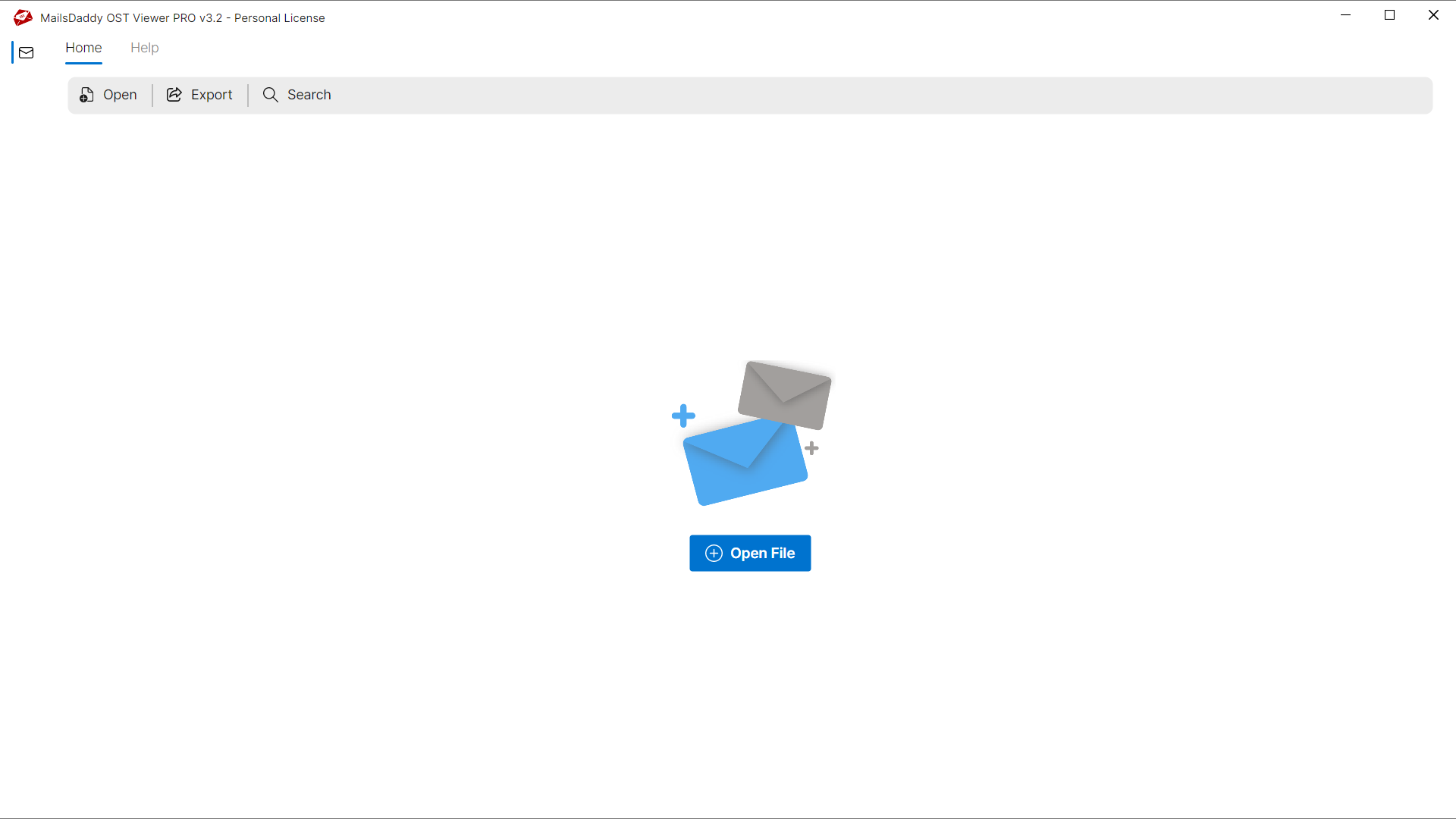
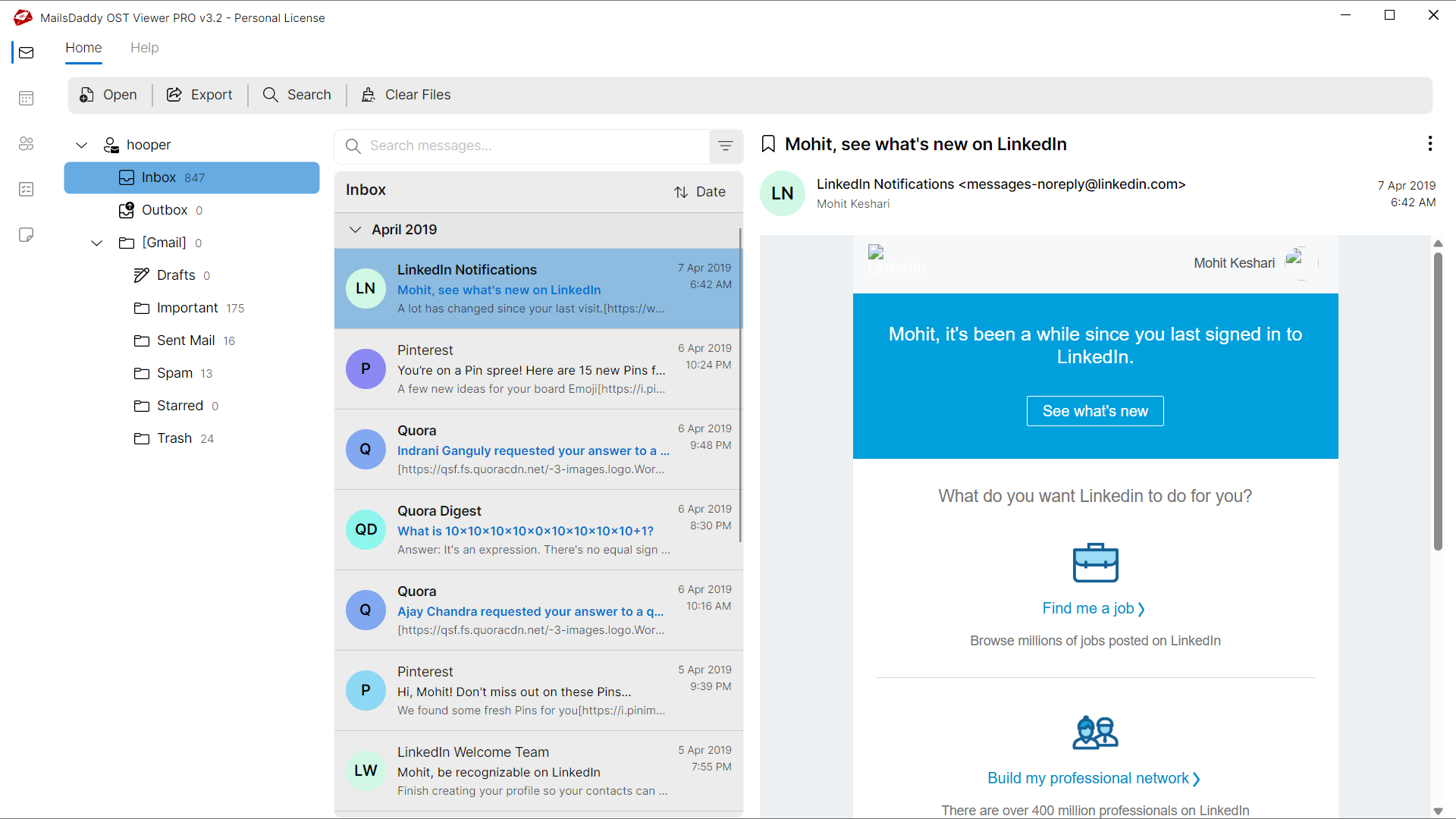
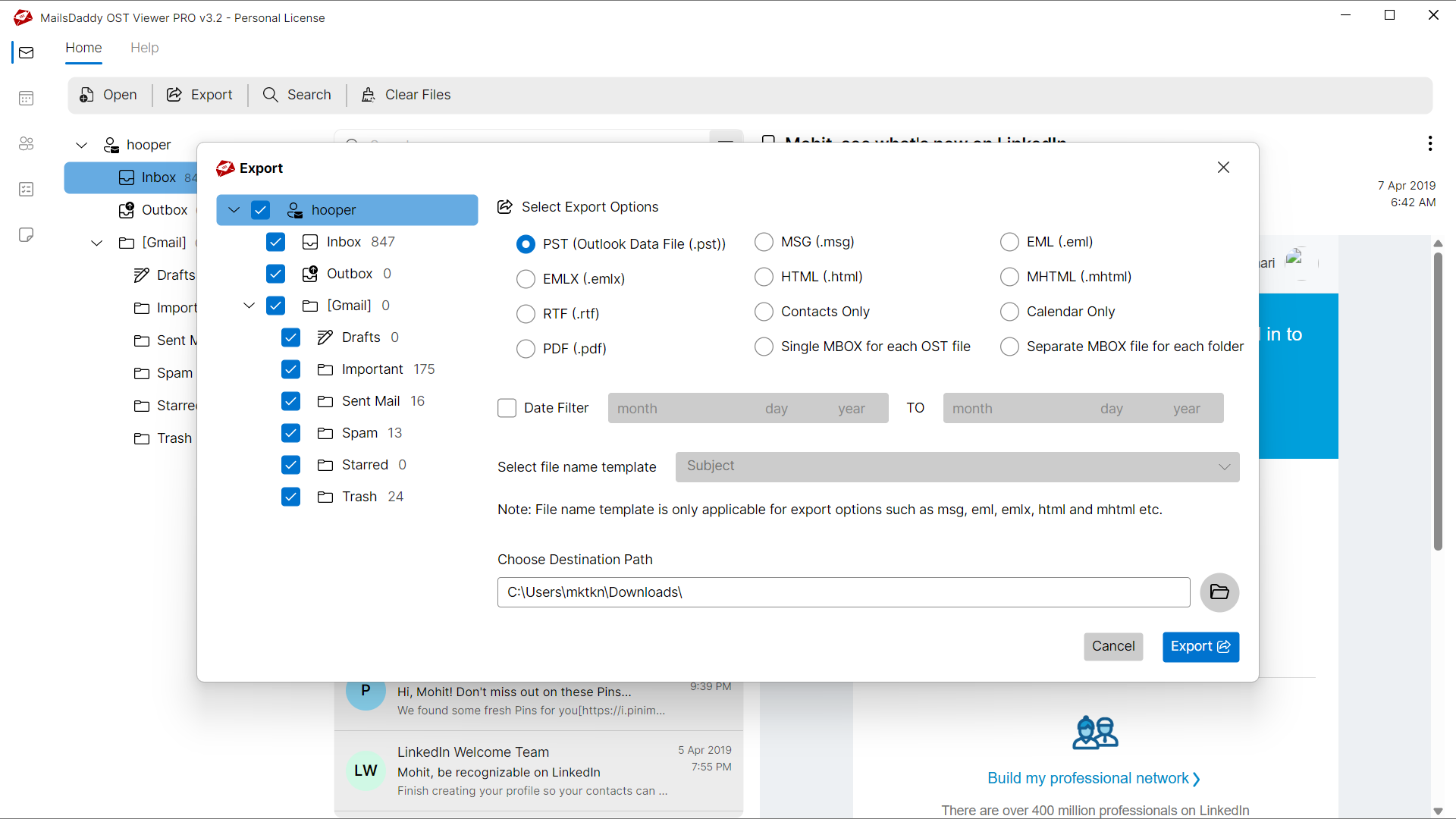
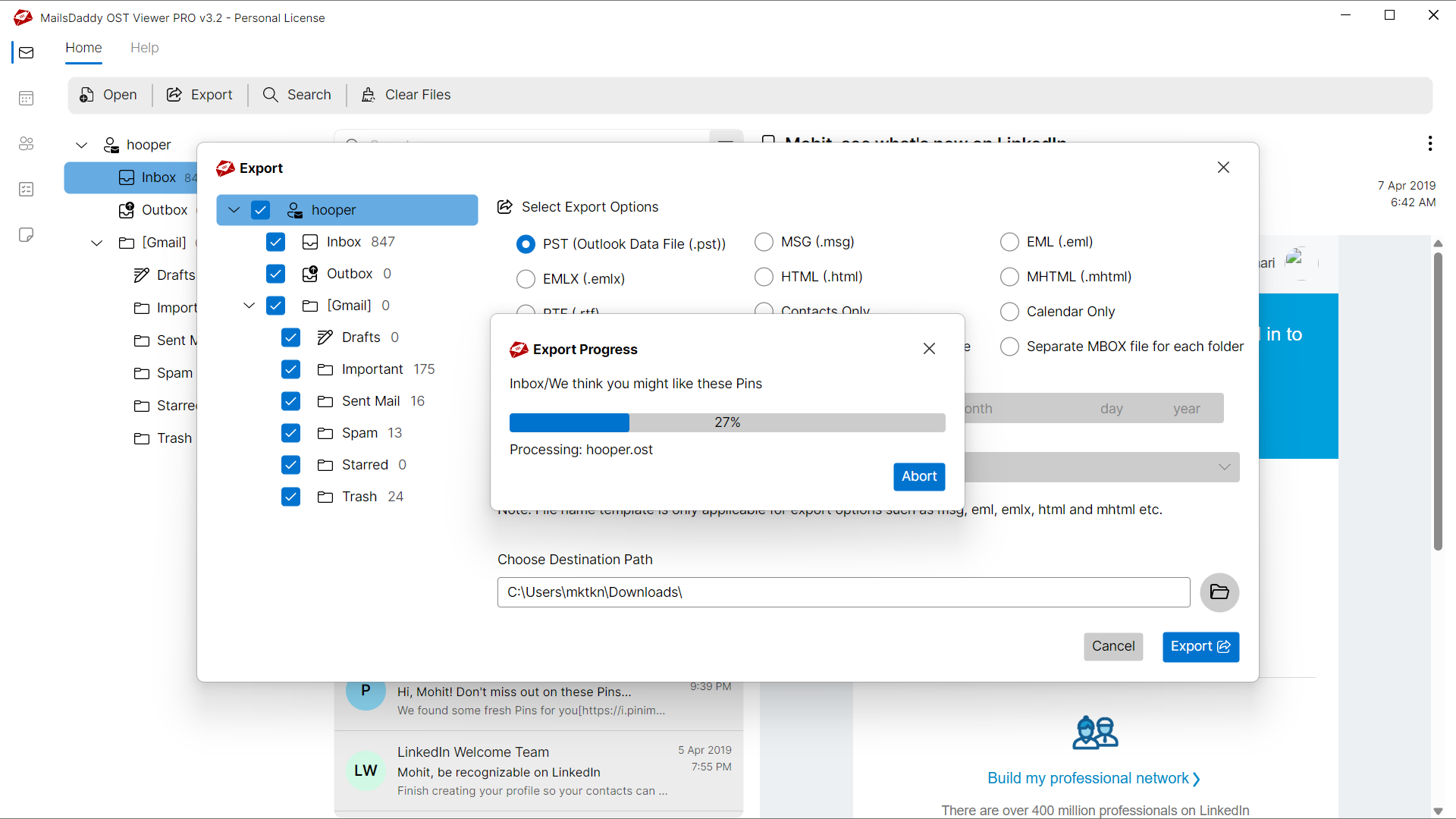
Looking for the complete user manual and working guide?
Explore comprehensive guides for standard PST conversion, search & filter migration, and Live Exchange Server export.
Understanding OST Files & Why Need Safe Migration
Understanding Cached Exchange Mode, reasons for offline file inaccessibility, and how conversion resolves corruption.
Resolving Common OST File Issues
Damaged, orphaned, or inaccessible OST files can prevent users from accessing crucial mailbox messages. MailsDaddy Free OST Viewer repairs and extracts data from problematic files without modifying original contents.
Common Causes of OST Corruption
Mailbox files can become unreadable or unstable due to several unexpected environment factors:
Sudden Application Termination
Abrupt power cuts or crashes while writing to OST files can leave header indexes inconsistent.
Oversized Mailbox Files
Exceeding recommended mailbox capacity can lead to performance degradation and corruption.
Hardware or File System Failure
Bad sectors on the storage drive or network transfer drops can damage database sectors.
Typical OST Error Messages
If you encounter any errors while accessing your mailboxes, converting with MailsDaddy Free OST Viewer resolves them immediately:
How Free OST Viewer Resolves the Problem
By bypassing the native email client's corrupt cache and performing low-level binary reading, Free OST Viewer extracts all healthy and orphaned items directly into clean PST files.
Technical Specifications
Engineered for lightweight footprint, standalone execution, and broad enterprise compatibility for MailsDaddy Free OST Viewer.
System Requirements
Full support for Windows Server 2022, 2019, 2016, 2012, 2008 & 2003 (32/64-bit)
Platform Support
PST, Microsoft Outlook, Webmail & Desktop Clients
Supported Formats
OST (Healthy, Corrupted, Orphaned, Large Archives)
Retains 100% attachments, inline images, headers, and metadata
Preserves complete folder hierarchy, read/unread flags, and timestamps
100% Offline & Private
Zero cloud uploads or telemetry. Processing happens strictly within your local machine.
No Outlook Required
Completely standalone engine. Processes OST files without requiring host email clients.
No File Size Limits
Tested on massive 50GB, 100GB, and 500GB+ enterprise mailboxes with zero crash.
Full Windows Support
Native execution across Windows 11 down to Windows XP & all Windows Server editions.
Trusted by IT teams and professionals worldwide
Explore our client testimonials to see why users trust and recommend our solutions.
“I was wondering how to open Hotmail OST file without Outlook and found this OST file reader, which full fill all my needs. I just want to say a special thanks to the development team for this free program.”
Steven Snell
“I was trying to open an orphan OST file with MS Outlook but it’s showing an error "outlook.ost is not an Outlook data file". I got this free OST viewer which helped me to open IMAP OST file content independently.”
Critstian Crawley
“OST Viewer is one of the best applications that I ever found to View Outlook OST files without MS Outlook Application. The tool also supports password protected OST file.”
Nelson Kallis
Need Help with Free OST Viewer?
Our dedicated 24/7 technical team is available to assist you with any migration or recovery challenge.
The free demo version lets you preview all items and export up to 20 emails per folder.
Frequently Asked Questions
Find clear answers regarding the Free OST Viewer conversion process, file compatibility, and recovery features.
Yes, The OST file reader is an independent solution that does not require Microsoft Outlook, Exchange Server or any additional program to open and view orphaned OST File.
Start migrating with Free OST Viewer today.
Download the free trial and inspect your recovered mailbox in minutes.