MailsDaddy Lotus Notes to Exchange Server Migration
Download a reliable MailsDaddy Lotus Notes to Exchange Server Migration tool to import user mailbox data from Lotus Notes to Exchange Server 2019, 2016, 2013 and 2010. Users can also migrate HCL Notes to without hard effort. Enable uploading single or multiple Domino Server to Exchange with original content.
- Helpful to import Domino Server database into Exchange Server.
- Additional option to export Lotus Notes to PST, EML, and MSG file format.
- Move multiple Domino Server mailboxes with mailbox mapping option.
- Capable of migrating heavy IBM Notes NSF file into Exchange Server.
- Directly add Domino Server, SmartCloud Notes/Verse NSF files in utility.
- Offers Data Filter options to migrate required Notes databases.
- Securely upload Lotus Notes emails, contacts, calendars, notes, etc.
- Import Lotus Notes to Exchange Server without any changes in the folder hierarchy.
- Support NSF files of all IBM Lotus Notes and Domino Server versions.
Certified & Highly Reviewed By Leading Software Authorities
Award-Winning & Recommended by Independent Editors
100% Clean & Secure Certification
MailsDaddy Lotus Notes to Exchange Server Migration provides verified security and fast performance with zero malware or adware detected during rigorous laboratory testing.
Supreme Software & Verified Quality Award
Recognized for high user satisfaction, intuitive mailbox processing speed, and comprehensive format support for enterprise users.
Top Rated Migration Utility
Praised by IT administrators for reliably parsing corrupted and oversized LOTUS-NOTES files with minimal manual intervention.
Features of the Lotus Notes to Exchange Server Migration
Enterprise-grade recovery and conversion, packed into a simple desktop app — no technical expertise or Exchange server required.
Easy to Use Migration
Software always offers a flawless and easy user interface so that any user, even non-technical users, can quickly use this effective solution without any technical expertise.
Different Search Options
It facilitates users to load Domino Server and SmartCloud Notes/Verse NSF files using Server Name/ IP address and convert them into Exchange On-premise platform.
Preview Lotus Notes Data
This advanced solution provides the preview facility using that users can open and access the complete Lotus Notes / Domino Server NSF file databases before migration.
Convert in Multiple Formats
This Lotus Notes data migration tool allows users to easily convert HCL Notes NSF files into Outlook PST, EML, MSG, and format without losing single data.
Lotus Notes to Office 365
The software provides the option to quickly add single or multiple HCL Notes NSF files into the application and migrate them into Office 365 without any hard effort.
HCL Notes to Exchange Server
With this effective program users can smartly transfer Notes NSF file databases into Exchange Server platform without any change in original email data content.
Import in Different Mailboxes
Using this solution users can speedily transfer Domino Server mailboxes into Office 365 Primary as well as In-Place Archive mailboxes with full accuracy.
Import Multiple Mailboxes
This utility offers users to upload single or multiple Domino/Lotus Notes NSF files into one or more Office 365 or Exchange Server accounts at a single time.
Different Filter Option
Users can use different data filter options to quickly filter, find, and transfer required NSF file email databases into Exchange Server without alteration.
Upload Complete Data
Migrate complete IBM Notes email items database without hampering original content, like email contacts, calendars, notes, tasks, and attachments.
Maintain Email Status
This advanced utility guarantees to shift Lotus Notes NSF files into Exchange Server mailboxes with full data security. It also perfectly keeps the read and unread status of all emails.
Keep Folder Structured
The program moves Notes mailboxes in a structured format. After successfully importing data from IBM Notes, the same order and name of the migrated folder are provided.
Maintains Complete Email Properties
The utility always maintains overall metadata properties (To, From, Cc, Bcc, Time, Subject, etc) without any interruption. It keeps safe all text formatting without alteration.
Support Lotus Notes and Domino Server
This HCL Notes to Exchange Server migration tool perfectly supports all versions of IBM Notes (such as 10.0, 9.0.1, 9.0, 8.5, 8.0.2, 7.0, 6.5, and 6.0) and Domino Server.
Work with all Microsoft Exchange Versions
This outstanding solution is compatible with all editions of Microsoft Exchange Server including Exchange Server 2019, 2016, 2013 and 2010 etc.
Eye-Catching Features of MailsDaddy Lotus Notes to Exchange Server Migration software
100% LOTUS-NOTES Mailbox Data Integrity
Guarantees that no email properties, HTML formatting, headers (To, From, CC, BCC, Date, Subject), or attachments are altered during conversion from LOTUS-NOTES to EXCHANGE-SERVER.
- Retains internal folder tree hierarchy from LOTUS-NOTES
- Supports inline images and nested email attachments
- Preserves unread/read flags and importance status
Advanced Recovery & Scanning Engine
High-speed scanning algorithms process damaged, inaccessible, or orphaned LOTUS-NOTES files without requiring host email server connectivity.
- Recovers inaccessible or damaged LOTUS-NOTES archives
- Supports large mailbox files without size barriers
- Fast multi-threaded extraction engine
Comprehensive EXCHANGE-SERVER Compatibility
Export your converted data to EXCHANGE-SERVER with complete compatibility across Microsoft Outlook and host messaging platforms.
- Generates clean EXCHANGE-SERVER compatible with all target platforms
- Option to split large output files by size
- Supports selective batch export with custom filters
We Convert All Data from LOTUS-NOTES to EXCHANGE-SERVER Format!
Every folder hierarchy, email header, embedded attachment, contact attribute, and calendar recurrence is processed with 100% bit-exact fidelity.
LOTUS-NOTES Emails & Formatting
Complete Message Body & Styling
Extracts all email messages from LOTUS-NOTES mailboxes while preserving rich-text, HTML styling, and inline images.
Supported Elements & Formats:
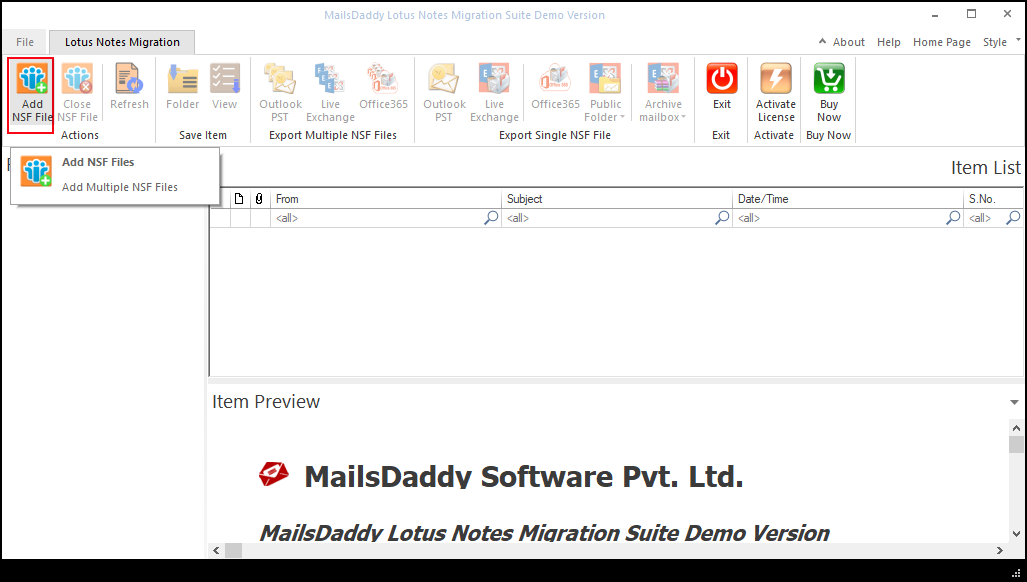
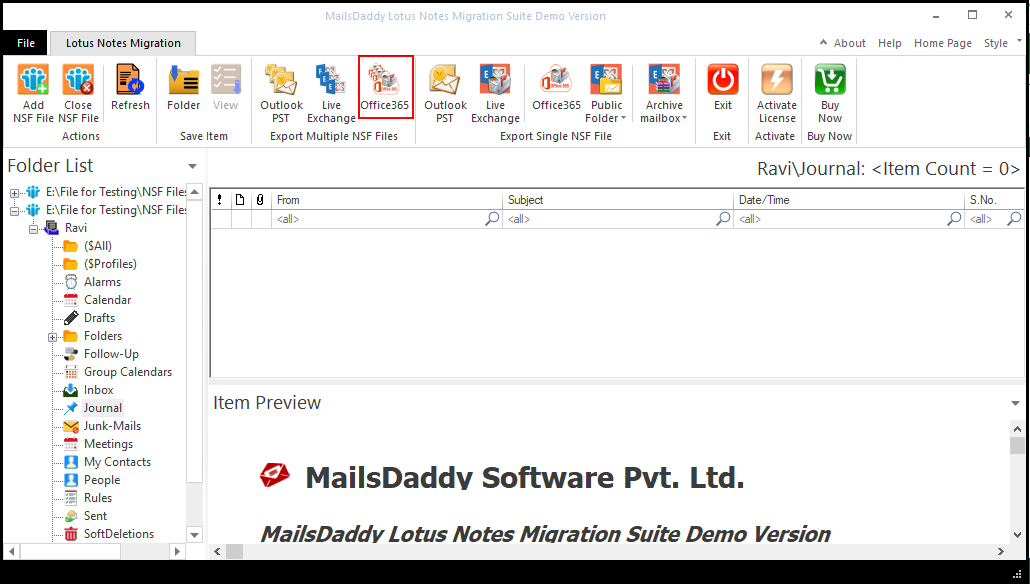
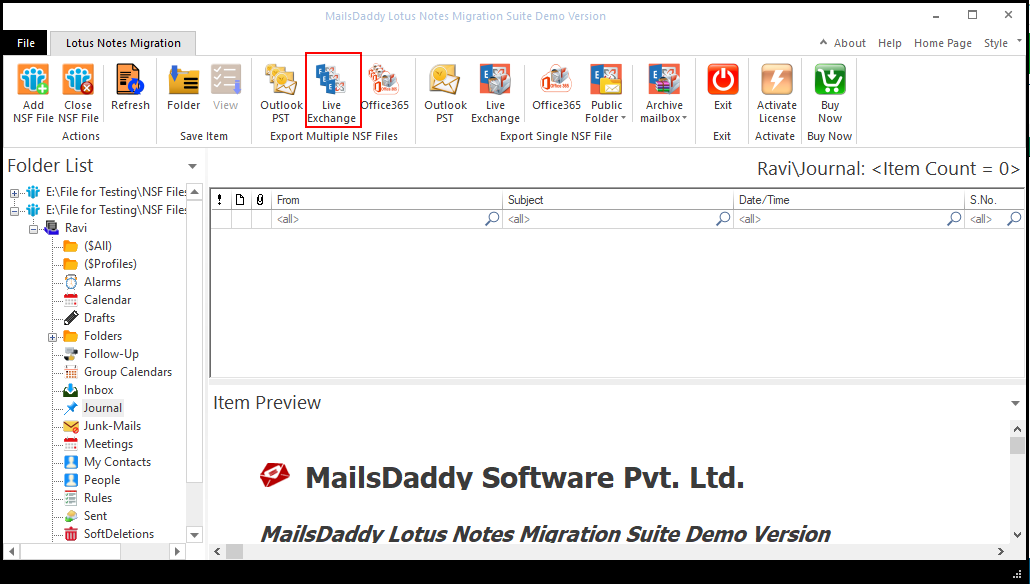
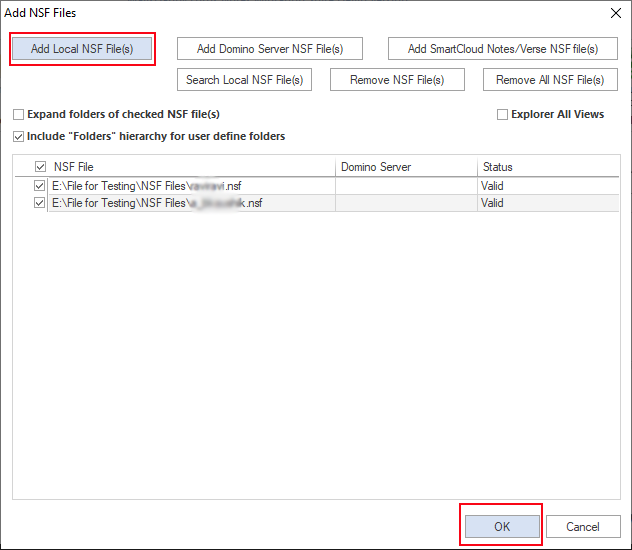
Convert LOTUS-NOTES to EXCHANGE-SERVER in 6 Simple Steps
No technical skills needed. Watch each step in the live software interface or click any step below.
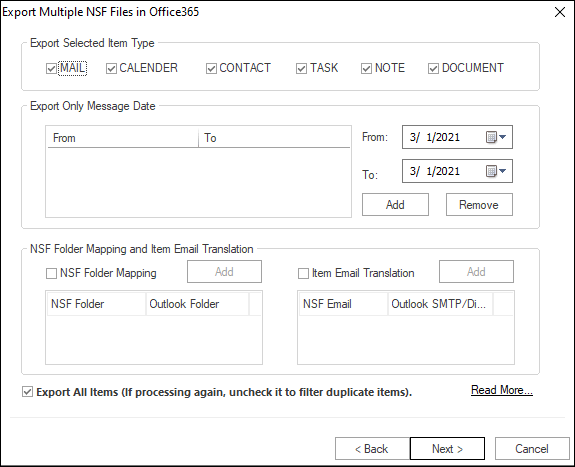
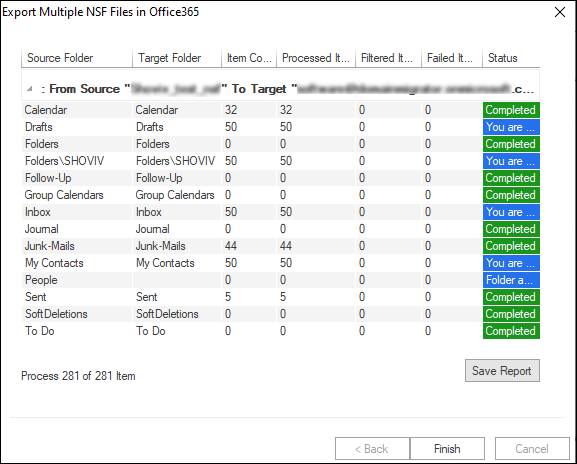
Looking for the complete user manual and working guide?
Explore comprehensive guides for standard PST conversion, search & filter migration, and Live Exchange Server export.
Technical Specifications
Engineered for lightweight footprint, standalone execution, and broad enterprise compatibility for MailsDaddy Lotus Notes to Exchange Server Migration.
System Requirements
Full support for Windows Server 2022, 2019, 2016, 2012, 2008 & 2003 (32/64-bit)
Platform Support
HCL / IBM Lotus Notes 12, 11, 10, 9.0, 8.5, 8.0, 7, 6 & Domino Server
Supported Formats
Lotus Notes NSF & Domino Server Mailboxes
Retains 100% attachments, inline images, headers, and metadata
Preserves complete folder hierarchy, read/unread flags, and timestamps
100% Offline & Private
Zero cloud uploads or telemetry. Processing happens strictly within your local machine.
No Outlook Required
Completely standalone engine. Processes LOTUS-NOTES files without requiring host email clients.
No File Size Limits
Tested on massive 50GB, 100GB, and 500GB+ enterprise mailboxes with zero crash.
Full Windows Support
Native execution across Windows 11 down to Windows XP & all Windows Server editions.
Trusted by IT teams and professionals worldwide
Explore our client testimonials to see why users trust and recommend our solutions.
“Thanks for providing such a reliable and effective LOTUS-NOTES to EXCHANGE-SERVER conversion solution. It successfully recovered my corrupted and orphaned LOTUS-NOTES files without any hassle. The advanced search option and flexible naming conventions are standout features that made the process smooth and efficient.”
Michael Angelo
“I was encountering an error while trying to open my LOTUS-NOTES file with Microsoft Outlook. I'm thankful to MailsDaddy LOTUS-NOTES to EXCHANGE-SERVER Converter, which helped me resolve the issue quickly and access my mailbox data without any trouble.”
Jessica Schofield
“This LOTUS-NOTES recovery solution truly impressed me when I needed to access an offline, orphaned LOTUS-NOTES file. The software provided a complete preview of all mail items and allowed me to export the required data to Outlook EXCHANGE-SERVER format with ease.”
Alexander Smith
Need Help with Lotus Notes to Exchange Server Migration?
Our dedicated 24/7 technical team is available to assist you with any migration or recovery challenge.
The free demo version lets you preview all items and export up to 20 emails per folder.
Frequently Asked Questions
Find clear answers regarding the Lotus Notes to Exchange Server Migration conversion process, file compatibility, and recovery features.
Yes, Lotus Notes client must be installed on the PC. Additionally, IBM / HCL Notes should be configured to connect with the local database or Domino Server.
Start migrating with Lotus Notes to Exchange Server Migration today.
Download the free trial and inspect your recovered mailbox in minutes.