Working Instructions of MailsDaddy EDB to PST Converter tool
Simple steps to convert EDB to PST file format using MailsDaddy EDB to PST Converter. This EDB converter tool easily restore EDB data to PST for Outlook.
How to Convert EDB to PST ? (7 Steps)
Click on any screenshot to view full resolution.
Step 1: Complete Operation
Download, install ( Installation Guide ) the free demo version of MailsDaddy EDB to PST Converter tool. If you have purchased a license key then activate the full version of the EDB converter tool.
In the first Window, click on Add EDB button to Browse EDB files manually
In the first Window, click on Add EDB button to Browse EDB files manually. After browsing EDB path click on OK button.

Step 3: Complete Operation
The second window leads you to the display window where you can view EDB data before restoring the EDB file in PST file format.Click on Export multiple options from the menu bar and press Outlook PST option in drop-down menu.

Step 4: Complete Operation
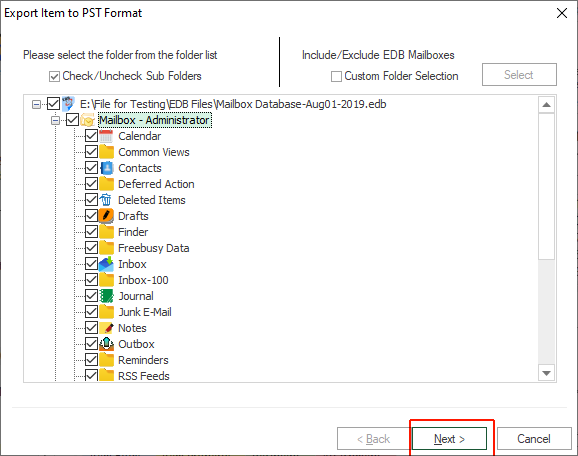
In pop-window, select all mailbox/folders to export EDB to PST format in bulk mode and press Next button.
Step 5: Complete Operation
Here user have 2 different options to recover Exchange EDB file in a new PST file or Existing Outlook PST file . Select one option and browse location in local drive or folder then click on the Next button.

Step 5: Complete Operation
In new pop-up window, all filters are optional for the users, so user can click on Next button directly.

You will see the process window is running on the screen
You will see the process window is running on the screen. If you chose the demo version of the software then it will export 50 items from each folder/mailbox. Read our blog to make sure how to open or import PST file in MS Outlook .

Ready to Start with EDB to PST Converter?
Download the free trial version to preview all mailbox items or buy the full license for unlimited conversion.